

- What skills to have for freelancing in 2026
- How freelancers can determine the price of their services
- How to create a portfolio for freelancing
- How to find clients in freelancing
- How to work with first clients
- How freelancers can avoid being without clients in a year
In the last two years, artificial intelligence has taken a significant portion of simple orders from freelancers: clients now often handle texts, translations, and layout themselves. However, with the right approach, freelancing still offers a flexible schedule, the ability to work from anywhere in the world, and payment in currency, as clients continue to pay for experience and results. Therefore, it's worth starting not with registration on a platform, but with preparation: identify the skills you can sell, gather a portfolio, and create a presence where you will be sought after.

What skills to have for freelancing in 2026
Analyze the tasks you perform in your main job or have performed in the past, and break each down into specific skills. Freelance clients are looking for not a position, but a performer for a specific task: not a "copywriter," but a person who optimizes an article for search or publishes it in WordPress.
So first, open a document or notebook and go through four steps:
- List the tasks you have performed in recent years.
- Break each task down into separate actions that you can perform.
- Assess your level in each action: "I use it fluently" — you can sell it now, "I have a basic understanding" — you take simple projects and develop in the process, "needs market" — your learning plan.
- Mark what can be accelerated with AI.
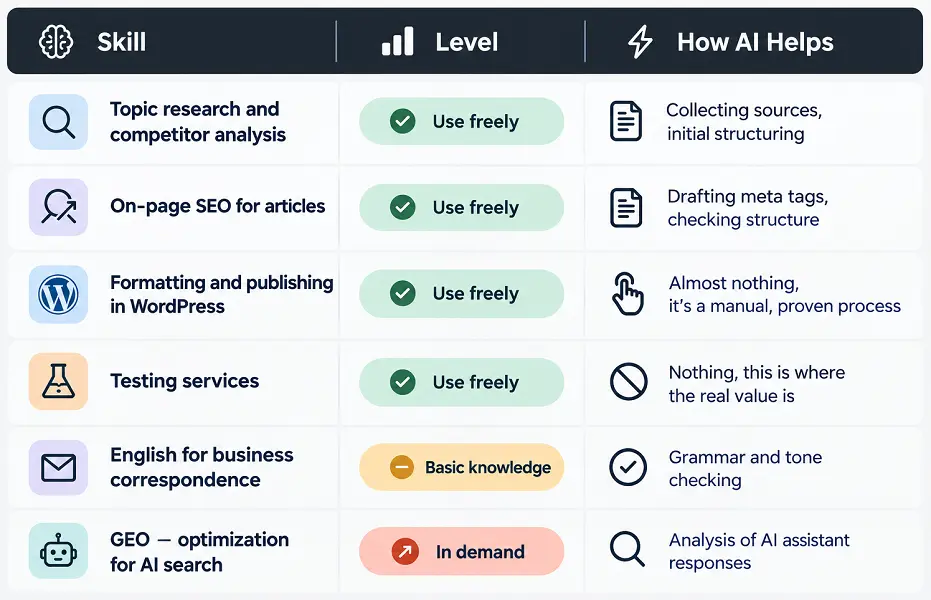
As a result, you will have a table like this, but with your own data.
The AI column is the most important in this table. According to Freelancehunt analytics, in a year, the number of paid projects up to 2,000 UAH decreased by 45%, while those from 7,000 UAH decreased by only 5%. Copywriting (-69% of orders) and HTML/CSS layout (-70%) saw the most decline. Meanwhile, according to Freelancehunt's 2025 results: 63% of freelancers who actively use AI report an increase in income.
So if your skill has declined, change what exactly you are selling. A copywriter can offer SEO optimization, editing, and fact-checking in AI texts, or a content plan for a blog. Or take a different path, offering texts with personal testing that artificial intelligence cannot replace.
How freelancers can determine the price of their services
At the start, the price is dictated by the market, not the desired income. Look at how much beginners in your niche are working for: sellers with 0-10 reviews on Fiverr, freelancers with a few reviews on Freelancehunt, plus the last 10 projects of clients on Upwork based on their previous payment history.
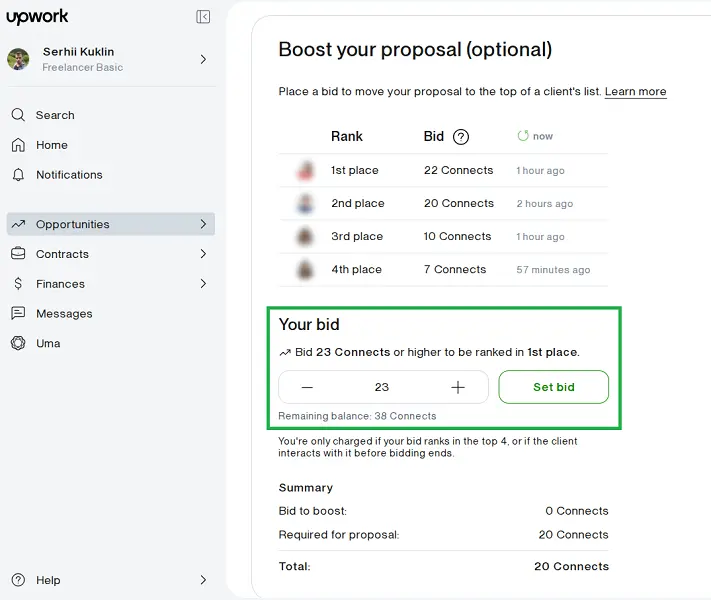
But do not lower your prices in an attempt to stand out. This will not help, especially on Upwork, where you can boost your position in the list of applications by paying more additional Connects. Therefore, choose projects where the client has a history of paying normal rates, and there are not many applications yet, and win with relevance: a portfolio from the same niche and a response specifically to their task.
How to create a portfolio for freelancing
Gather 3-5 works, for example, published articles, websites, designs, or videos from your main job. If you don't have them, create examples based on real market requests: write an article based on a technical task from a platform or create a demo site for a fictional client.
Next, turn each example into a case:
- Describe the client's task.
- Explain what exactly you did.
- Show the result in numbers or consequences for the business.
- Add a link or screenshot.
For example, instead of "wrote articles for the company's blog," write: "The blog of the online store hardly brought visitors from Google → I rewrote 20 articles for customer search queries → in three months, traffic to them doubled." If there are no numerical results, show what changed for the client.
Place ready cases where clients will see them:
- in the portfolio sections on freelance platforms like Upwork, Fiverr, Freelancehunt;
- in the Featured section on LinkedIn;
- on Behance or Dribbble if you are a designer;
- on GitHub if you are a developer;
- on your own web resource.
And the website in this list holds a special place because only it fully belongs to you. A platform can change its rules or commission or block your account, and along with your profile, all your cases will disappear. In contrast, a web resource on your domain name allows you to gather all your works in one link that you can give to any client. And in the future, it can also become an additional way to acquire clients.
Also read: How to create your own website for business: independently, easily, and relatively cheaply
How to find clients in freelancing
List the platforms where your target audience looks for performers: freelance platforms, social networks, specialized platforms. On each, create a profile with your full name, clear face photo, understandable description of services, and examples of works. Then regularly maintain activity: from applications for projects to thematic publications.
| Platform | First Actions | Regularly |
|---|---|---|
| Social Networks | 3-5 posts, "Highlights", link to website | 2-3 posts per week if you want clients from here |
| Headline, About, Featured, services page, recommendation | New contacts and 1-2 posts weekly | |
| Freelance Platforms | Profiles on 2-3 | Daily review |
| Website | Five pages and links in all profiles | One page per client request monthly |
Choose as many platforms as you can regularly manage: this way, you will be found exactly when someone needs your skills. But do not limit yourself to just one: when entering the English-speaking market, I spent two weeks looking for clients only on Upwork, even though during this time my services could have already been working on Fiverr and my profile on LinkedIn.
- Social Networks — Building Trust in Freelancers
- LinkedIn — Finding Clients-Companies in Ukraine and Abroad
- Freelance Platforms — Safe Acquisition of Warm Clients
- Website — Attracting Clients through Search Engines and AI
- Direct Outreach — A Complex but Effective Way to Find Clients
Social Networks — Building Trust in Freelancers
Social networks provide freelancers with two sources of orders. The first is people who already know you personally: one story "looking for work" reaches acquaintances, former colleagues, and entrepreneurs in your circle who may order the service themselves or recommend you. The second is unfamiliar clients from your niche who see your posts about work and reach out when they need a performer. Moreover, a client from a platform often checks the freelancer's social networks before collaboration, and a live profile with works adds trust.
But do not register everywhere just "to have it." One or two main social networks that you will regularly manage and a few Telegram channels with job vacancies for direct job searching are sufficient. In the description, it's enough to add one sentence about the service, plus a link where the client can find your works and contacts.
At the start, the social network is primarily your showcase, not a channel that needs to be constantly filled. Once, the advice to "publish regularly" pushed me away so much that for years I only had a private account for friends. So start with 3-5 posts about services, cases, and work processes and pin the main ones. Meanwhile, personally reach out to former colleagues, acquaintances, and partners who know your level.
LinkedIn — Finding Clients-Companies in Ukraine and Abroad
LinkedIn is a social network where business owners, marketers, and company managers look for specialists and check them before collaboration. You just need to create a showcase so that a client who found you on a platform or through acquaintances sees a professional profile. And for clients to come from LinkedIn themselves, regular activity is needed.
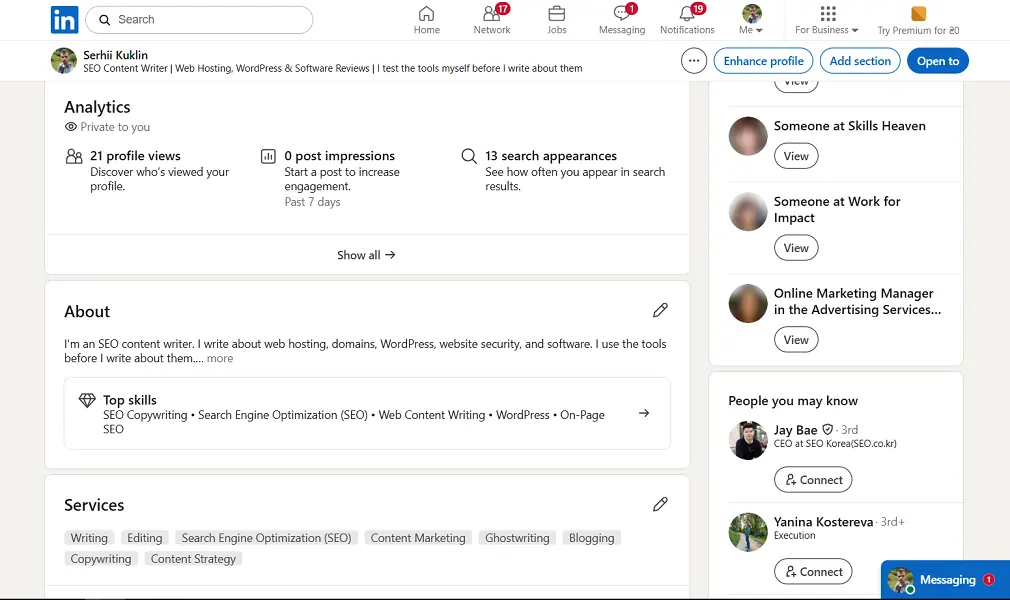
After registration, perform the minimum basic actions:
- Write a headline as a service, not as a position.
- In the About section, briefly describe who you help and with what tasks.
- Add 2-3 of your best works in the Featured section.
- Create a services page via the Add services button in your profile.
I did just such a showcase, published a few posts, and sent a few connection requests. In two months, the posts gained 352 views, of which 79% were among my contacts. This is enough for trust during the first acquaintance, but for clients to find you themselves, weekly new contacts from the niche and meaningful comments are needed.
On a free LinkedIn account, the number of connection requests with a personal note is limited: I had only 3 per month. Use notes for key companies, and send requests without them to others.
Freelance Platforms — Safe Acquisition of Warm Clients
Clients come to the platform already with a task and budget, and the platform protects the payment for both parties. At the start, choose 2-3 platforms with different working models: one where you submit applications yourself, like Upwork or Freelancehunt, and one where the client buys a ready service, like Fiverr or Contra.
For the showcase, set up a profile on each chosen platform: service headline, description with examples of tasks you solve, cases from your portfolio, and rate. Pay special attention to the headline, as it determines the projects the platform will show you. In the first version of my profile on Upwork, I added the word "Wellness," and the feed filled with medical-themed projects that required certificates.
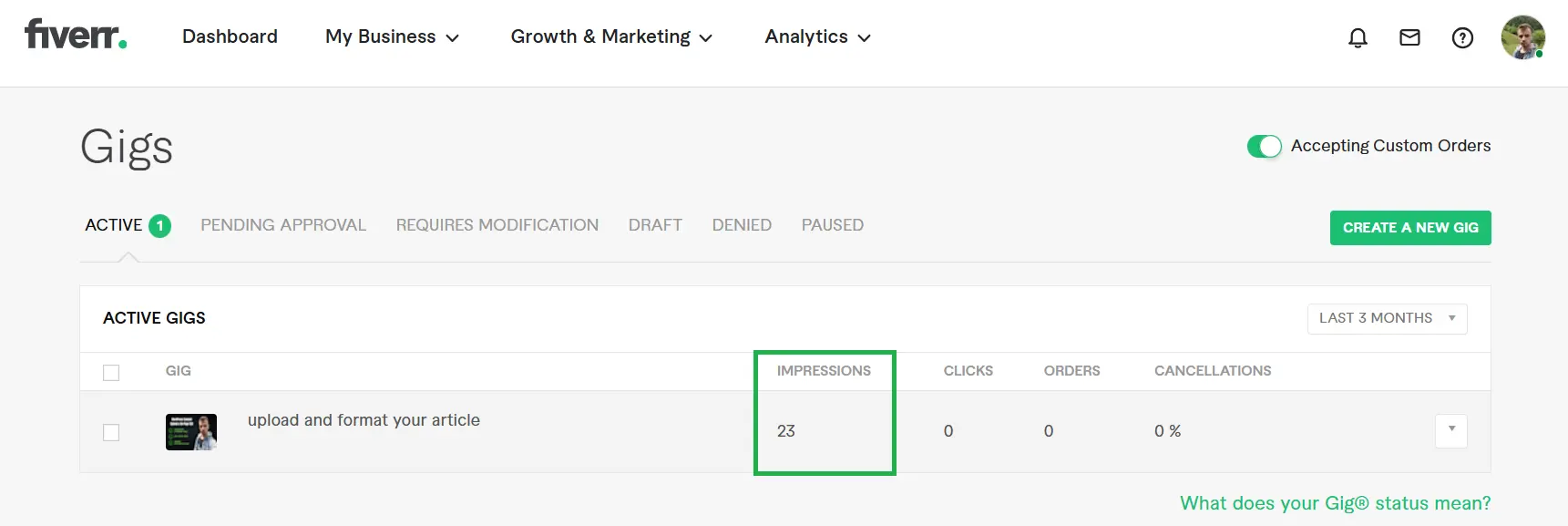
On Fiverr and Contra, immediately create several services. But keep in mind that without reviews, they are hardly shown: my gig on Fiverr received 23 views and no clicks in 3 months.
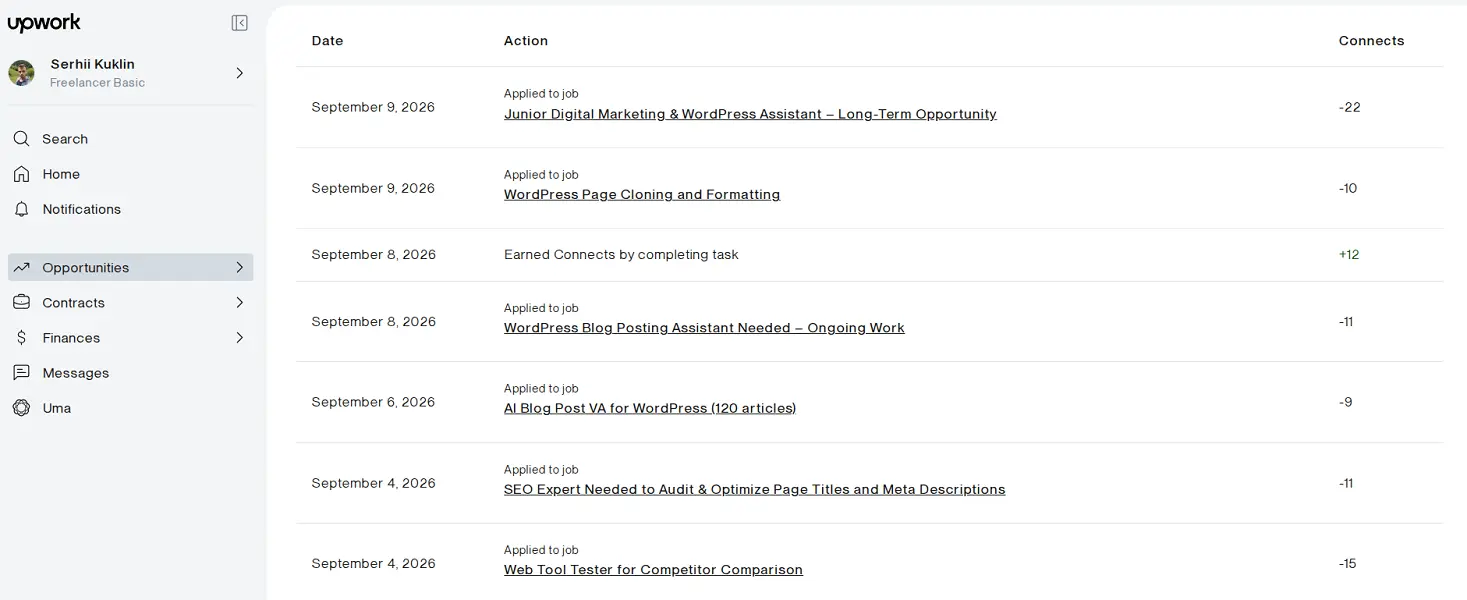
And carefully study projects before submitting applications. It's better to submit 2-3 targeted applications than a dozen randomly. Especially on Upwork, where each attempt costs money: on average 10-15 Connects, which is 1.5-2 dollars (the cost of one Connect is $0.15 USD).
Also read: Overview of foreign freelance platforms: Upwork, Freelancer, Fiverr
Website — Attracting Clients through Search Engines and AI
A website brings clients in three ways. It gathers all your profiles in one place: a client who found you on a platform or LinkedIn goes to the web resource and sees services, prices, and cases together. It brings new clients from search when a person searches for a service in Google and finds your page. And increasingly, it attracts the target audience from AI assistants: according to Freelancehunt data, the number of registrations on the platform from AI-related sources has increased 3.5 times since the beginning of the year.
To create a website, it's enough to register a domain and affordable reliable hosting, and then install a CMS (content management system), such as WordPress, in one click from the provider's cabinet. You don't need programming skills, as there are many free templates and plugins that allow you to set up and manage the web resource.
And of course, you should add the following pages:
- “Home” with one phrase about your service and who it is for.
- “Services” with packages and prices “from.”
- “Cases” with portfolio.
- “About Me” with a photo and experience.
- “Contacts” with a contact form.
To ensure the website brings clients from search, add service pages and blog articles under the queries your clients enter:
- “how much does it cost…” — with an honest breakdown of your service price;
- “how to choose…” — with tips on how to choose a performer or tool;
- cases with the client's niche in the title, for example, “SEO texts for an online furniture store.”
As with social networks, you don't need to become a blogger, as it's enough to add basic pages right away and then publish articles in the blog 1-2 times a month. And don't forget to connect the website to Google Search Console to see which queries are already bringing you traffic and write the next pages for them. But don't expect quick results: a new website takes months to gain positions in search, so initially, the main clients will come from platforms and social networks. However, over time, the website will become a source that works without daily effort.
Also read Plugins for WordPress that you should install right away: checklist for launching a website
Direct Outreach — A Complex but Effective Way to Find Clients
Outreach is when you don't wait for the client to find you, but you write to them first. For a beginner, this is a way to reach out to companies that do not post projects on platforms and not compete there with dozens of applications. But don't expect quick orders, as this is mostly a way to get contacts and a place in the pool of candidates from which clients will come later.
Start with a list of 20-30 companies that potentially need your services. Look for those who are already working with your type of tasks, but their blog and social networks are updated irregularly, websites have noticeable problems, etc. For example, I wrote to product companies with blogs about WordPress, hosting, and SEO tools. Find the contact of a specific person, such as an editor, marketer, or owner, on the team page or LinkedIn, and if not available — write through the form on the website.
How to work with first clients
Most conflicts in freelancing arise for two reasons: no one recorded what is considered a completed result, or work began before payment was guaranteed. Therefore, in the first conversation, clarify the result and acceptance criteria, deadlines, the number of revisions included in the price, and the payment method. Gather the answers in one message and ask the client to confirm, as this is your main argument in case of a dispute.
Start working only when payment is secured:
- On Upwork — when the stage has a "Funded" mark. Submit the result through the "Submit Work for Payment" button.
- On Freelancehunt — when the amount is reserved in the "Safe."
- With a direct client — after a prepayment, for example, half of the amount. If the client does not agree to prepayment, break the work into stages and take payment for each before the next.
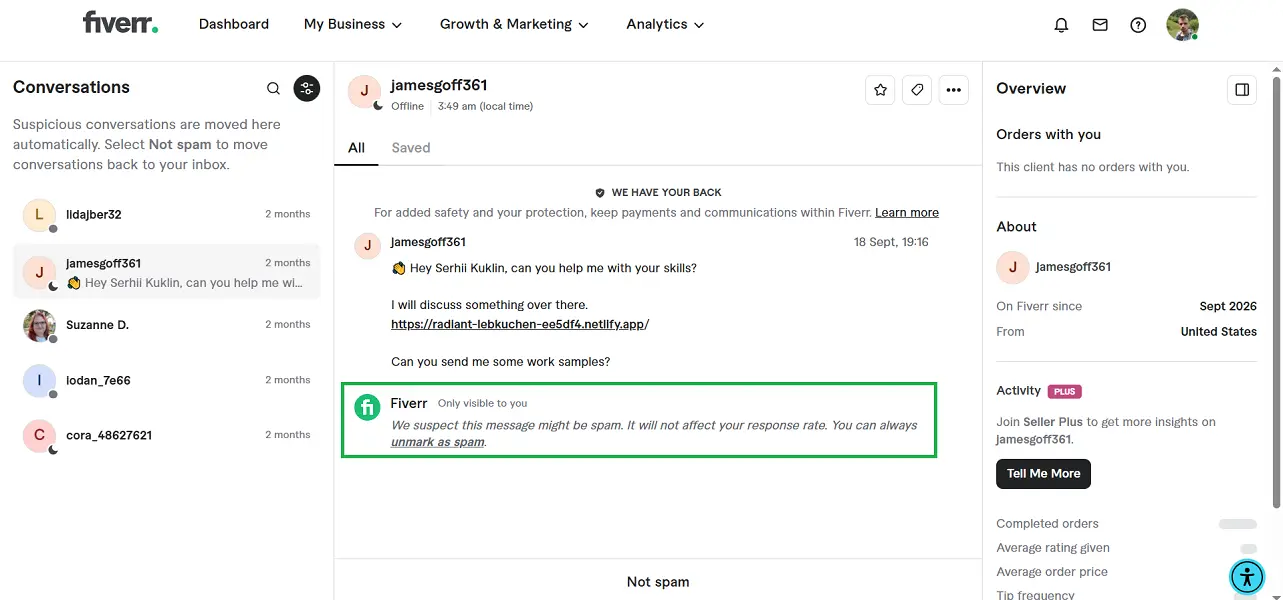
Fraudsters appear immediately after the profile is created: as soon as I published a service on Fiverr, bots started writing "order sent, please follow the link." So be cautious if you are directed to Telegram or WhatsApp before signing a contract, sent links to "confirm the order," asked for card details, or "accidentally" overpaid.
How freelancers can avoid being without clients in a year
Maintain a minimal presence on platforms even when you are fully loaded with work. A client may leave for entirely normal reasons, whether it's the completion of a project or a budget change. If by that moment your brand has been on pause, the search for clients starts from scratch.
To avoid such a situation, follow a few simple rules:
- Take at least one small project outside of regular clients every 1-2 months.
- Add a new case to your portfolio after each successful project.
- Every few months, update your skills table and learn what the market demands.
- Maintain regular activities on at least 1-2 platforms.
Despite serious changes in the market, you can still become a freelancer in 2026. To do this, identify the skills you can sell right now, set a realistic price, gather a portfolio, and create a presence on several platforms. The first months will be slow, but over time you will be able to build a serious portfolio, a stable client base, and a brand that will regularly bring in new clients.