
- Who needs Bing Webmaster Tools in 2026
- How to add a site to Bing Webmaster Tools
- What technical optimization tools are available in BWT
- How to check site performance in BWT
- How to search for keywords for free in Bing Webmaster Tools
- What to do with BWT next
Owners of Ukrainian-language websites are used to relying on Google as the main source of traffic, often ignoring other search engines, including Bing. However, in 2026, Bing is no longer just an "additional foreign search engine," but a source of information for large AI models. Its webmaster platform was the first to provide tools for tracking the visibility of web resource pages in artificial intelligence systems. So even if you do not plan to promote internet projects in this search engine, it is worth knowing how to add a site to Bing Webmaster Tools, conduct a scan, and analyze performance.

Who needs Bing Webmaster Tools in 2026
The platform remains important for marketers, SEO specialists, and website owners who want to get traffic from English-speaking countries through Bing. But in 2026, it is also useful for those who want to track citations of their web resource in AI systems.
The situation with Ukrainian-language content is more complicated. According to StatCounter data for August 2026, Bing holds 2.42% of searches on all devices in Ukraine. On desktop, the share is higher — 3.93%, but even there Bing ranks only third. Thus, it is not advisable to consider this search engine as a major source of traffic for Ukrainian websites.
However, there is a second advantage — Bing's index feeds AI systems. Thus, how you optimize your site for Bing directly affects your chances of appearing in Copilot or ChatGPT responses. In Microsoft's webmaster guidelines, the company directly links adherence to these rules with three things: the site is indexed and ranked, becomes suitable for citation in AI responses, and receives stable visibility and quality traffic.
As a result, the value of Bing Webmaster Tools depends on your goals:
- Need technical tools. AI Performance (AI citation report), IndexNow, URL checking, site scanning, and site explorer — this is technical diagnostics and AI analytics that is useful for any site regardless of audience.
- Planning to promote a Ukrainian-language site on Bing. Keyword research here will be futile, as Ukrainian queries often yield empty reports. Country breakdowns will also not help, as Ukraine is not on the list. But there remains free technical scanning and reports from AI systems.
- Promoting an English-language site or its English version. For the US audience, Bing's desktop share is already measured in double digits, plus Yahoo, which operates on the same index, is added. Here BWT is most useful: organic traffic from Bing, AI citations, and technical site monitoring.
In any case, ignoring Bing Webmaster Tools is not advisable. Especially since it has a Ukrainian version, the site can be added in a couple of clicks, and the settings do not require special technical skills.
Also read: The best AI services for SEO: site optimization without unnecessary effort
How to add a site to Bing Webmaster Tools
The easiest way is to export data from Google Search Console. You can transfer ownership of the site and sitemaps with one click. If this method does not suit you, then use the classic methods: adding an XML file, a meta tag, or a CNAME record in DNS through the provider from whom you purchase hosting services for your project.
Let's consider how to add a site to Bing Webmaster Tools step by step using my test web resource as an example:
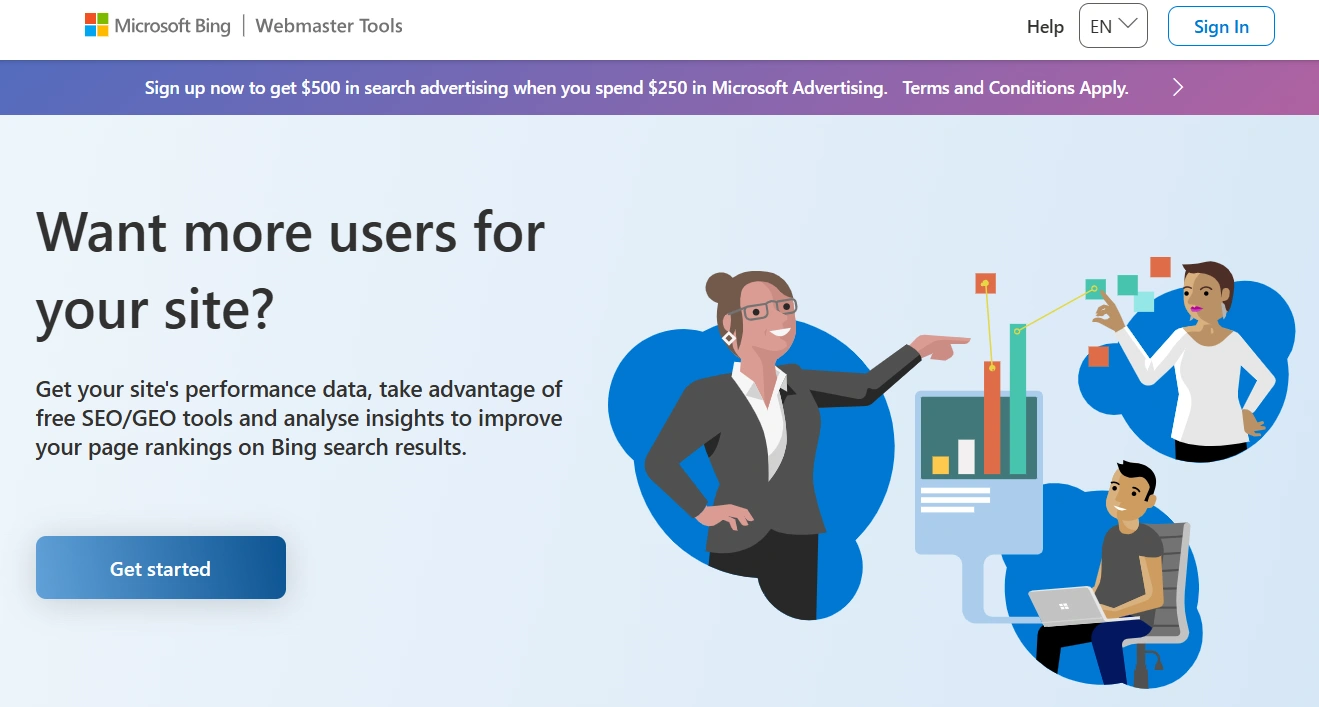
- Click "Get Started" on the main page of Bing Webmaster Tools.
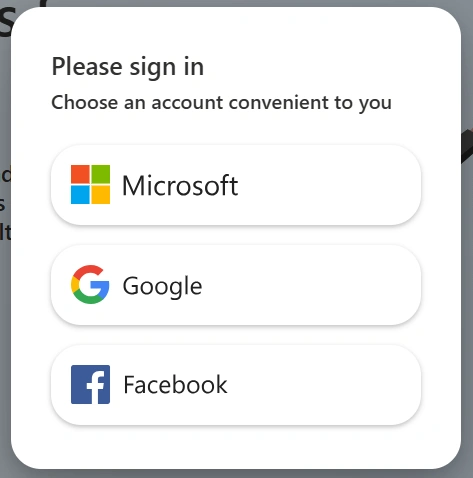
- Choose a registration method — Microsoft, Google, or Facebook (I use Google).
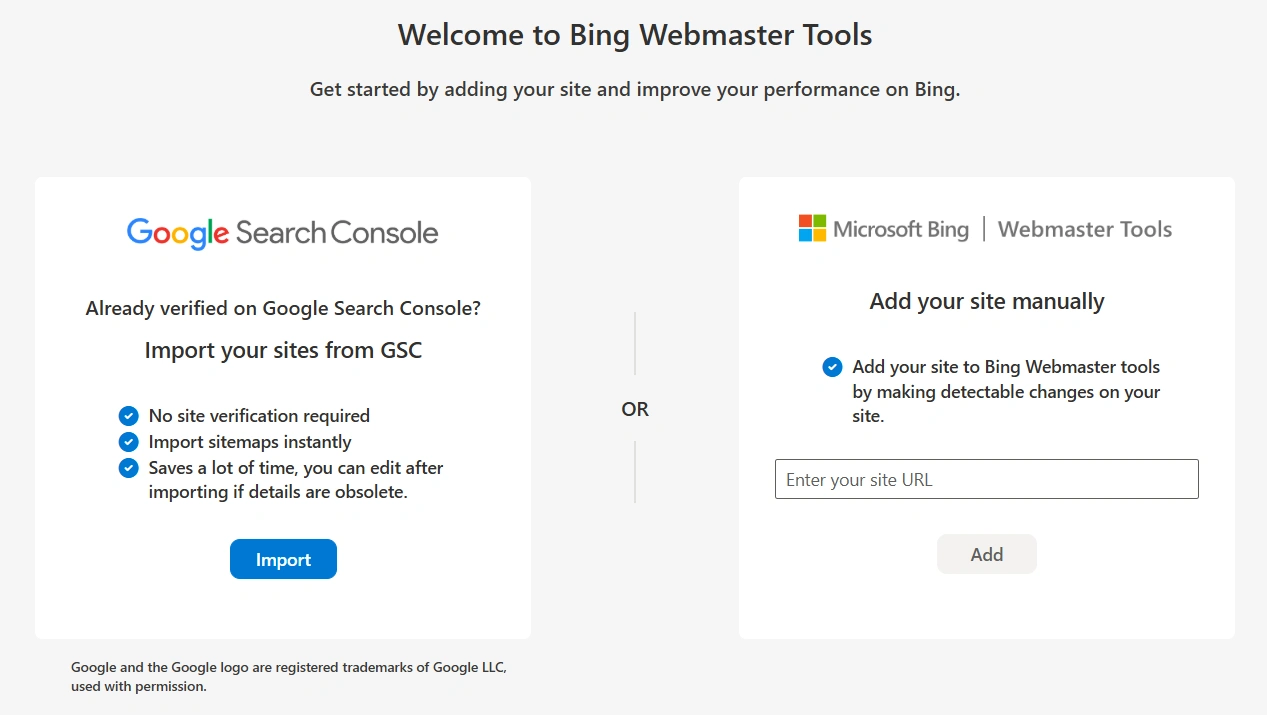
- Enter the web resource address, click "Add," and confirm ownership using an XML file, HTML tag, or CNAME record in DNS. Or select "Import" from Google Search Console (I did just that, it took a couple of seconds).
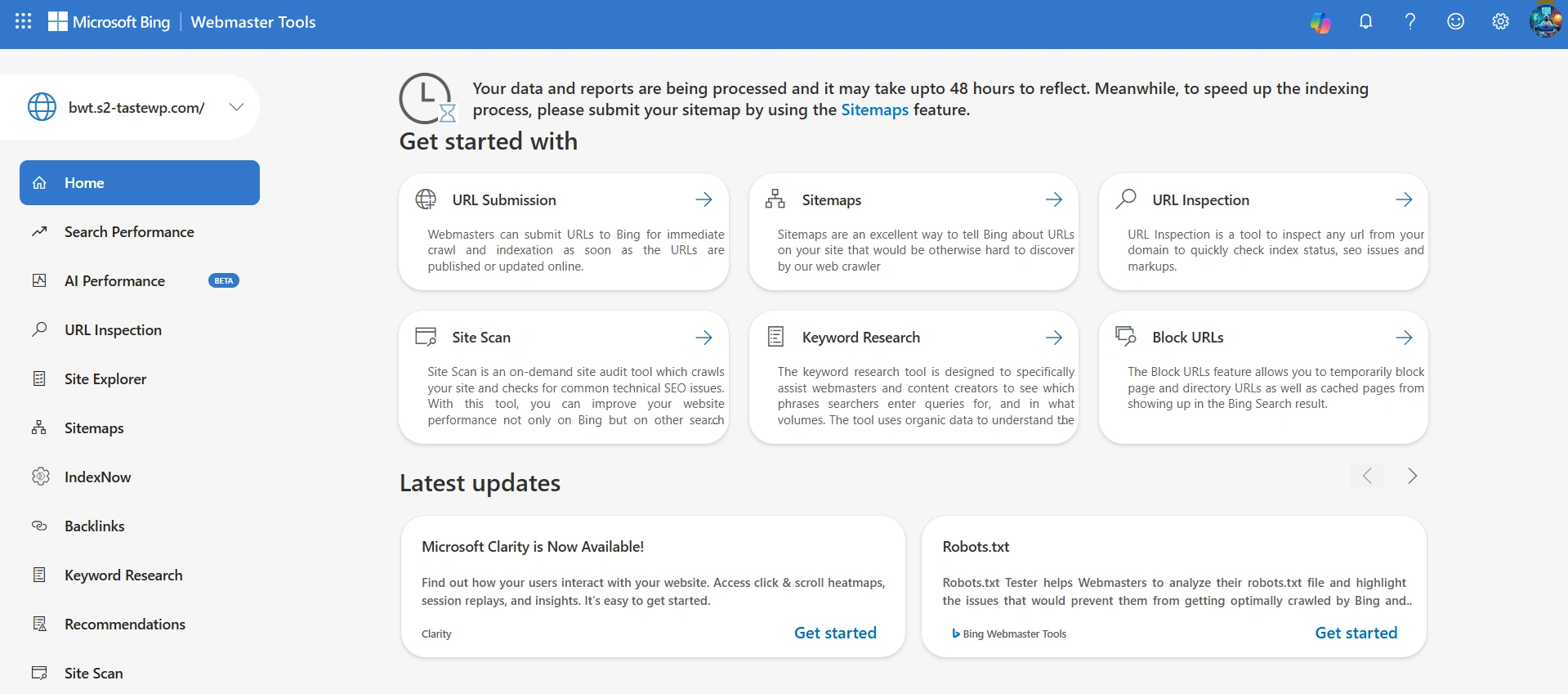
The time to receive data in Bing Webmaster Tools is similar to Google Search Console — up to 48 hours. However, 48 hours refer to the processing of your data and reports, not the indexing of the site, so the first positions and impressions on a new web resource will appear much later.
What technical optimization tools are available in BWT
The platform provides free access to all its tools, including a complete site scan with a report on technical errors, checking robots.txt and sitemaps, and instant submission of pages for indexing. You can even manage the crawl rate and temporarily block your own URLs from appearing in the results.
- How to add a sitemap to Bing Webmaster Tools
- How to conduct a site scan in BWT
- What is IndexNow
- How to check the indexing of a site page
How to add a sitemap to Bing Webmaster Tools
Go to the "Sitemaps" section and click "Submit Sitemap." The platform allows you to add text files or documents in XML, RSS 2.0, mRSS (Media RSS), Atom 0.3, and 1.0 formats. Paste the link and click "Submit."
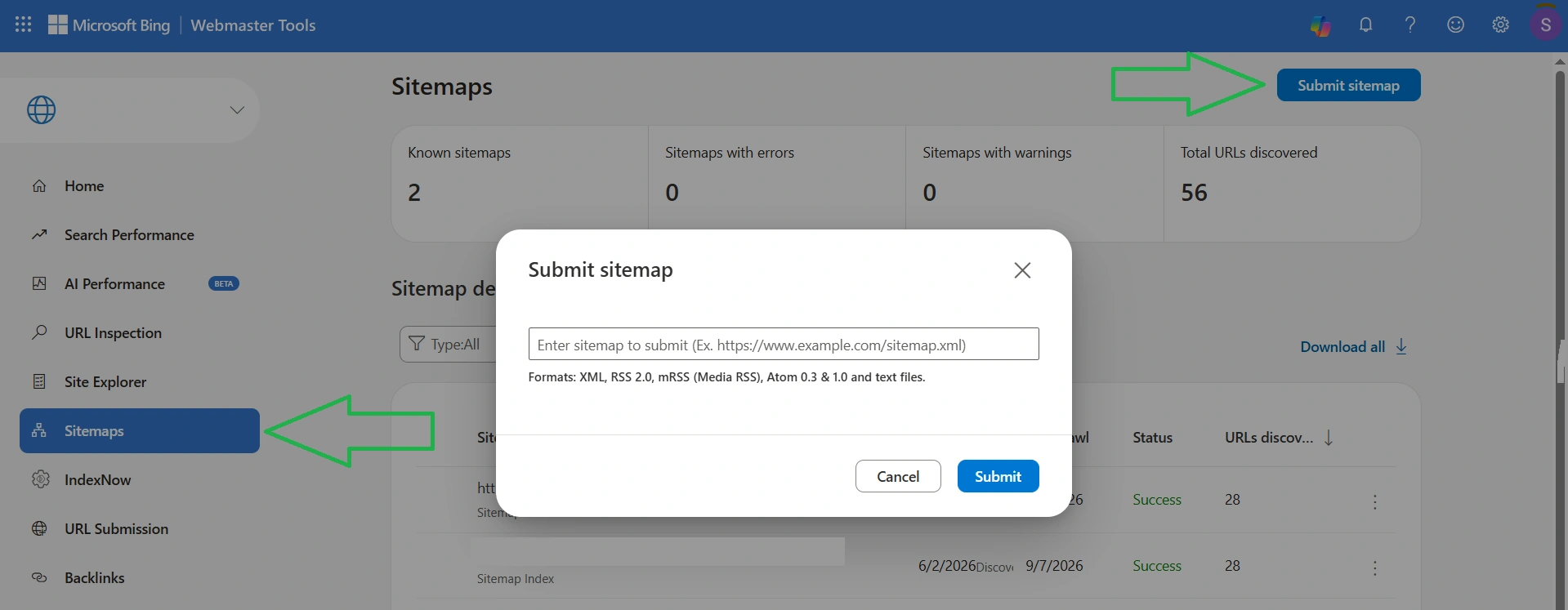
Immediately after uploading, the file status will change to "Processing," which may take up to 48 hours. If everything is fine, then during this time you will see the status "Successfully."
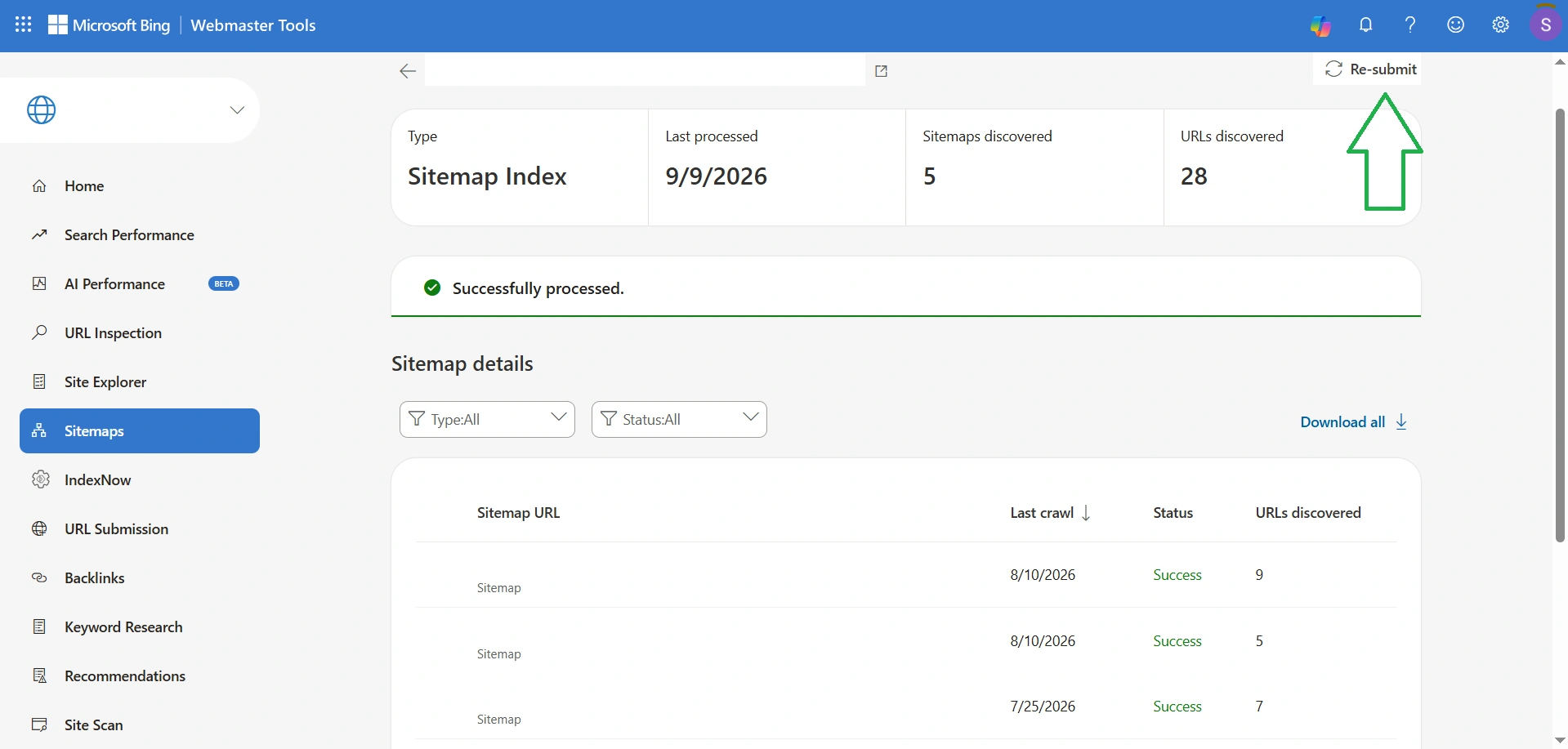
To view detailed information about each sitemap, click on the main file where the nested ones are located. I recommend doing this periodically because I had a situation where the overall status was "Successfully," but a specific document was "Error." If you click on the file with the error, you will see the specific reason. After fixing it, I recommend immediately clicking "Resubmit."
Also read: Image sitemap: why it is needed and how to create it
How to conduct a site scan in BWT
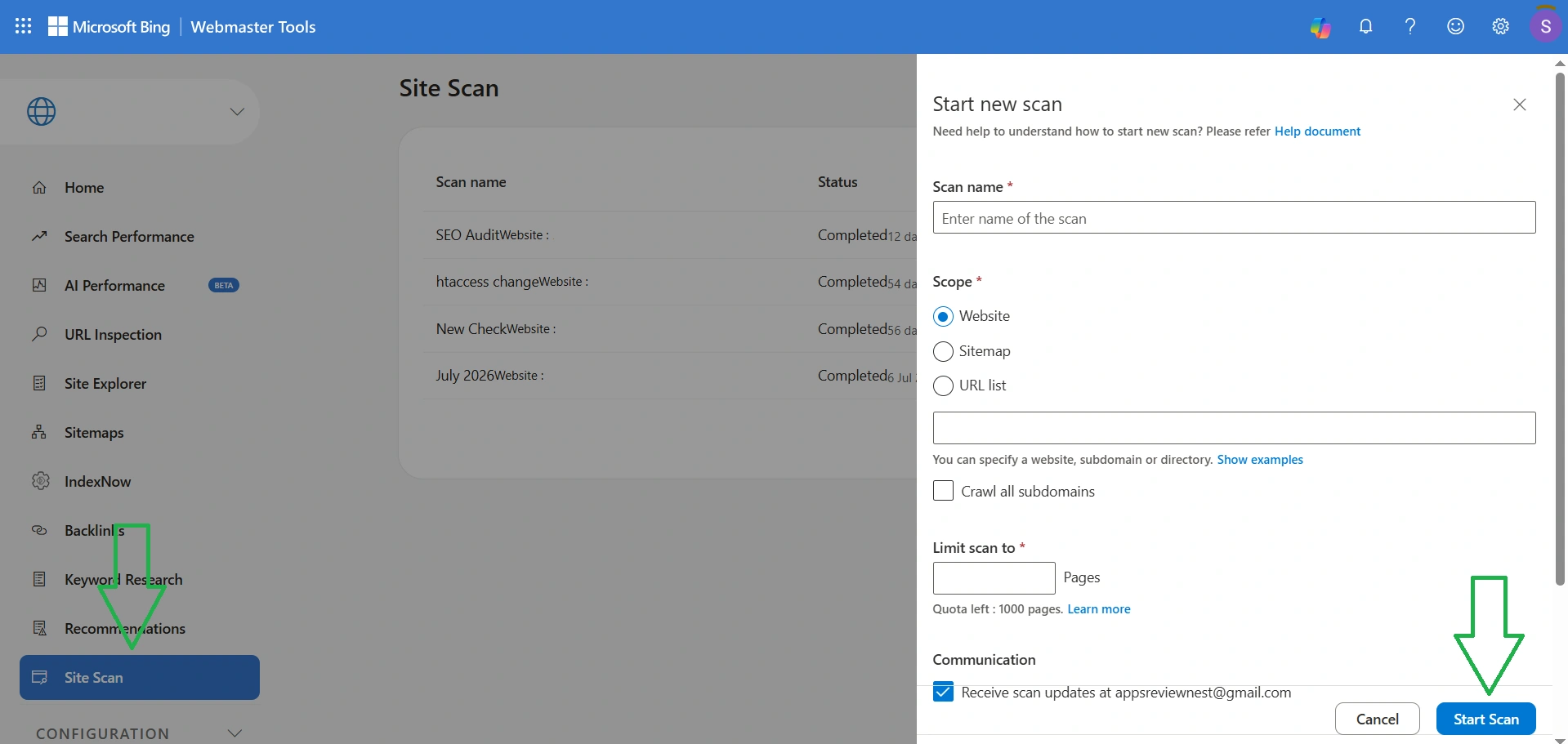
Go to the "Site Scan" section and click "Start New Scan." Then specify any name for this scan, choose the scan type (entire web resource, only sitemap, or specific URLs), the number of pages (maximum 1000), and click start scan. The duration of the scan depends on the size of your internet project, and the results are displayed in this same section and sent to your email.
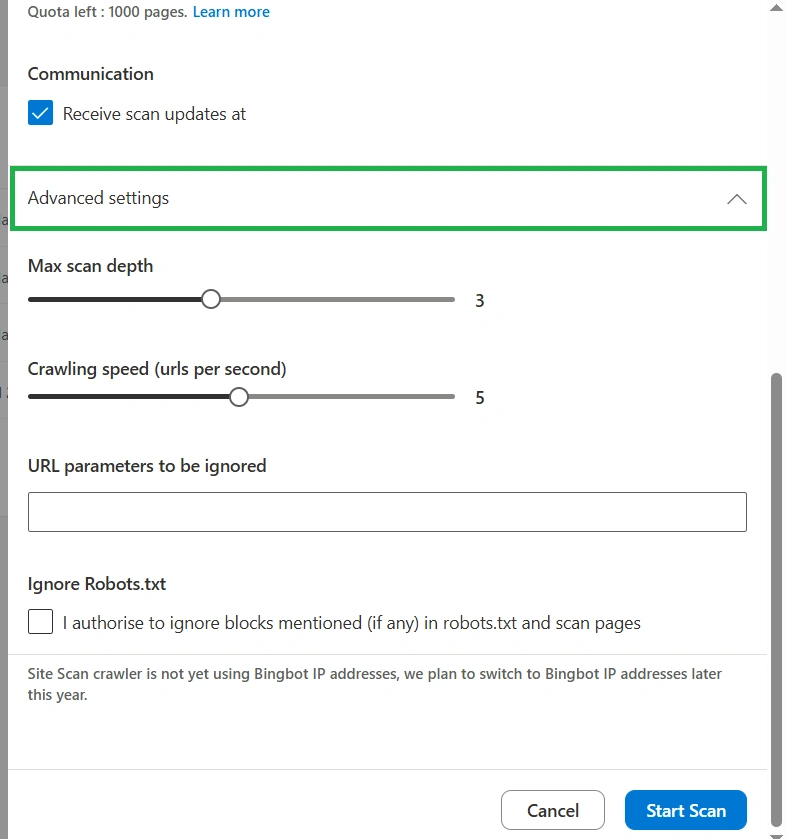
You can also change additional settings, but by default, everything is set correctly: maximum scan depth is 3 and crawl rate is 5 URLs per second. You can also specify certain URLs that should not be scanned and activate ignoring rules from the robots.txt file.
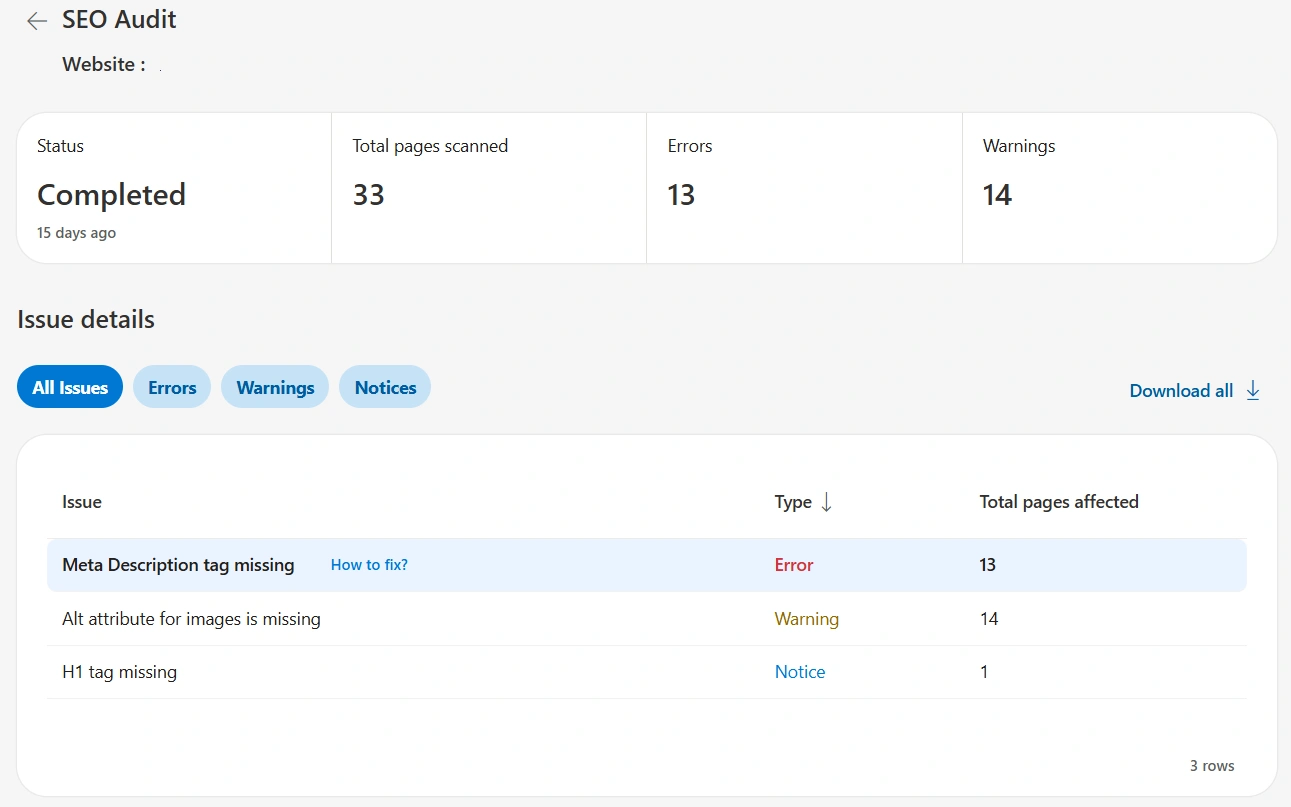
The scan report consists of the total number of checked pages, critical errors, and warnings. You can click on any error to see detailed information about it, including specific pages and suggestions for fixing.
What is IndexNow
IndexNow is an open protocol for instant notification of search engines about changes on a site. It is supported not only by Microsoft Bing but also by Naver, Seznam.cz, and Yep. If you have WordPress with a modern SEO plugin, you do not need to configure anything manually. On the official IndexNow page, Microsoft lists plugins that enable the protocol in minutes (IndexNow, Yoast, RankMath, AIOSEO, SEOPress) and states that manual key generation is only needed for those whose web resource does not use these extensions.
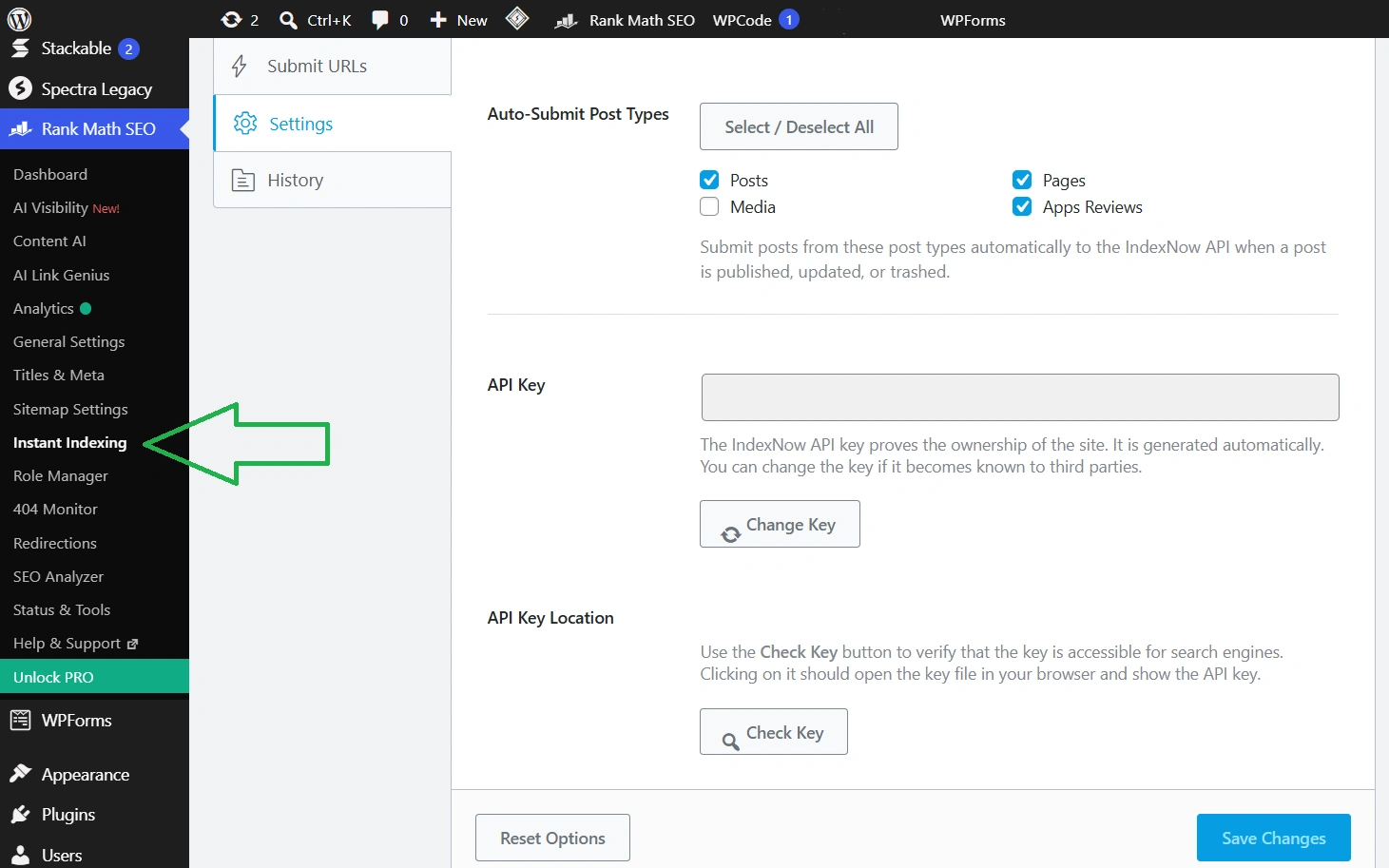
I use Rank Math. If you do too, then to check if IndexNow is working on the site:
- Go to Rank Math SEO → Instant Indexing → Settings.
- In the Auto-Submit Post Types block, check the post types that need to be submitted automatically. For me, these are Posts, Pages, and the custom type Apps Reviews.
- Look at the API Key field. It is already filled in, as the plugin generates the key itself, and it is directly stated below the field.
- Click Check Key in the API Key Location block. The button will open the key file at yoursite.com/key.txt — this is the one that search engines check.
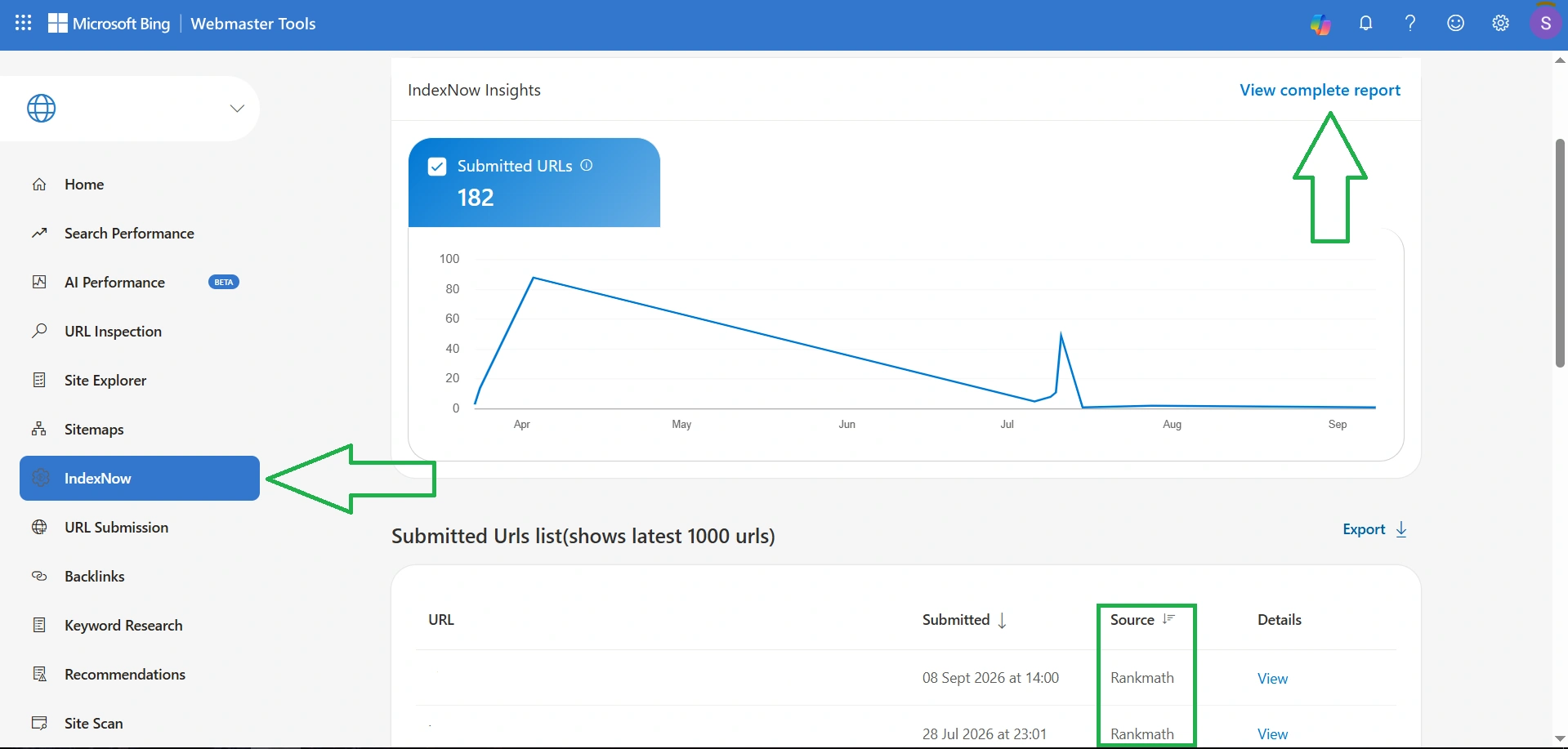
The result is visible in the IndexNow section. In the table of submitted URLs with the "Source" column, you can see Rankmath, which submits pages for indexing without any action on my part.
Also read: What is site indexing and how to check it
How to check the indexing of a site page
Go to the "URL Inspection" section, paste the link to the site page, and click "Check." The system will instantly provide the status of the page, for example, if everything is fine, you will see "Successfully indexed," the discovery date, and the last crawl date, as well as how the last crawl went.
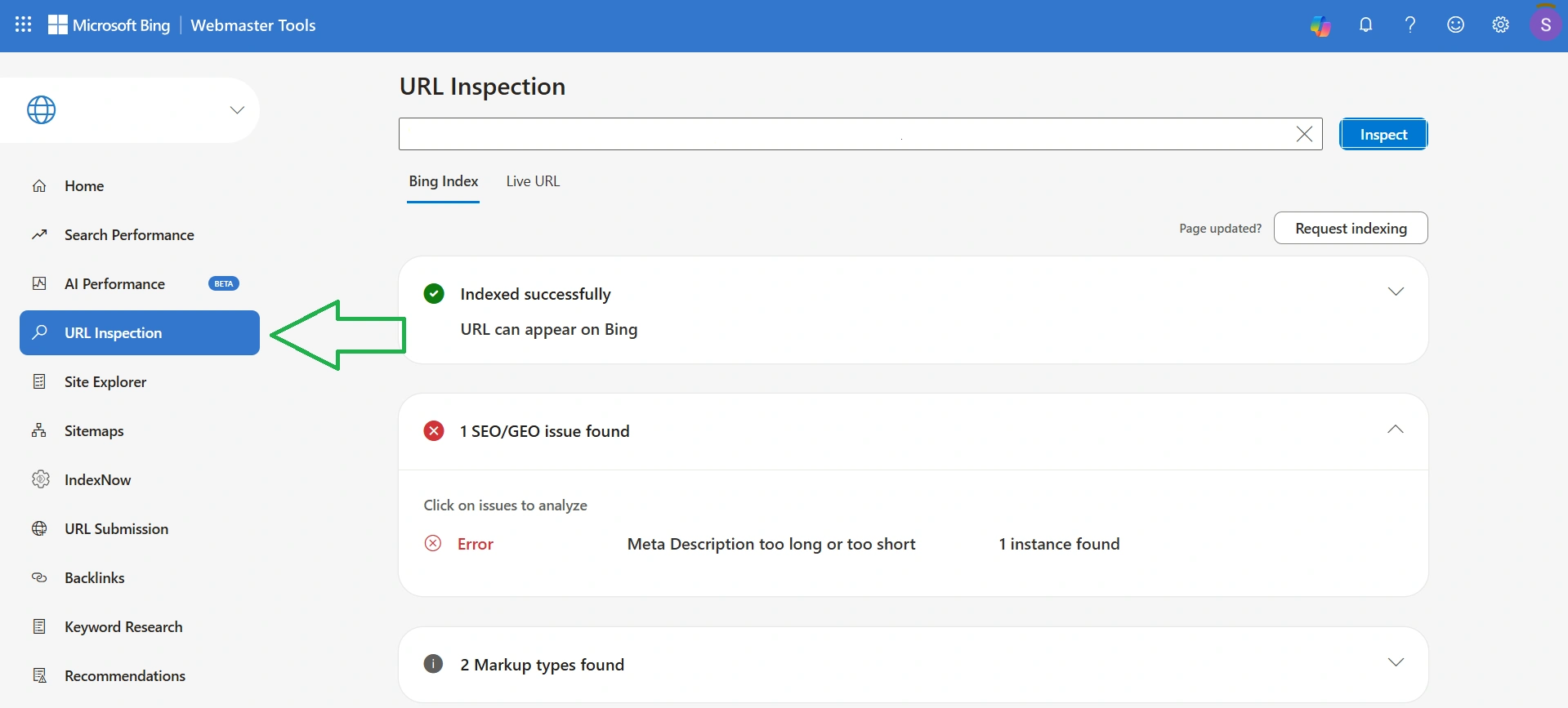
On a successfully indexed page, there may be certain errors. They did not prevent the crawler from scanning and adding the material to Bing's results. However, fixing them may improve your chances of ranking in the top results, for example, in my case, "META Description tag is too long or too short."
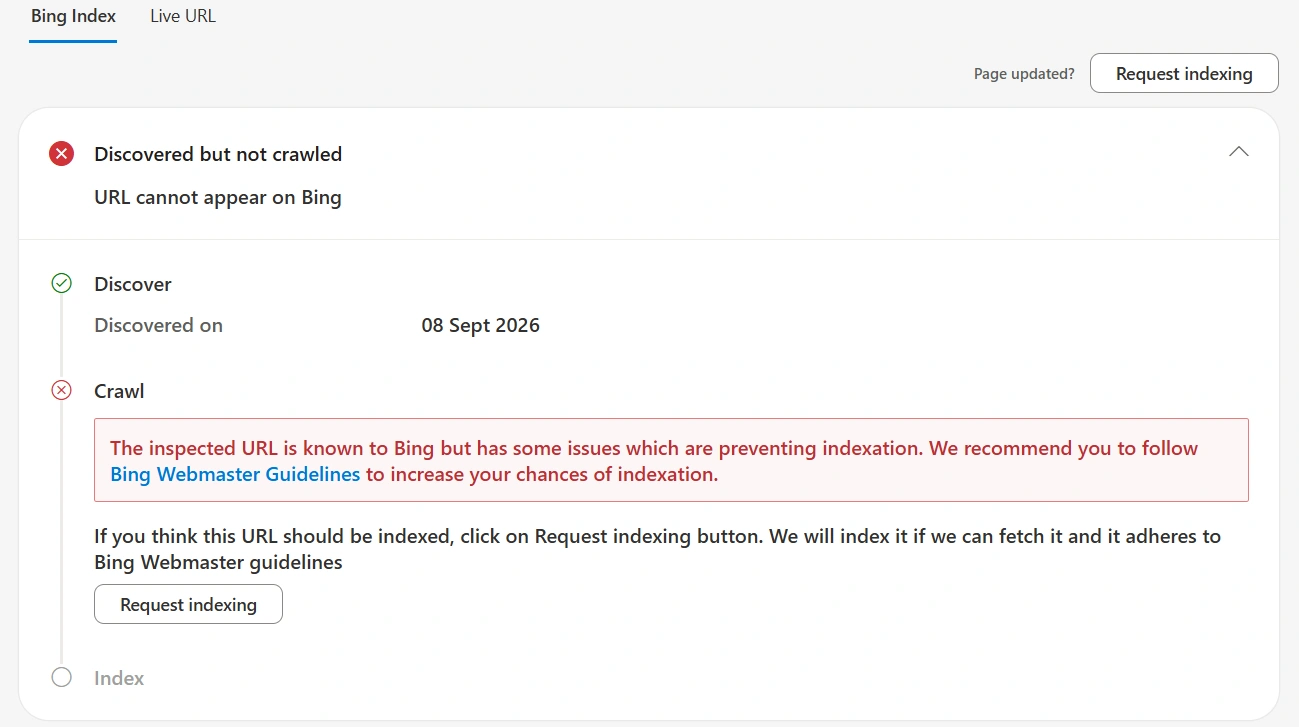
And this wording is annoying. When my page did not pass indexing, I saw the status "Detected, but crawl not performed." And there was an explanation like "Bing knows about the URL but found issues preventing indexing, so it advises adhering to the Webmaster Guidelines." And what exactly the problem is — that’s a secret.
I followed the link. In the webmaster guidelines, which Microsoft rewrote at the end of February 2026, there are 22 numbered sections of recommendations and a separate block on abuses. However, searching among them for the reason for a specific page is a maximally lengthy process without any guarantees.
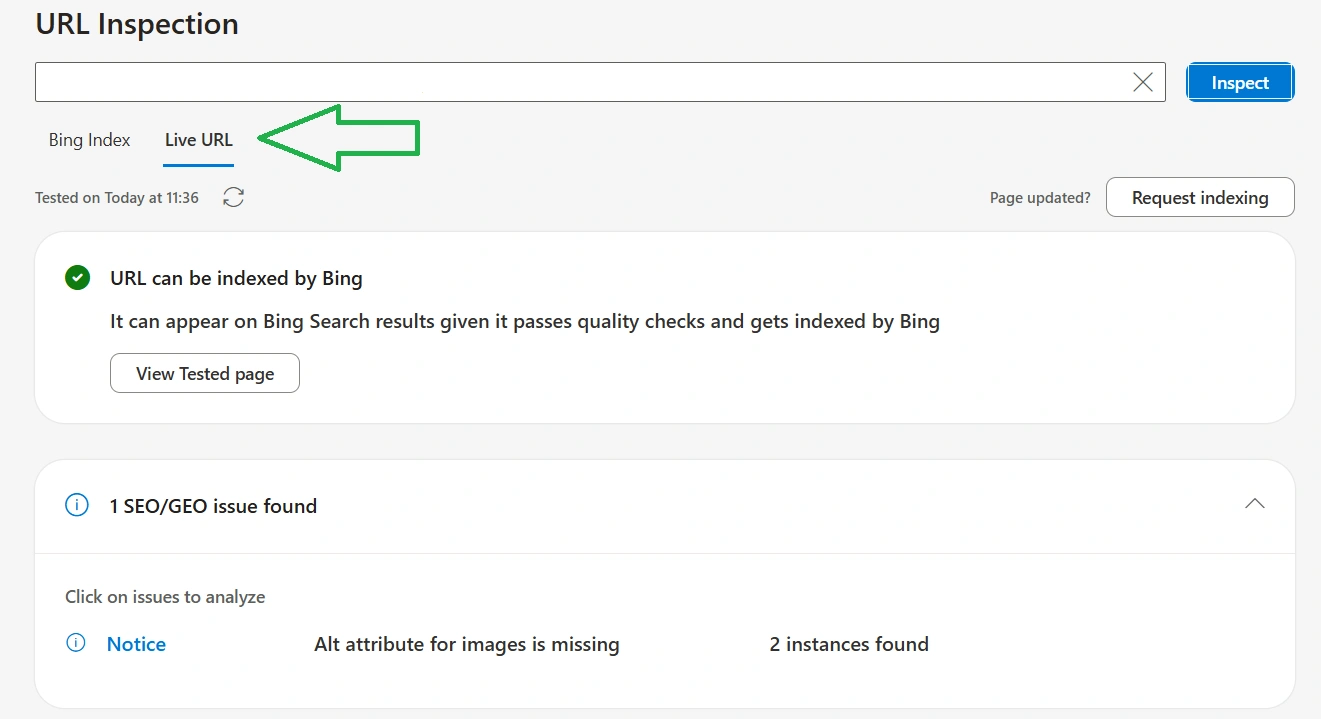
The situation is somewhat improved by the "Dynamic URL" tab next to "Bing Index." If you click on it, the system will check your page right now, showing whether there are any technical issues that prevented the crawler from performing the crawl. But the problem is that it shows only the technical part, for example, whether the crawler is blocked in the robots.txt document, and not other reasons why the page cannot be indexed.
How to check site performance in BWT
BWT allows you to analyze the performance of your site in Bing results, AI systems, and backlink profile separately. All reports can be downloaded completely free of charge, but only in CSV format.
- How to check site performance in Bing results
- How to check the promotion of pages in AI systems
- How to analyze backlinks in BWT
How to check site performance in Bing results
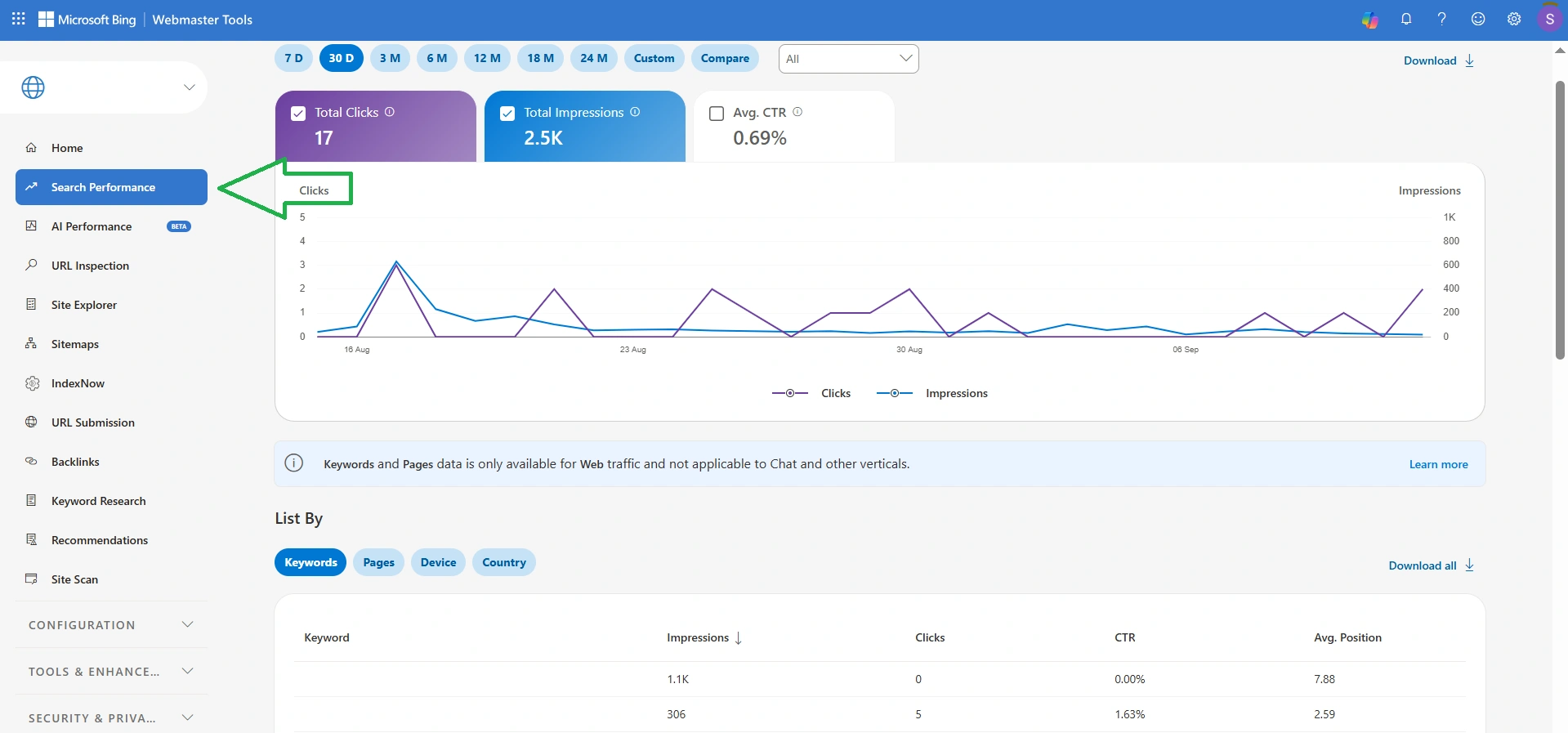
Go to the "Search Performance" section, select a convenient data period (7 or 30 days, 3, 6, 12, 18, 24 months) or set your own range by clicking "Custom." At the top, you will see a graph with the total number of clicks, impressions, and average CTR, and at the bottom — a table with a breakdown of this data by keywords, pages, devices, and countries.
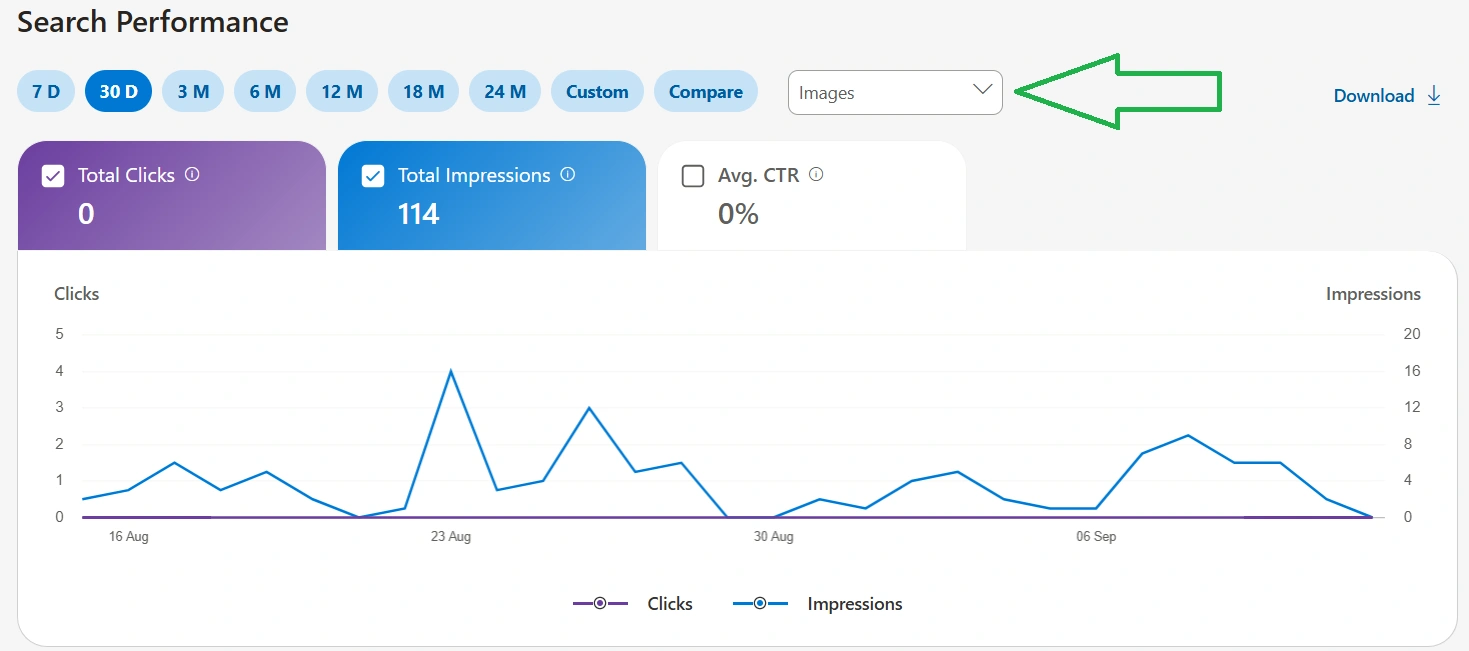
A useful tool is the filter by data type. You can view site performance reports in search, news, images, video, knowledge panel, and indexing separately. But there is a downside here — only the graph is displayed. For example, if you choose "All," then you will see a table at the bottom; if "Images" — it will not be there. That is, it will not be possible to understand which keywords your images are shown for and on which pages. Although this is also important, especially for web resources with a focus on the visual component.
How to check the promotion of pages in AI systems
Go to the "AI Performance" section and select a period for analysis (7 or 30 days, 3 or 6 months). On the graph itself, you will see the total number of mentions of your site pages and the average number of unique pages that were cited. And at the bottom, there will be a table with a breakdown of data by queries and pages.
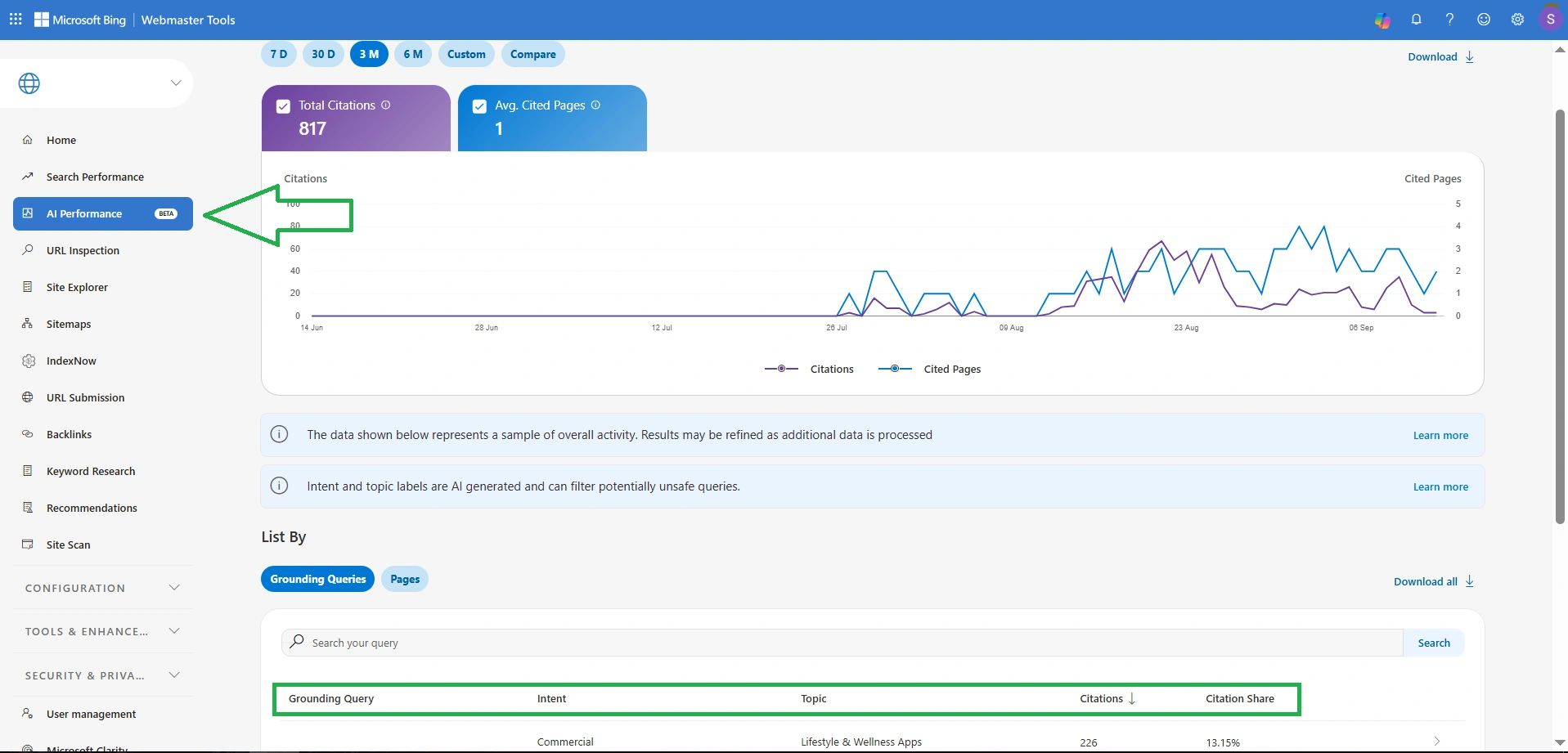
And the Bing AI Performance table is more useful because it displays:
- queries;
- user intent;
- topic;
- number of citations for a specific query;
- percentage of your citations among all cited sources for this query.
Bing Webmaster Tools warns that the data is only a sample of overall activity, meaning the results may not be accurate. Additionally, the system indicates that user intent and topic are generated by artificial intelligence, which can also make mistakes.
Pay special attention to the "queries" column, which is not analogous to queries in traditional search. These are so-called grounding queries — generalized formulations that the system generates itself to find sources for the answer.
Also read: Long live GEO: How to dominate in AI search in 2026
How to analyze backlinks in BWT
Go to the "Backlinks" section, where the total number of donor domains, donor pages, and anchors are immediately displayed. And right in the table, there is a list of domain names, pages, and anchors. In the adjacent tab "Backlinks to any site," you can add up to two competitors to analyze their backlink profile and compare it with yours.
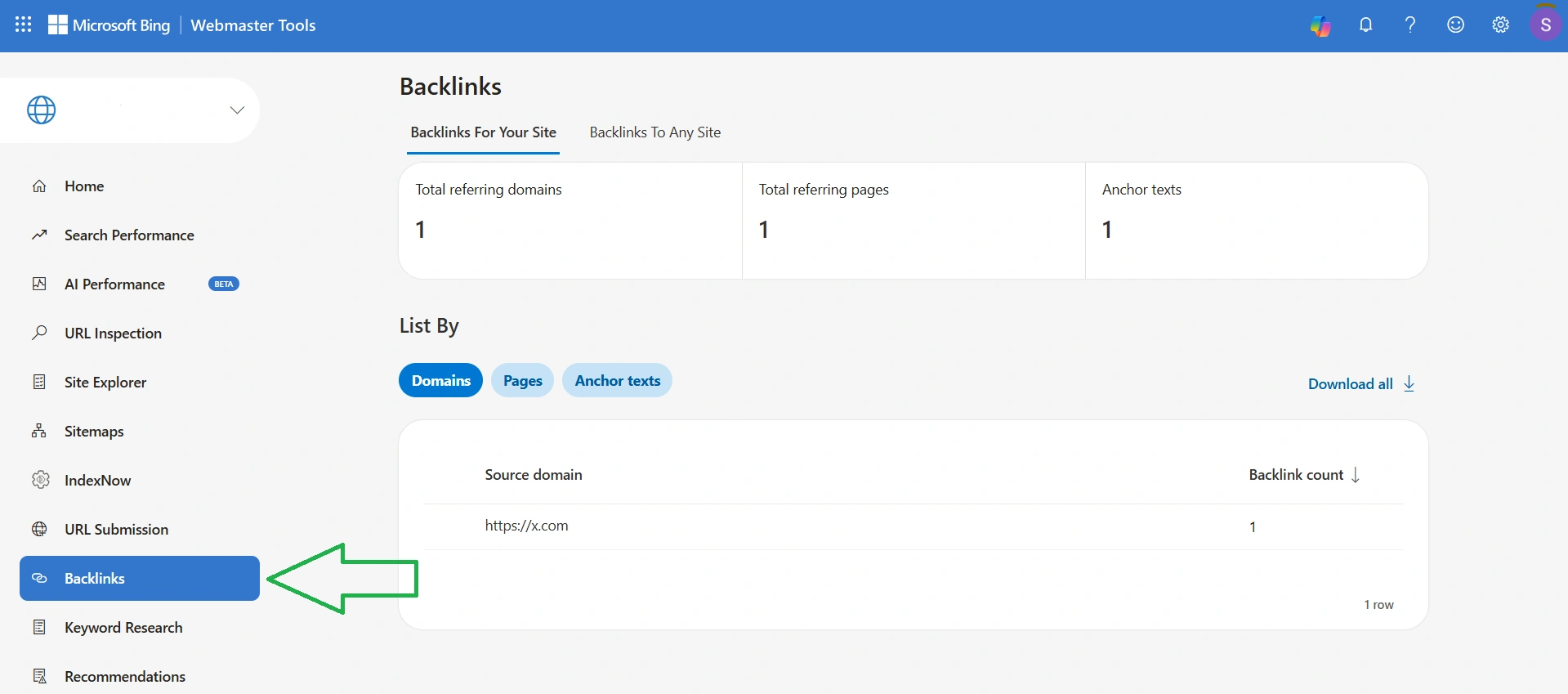
Recently, a large article about services for finding external links was published on Cityhost, including Bing Webmaster Tools. So I recommend reading it, as while BWT found one backlink to my site, others — over 400, more than half of which were spammy.
How to search for keywords for free in Bing Webmaster Tools
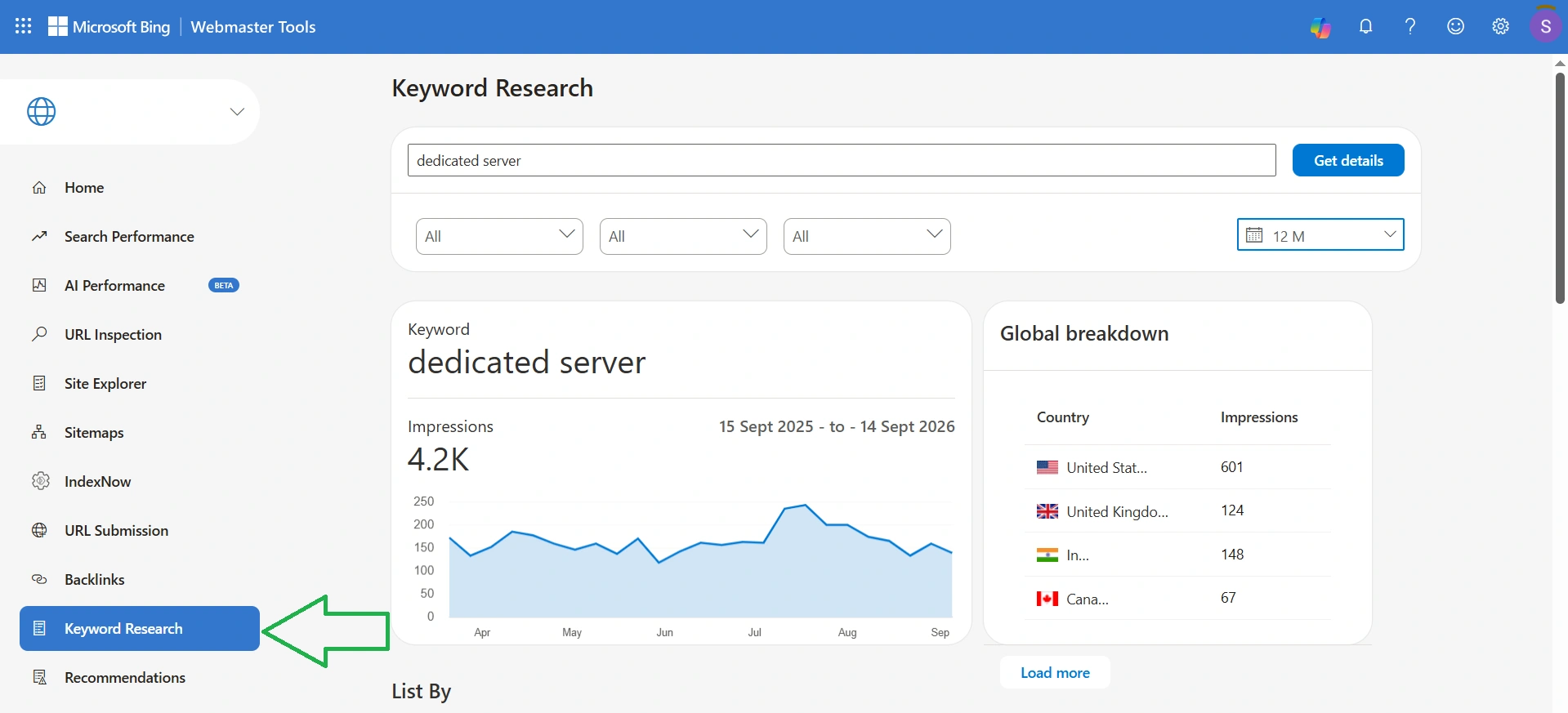
Go to the "Keyword Research" section, paste the search query, and click "Get Insights." Before searching, you can set filters by country (Ukraine is included), language (Ukrainian is included), and device type (mobile or desktop). Data can be obtained for the last 30 days, 3, 6, 12, 18, 24 months, or set your own period.
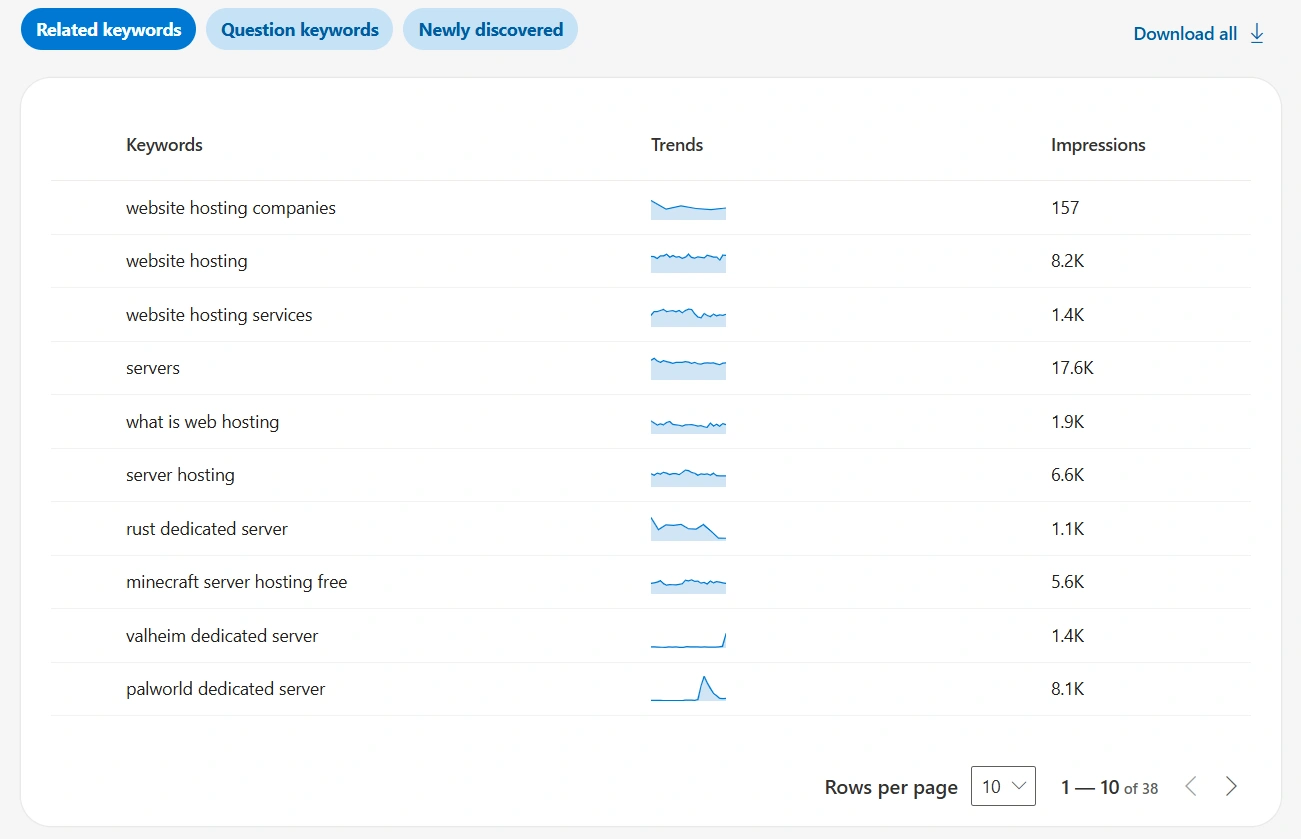
I checked English queries. For "dedicated server," I received 4.2K impressions per year with a dynamic graph, a breakdown by countries (USA 601, India 148, UK 124, Canada 67), and three tabs with keywords: related, question, and recently discovered. For "best meditation apps" — 136.8K impressions. All of this can be exported to CSV with the "Download All" button.
The "Ad Views" column is a localization error. In the original, the metric is called Impressions and shows organic demand for the query, not ad views. Moreover, the block with the breakdown by countries is labeled as "Global Accident," which also contains an error. In the original, it is Global Breakdown — "global breakdown," meaning the machine translation took the word breakdown in the sense of "breakdown."
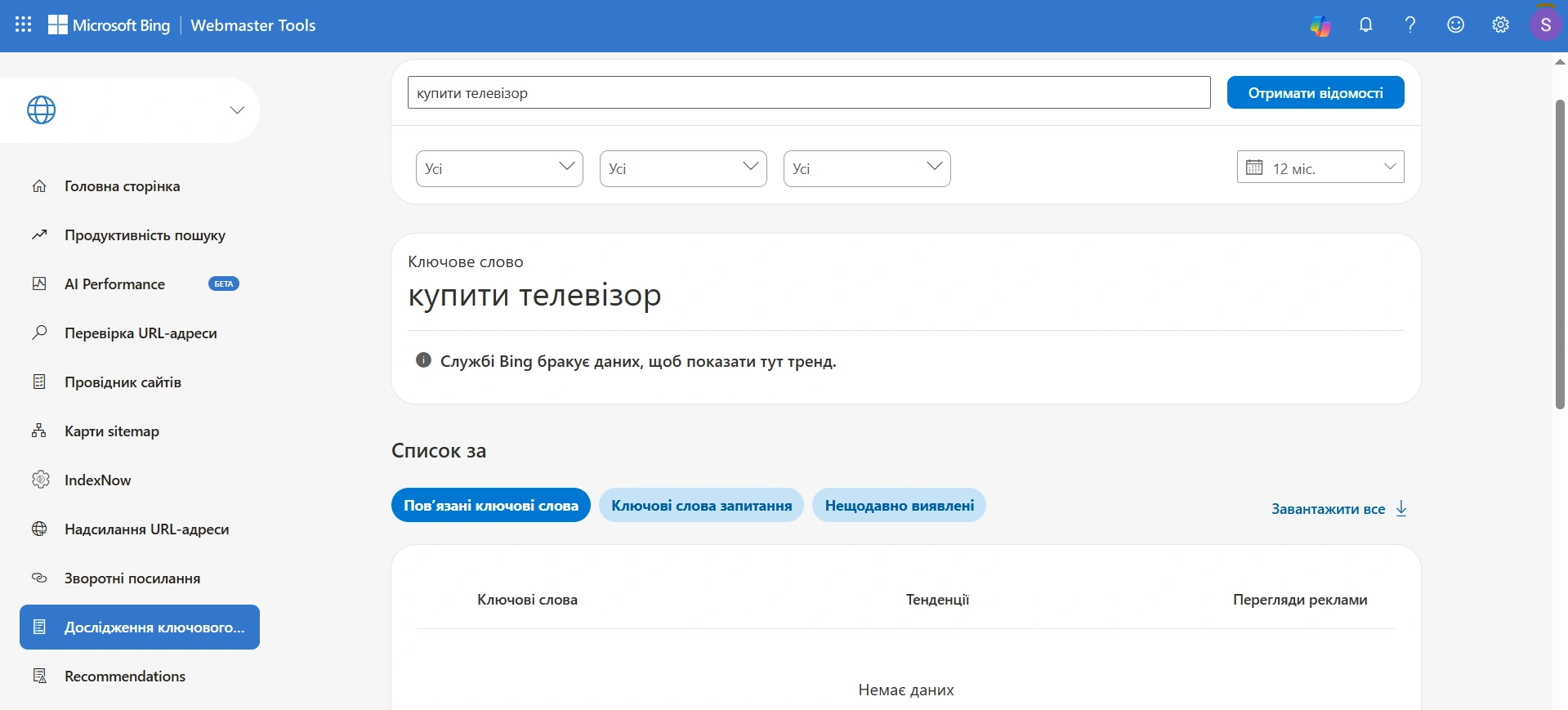
However, the main drawback for owners of Ukrainian-language websites is not the localization errors, but the lack of data. I checked four Ukrainian queries from different niches — "dedicated server," "buy TV," "buy socks," "registration of an individual entrepreneur." The result is the same for all four: "Bing lacks data to show trends here" and an empty table of related keywords.
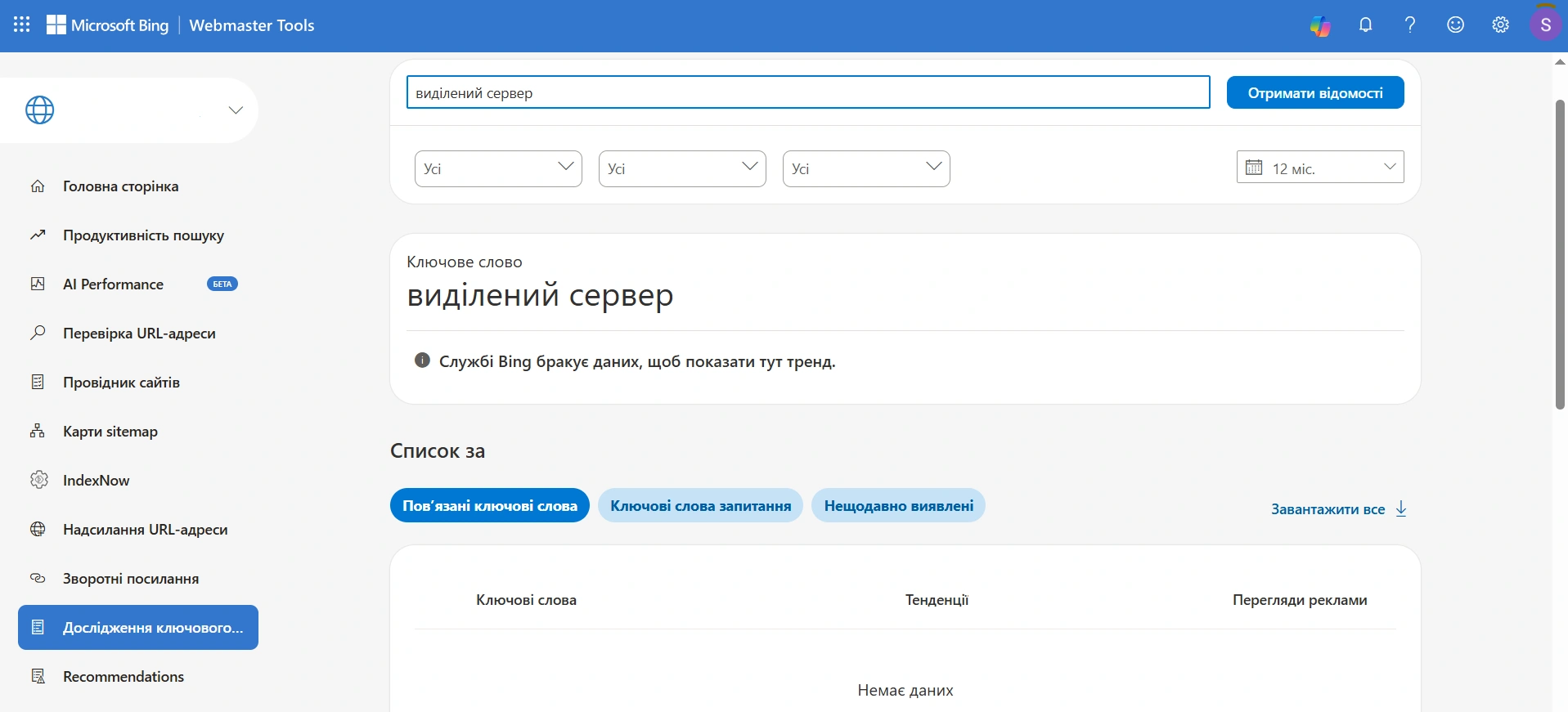
Thus, this tool is not suitable for gathering Ukrainian semantics, and this does not depend on a specific keyword. However, for an English-language project, it works quite well and provides what is not available in Google Keyword Planner for free — exact figures instead of ranges.
What to do with BWT next
To summarize all the testing, Bing Webmaster Tools for a Ukrainian site is not a source of traffic and not a source of data about the Ukrainian market. This is a free technical diagnosis at the level of paid services and one of the few ways to see for free if AI is citing you.
So right now it is worth:
- Verify the site by importing from Google Search Console.
- Submit the sitemap and check the statuses of nested files separately.
- Check if IndexNow is working.
- Run a full site scan and fix errors.
Then periodically check the "AI Performance" section and see what topics you are being cited for. This will not replace the main SEO work, but it will give a rare signal: when AI Overviews and chatbots take more and more clicks from classic results, knowing that you are at least being cited is already an advantage. And from such citations, people usually come to the site who have already received an answer and are specifically looking for whom to contact.