

- What is an SSL certificate in simple terms
- Which websites need an SSL certificate
- What types of SSL certificates are there
- What is the difference between a free and a paid SSL certificate
- How to obtain an SSL certificate
- How to check a website's SSL certificate
With the release of Chrome 154, the browser now warns visitors by default before opening a public site without HTTPS and suggests not to proceed. For the website owner, this means that without a secure connection, some visitors will close the tab before even seeing the first page. Hosting providers, including Cityhost, issue a free SSL certificate along with hosting, but sometimes this may not be enough. I checked the certificates of my English-language site and Cityhost to show how they differ through real examples.

What is an SSL certificate in simple terms
An SSL certificate is an electronic document that confirms that the website belongs to the domain owner and allows data to be transmitted between the web resource and the visitor in an encrypted form. When the certificate is installed and redirection is configured, the browser opens the site at a secure address without warnings.
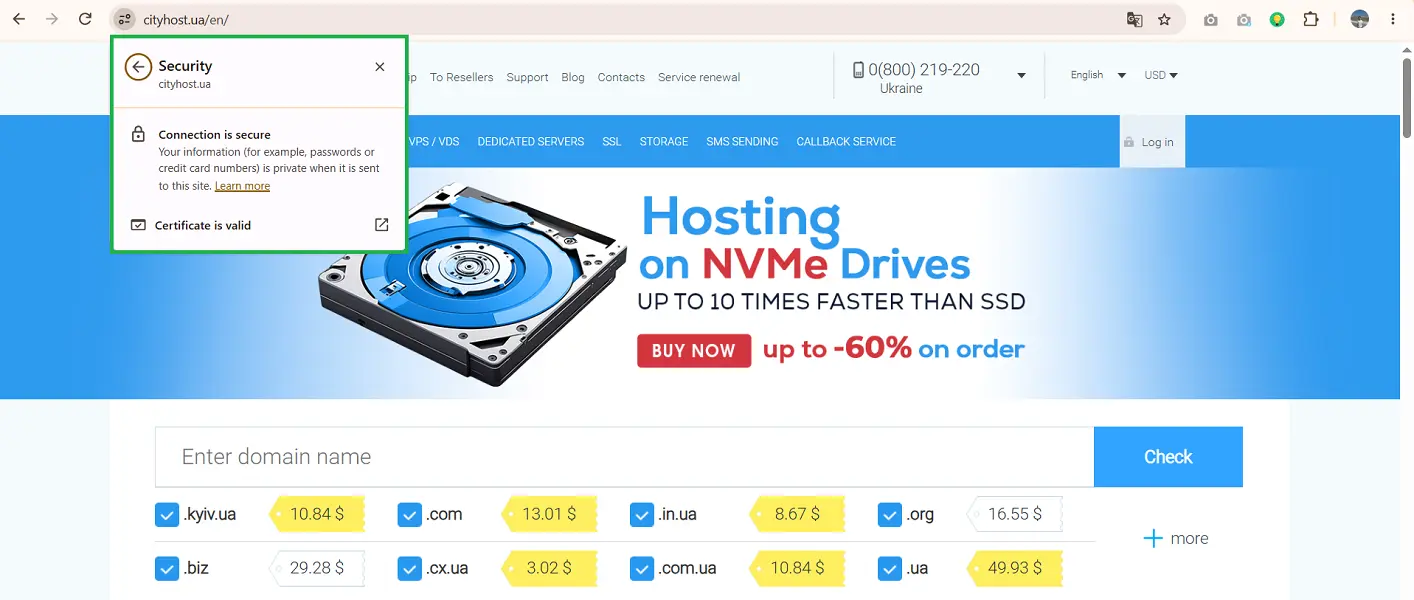
The main task of an SSL certificate is data encryption. It creates an encrypted tunnel between the visitor's browser and the server. If data (passwords, bank cards, personal information) is intercepted by third parties, they will only see a set of incomprehensible symbols.
A secure connection is established through a process called "handshake" (TLS handshake). When the site is first accessed:
- The browser sends a list of encryption algorithms it supports to the server.
- The server selects an algorithm and sends its certificate.
- The browser checks whether the certificate is signed by a trusted certificate authority.
- The browser and server exchange temporary keys and compute a shared session key.
The certificate authority is an organization like Let’s Encrypt. Browsers trust it, and its root certificate is already embedded in the browser or operating system. A new session key is created for each connection, so even if the server's main key is leaked, it will not allow decrypting previously intercepted traffic.
Also read: How to protect a WordPress site and not become a victim of open source vulnerabilities
Which websites need an SSL certificate
An SSL certificate is needed for any website, regardless of its size, theme, or purpose. Previously, it was mainly connected by banks, online stores, and payment systems, but without HTTPS, visitor data is at risk even on a small blog.
Through an unprotected connection, an attacker can:
- intercept card data on sites with online payments;
- steal personal data from feedback forms, applications, and online bookings;
- intercept login and password on sites with authorization;
- embed foreign ads, malicious scripts, or phishing links into pages.
Even if your blog visitors do not enter anything, attackers can change the page between the web resource and users, who will think that the foreign ads were placed by you. And on a WordPress site without HTTPS, your administrator password is transmitted in plain text every time you log in to /wp-admin. Additionally, Google takes HTTPS into account among the page experience signals, although it affects the position less than content quality.
A significant role is played by the warning that repels visitors. Previously, Chrome only displayed the "Not secure" label in the address bar. With the release of Chrome 154 on September 22, 2026, the browser now asks for permission before opening a site through an unprotected connection and shows a warning even before the page loads.
What types of SSL certificates are there
SSL certificates differ in two parameters: what the certificate authority checks before issuing and how many domains one certificate protects. By type of verification, there are certificates with domain name validation, organization validation, or extended validation. By coverage, they protect one domain, the main domain with subdomains, or several different domains.
So, by type of verification, there are three types of SSL certificates:
- Domain validated (DV). The simplest type, issued within minutes. The certificate authority only checks whether you actually control the domain. It is sufficient for a blog, business card site, portfolio, and most online stores.
- Organization validated (OV). To obtain it, you need to document the existence of a legal entity. Verification takes from a few hours to a few days, after which the company name can be seen in the certificate details. Suitable for companies that want partners and clients to verify who is behind the site in the certificate.
- Extended validation (EV). The highest level of verification, where the certificate authority thoroughly examines the company's registration documents, legal status, physical address, and phone number. Necessary for financial institutions, banks, payment systems, and large international marketplaces.
You can see the difference in the certificate window by simply clicking the settings icon in the address bar → Secure connection → Certificate valid → Details → Subject.
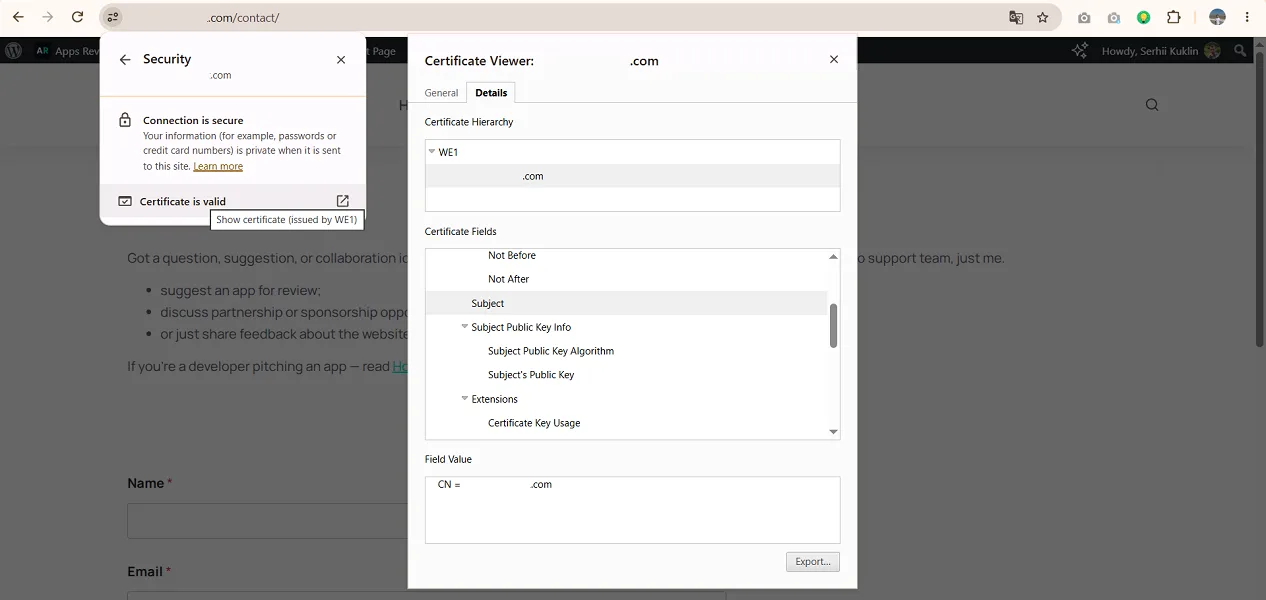
For example, my informational site has a DV certificate, and in the "Subject" field, only my domain is indicated.
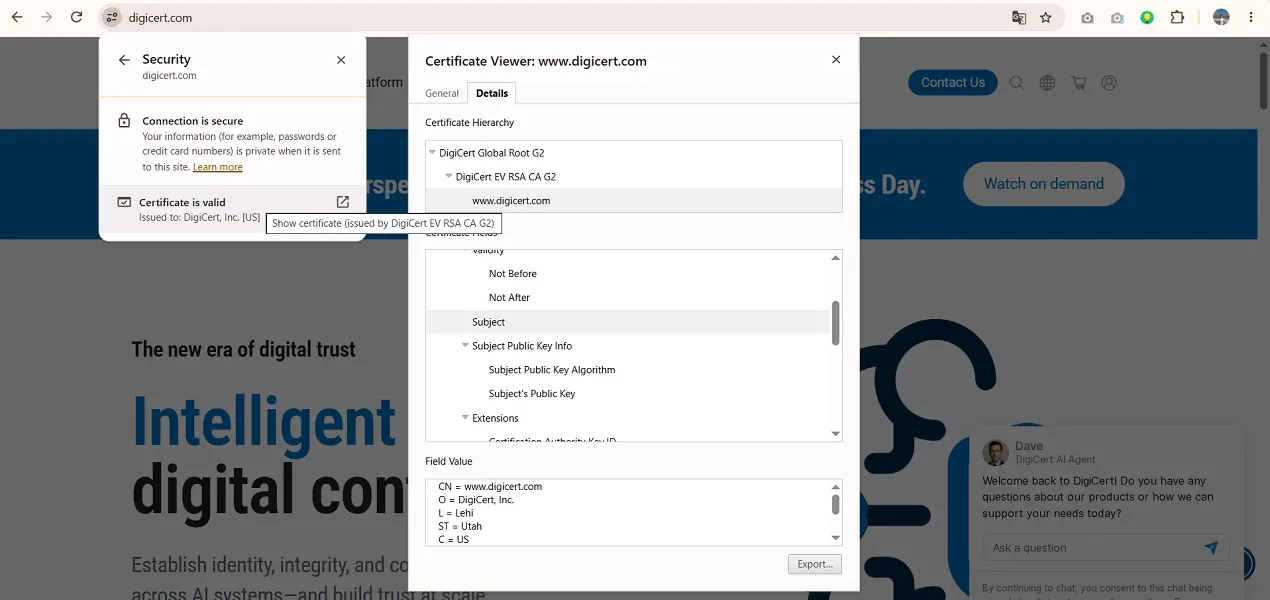
In contrast, the web resource digicert.com has an EV certificate, and the browser already shows the company name, city, state, country, and registration number.
By type of coverage, an SSL certificate can be:
- Single-domain. Protects only one specific domain (example.com) or one specific subdomain (shop.example.com).
- Wildcard. Protects the main domain and an unlimited number of its first-level subdomains (*.example.com). This is the ideal solution for large projects that use many subdomains, such as blog.example.com, account.example.com, shop.example.com).
- Multi-domain. Protects several completely different domains within one certificate.
Separately, it is worth highlighting the types of SSL certificates by cost. Any website owner can have both a free and a paid certificate. However, the decision here should not be made solely based on savings.
What is the difference between a free and a paid SSL certificate
Free certificates are issued by the non-profit center Let's Encrypt. Such a certificate can be enabled in the Cityhost hosting control panel, and it will continue automatically. Another free option is Cloudflare: for all connected domains, it automatically orders from partner certificate authorities and renews certificates that are valid for 90 days.
Cloudflare does not replace the certificate on hosting. Its certificate only protects the path from the visitor to Cloudflare. In the recommended Full (strict) encryption mode, Cloudflare checks whether a valid certificate is installed on the hosting.
The following differences exist between free and paid SSL certificates:
| Criterion | Free certificates | Paid certificates |
|---|---|---|
| Type of verification | Only DV (domain validation) | DV, OV, EV (full business verification) |
| Validity period | 90 days (from February 10, 2027 — 64) | Up to 200 days (from March 15, 2027 — up to 100) |
| Renewal | Automatically through hosting | Subscription for 1+ years, but the certificate is reissued at least twice a year |
| Financial guarantees | None | From $10,000 for DV to $2 million for EV, which are paid to the visitor if the certificate authority made a mistake during issuance |
| Support | Let's Encrypt documentation and hosting support | Support from the certificate authority or vendor |
| Who needs it | Blogs, informational sites, business cards, landing pages | Online stores, banks, corporate portals, SaaS platforms |
Overall, with a free certificate, you get basic protection that is great for starting an online project. In contrast, a paid SSL certificate significantly expands business capabilities, providing the following advantages:
- company verification, as OV and EV are only available for paid certificates;
- guaranteed payout if losses occurred due to an error by the certificate authority;
- technical support from the certificate authority;
- longer validity period, meaning less frequent reissuance.
Pay special attention to the validity period. From March 15, 2026, any public certificate will be valid for a maximum of 200 days, from March 15, 2027 — 100 days, and from March 15, 2029 — only 47 days. For example, RapidSSL TLS on Cityhost is valid from October 3, 2026, to April 20, 2027, which is 199 days.
Free Let's Encrypt certificates currently last for 90 days, but from February 10, 2027, it will shorten them to 64 days, and from February 16, 2028 — to 45. My site received a free certificate for 90 days — until January 5, 2027. If the hosting automatically renews the certificate, you won't even notice these reductions, so be sure to check your provider's terms.
Read more about this in the article: Paid SSL certificates are already shortening their validity period: what is happening and what to expect next
How to obtain an SSL certificate
On virtual hosting, a free certificate is enabled in the control panel with just a few clicks. On a VPS or dedicated server without a control panel, it is installed manually, most often using Certbot. A paid certificate is installed manually: you upload the certificate file, private key, and chain of intermediate certificates (CA bundle) issued by the certificate authority to the panel.
To enable a free certificate in Cityhost:
- Open the hosting control panel and select the domain.
- Go to the SSL tab.
- Enable the free certificate.
- Enable redirection to HTTPS.
Enable redirection with any certificate, otherwise the site will continue to open at both http://... and https://.... Visitors coming from the old link will remain on the unprotected version. And search engines will see two copies of each page: Google usually chooses the HTTPS version as the main one, but ranking signals are dispersed between the two addresses.
How to check a website's SSL certificate
After connecting, check four things: whether the browser sees a valid certificate, whether all site addresses lead to HTTPS, whether there is any mixed content on the pages, and how the server is configured. The first three checks take a few minutes in the browser, while the fourth requires a free service like SSL Labs.
First, check the presence and details of the certificate. Simply open your web resource, click on the settings icon to the left of the site address, and select "Secure connection" → "Certificate valid." This way, you will see which domain the certificate was issued for, who issued it, and until what date it is valid.
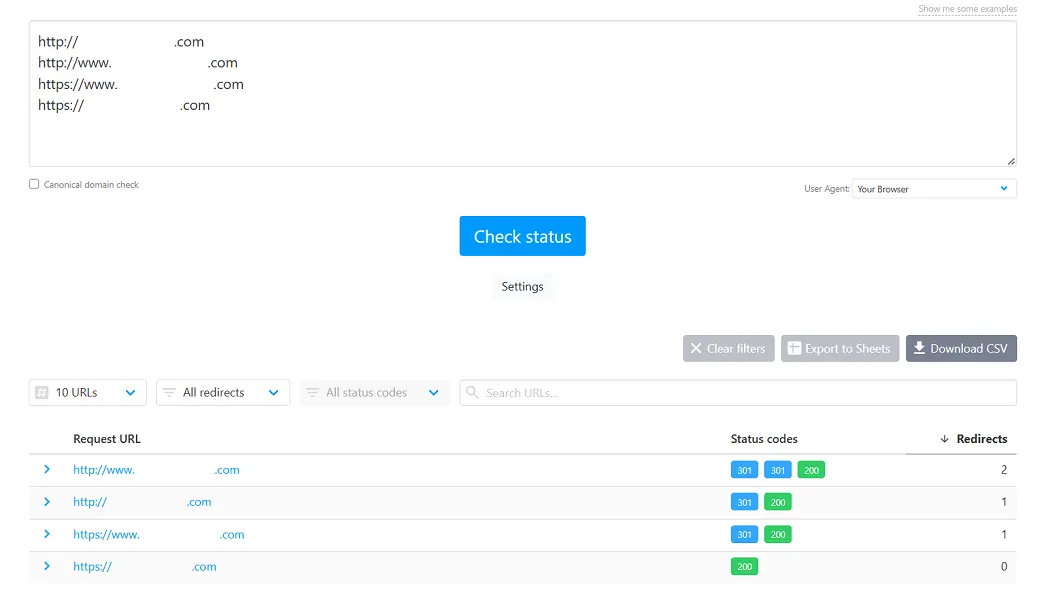
Next, check if redirection is configured. Go to the free service httpstatus.io and enter four variations of the site address:
- http://site.com
- http://www.site.com
- https://www.site.com
- https://site.com
The first three addresses should lead to the main version of the site in one step with a 301 redirect. That's how I noticed that on my site, the address with http://www made two steps: first, Cloudflare redirected it to https://www, and then WordPress redirected it to the address without www. The web resource works, but it's better to avoid unnecessary redirects.
Next, check for mixed content, where some types of content or pages have HTTPS, while others continue to operate on HTTP. Open a page on the site, press F12 (on Mac — Cmd + Option + I), go to the Console tab, and check for any warnings about mixed content.
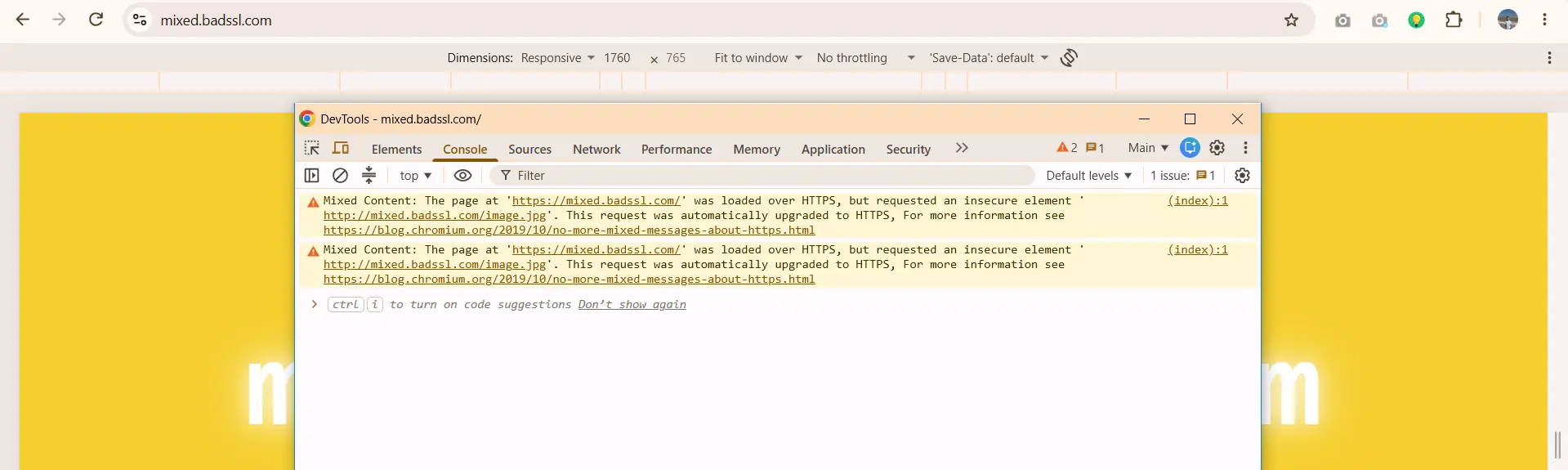
On the test page mixed.badssl.com, Chrome automatically loaded such an image via HTTPS. But if the image is unavailable over HTTPS, Chrome blocks it, and it simply won't appear on the page.
And then check the server settings. For example, the free service SSL Labs shows how the server is configured with which the visitor connects. That is, if the site operates through Cloudflare, the service checks Cloudflare's servers, not the hosting.
To check your site:
- Open ssllabs.com/ssltest.
- Enter the domain without https://.
- Check the box "Do not show the results on the boards."
- Click "Submit" and wait a few minutes.
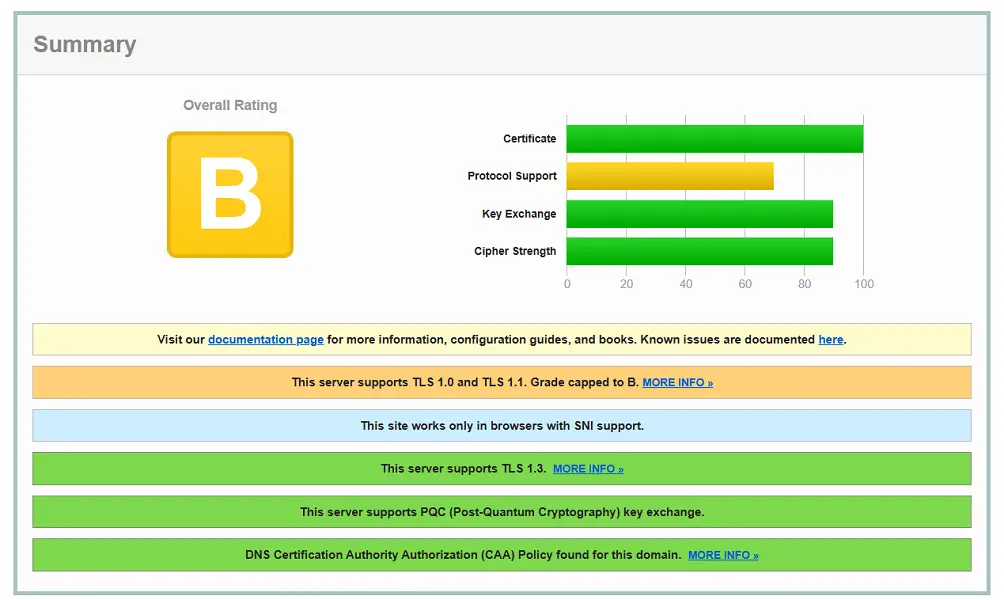
My site initially received a grade of B, although everything was fine with the certificate. The service stated the reason directly: the server supports outdated TLS 1.0 and 1.1, and since January 2020, SSL Labs does not give such sites a grade higher than B. I didn't enable them; they are just enabled by default in Cloudflare TLS 1.0.
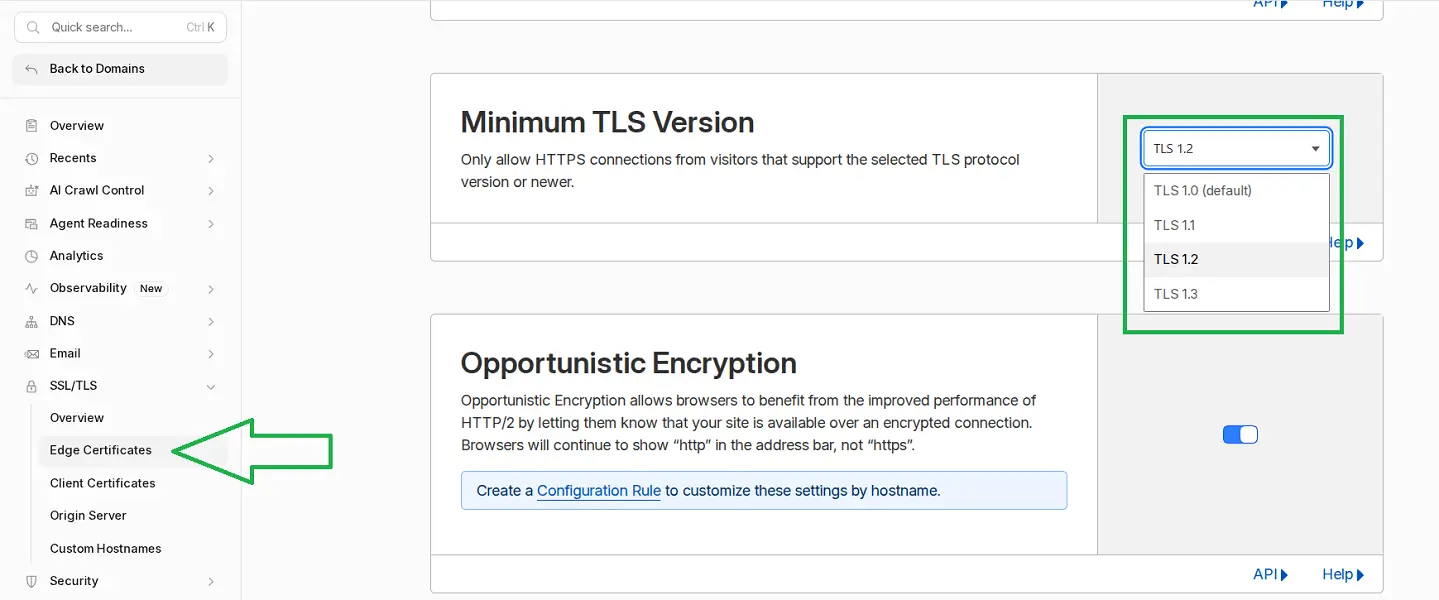
In Cloudflare, I opened the SSL/TLS section → Edge Certificates and changed the Minimum TLS Version from TLS 1.0 to TLS 1.2, thus disabling both outdated versions.
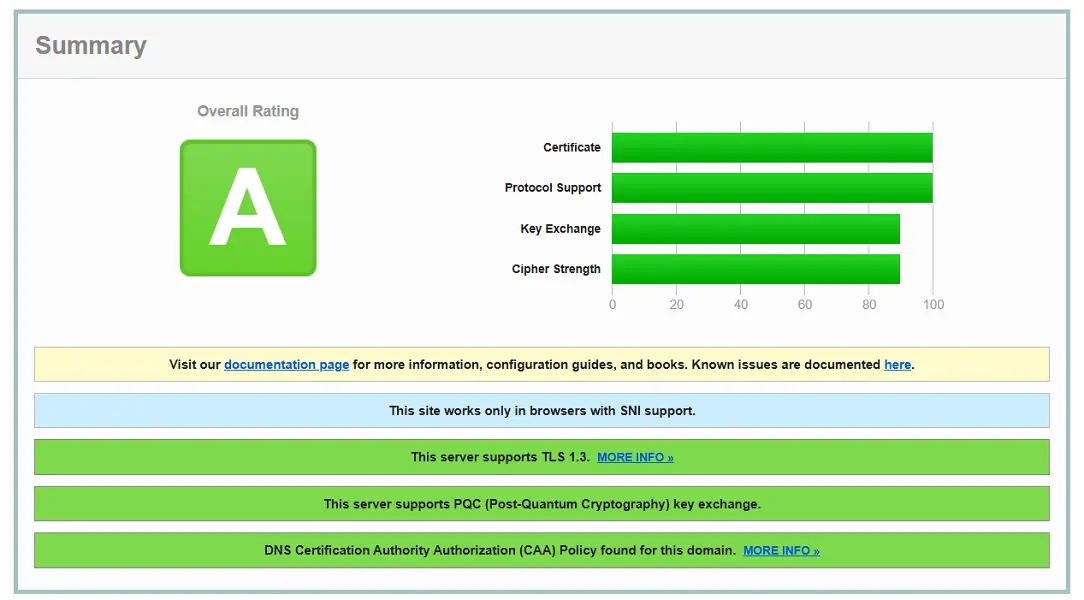
After rechecking, the site received an A rating. Visitors did not notice the difference: according to Cloudflare statistics, over 90% of requests to my site were already going through TLS 1.3, while TLS 1.2 remained enabled. The limitation only applies to very old devices like Android 4.3 and older, Internet Explorer 10, Windows XP.
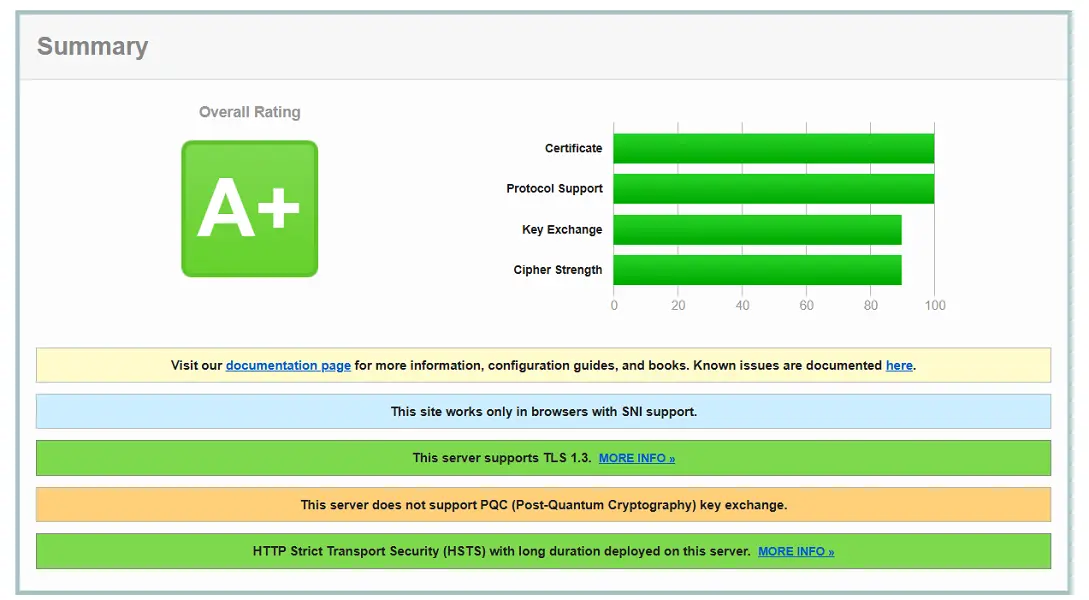
The site cityhost.ua received an A+ rating. It not only has outdated protocols disabled but also has HSTS configured, which forces the browser to always open the site via HTTPS.
So, if your site still does not have a certificate, enable the free one in the hosting control panel, which is quite sufficient to start. If it is important for your clients and partners that the company has undergone full verification, then it is worth purchasing a paid SSL certificate. And after connecting, don't forget to check the redirection and look at the rating in SSL Labs.



.webp)