

- What is VPS in simple terms
- What virtualization technologies are available for VPS
- What opportunities does VPS provide for business
- When should you switch to VPS
- Who needs VPS: analyzing specific scenarios
- How to manage VPS in 2026
- How to choose VPS configuration for your own business
- How to test VPS without unnecessary costs
VPS — is a virtual server with dedicated resources and full administrator rights to settings. This is its key difference from regular hosting, where resources and capabilities are shared among all sites on the server. However, root access alone — is not a reason to switch to a VPS server: the decision depends on specific tasks — automations, chatbots, local AI models. When there is a clear understanding, then you can take advantage of all its capabilities without overpaying for unnecessary power.
What is VPS in simple terms
VPS (Virtual Private Server, «virtual private server») — is a virtual machine on a physical server of the provider, which has its own operating system, resources allocated to you, and full administrative access. On one physical server, there are several such machines, but they have their own operating system and resources, and do not see each other's contents.
The difference between renting virtual hosting and a virtual private server is in the freedom to manage available resources. Virtual hosting is similar to coworking: you pay a certain amount of money every month, in return you get a desk, internet, coffee machine, security, and cleaning in one shared space. You are not responsible for anything: you come, work, leave — the main thing is to pay on time and not disturb anyone. But at the same time, you are always limited by the rules of coworking: you cannot rearrange tables, kick out other people who disturb you, or stay to work at three in the morning if the coworking closes at ten.
In contrast, VPS — is your own rented space. It usually has no furniture, equipment, security, cleaning, etc., as you have to take care of all this yourself. But this is its own advantage: you can arrange the space as you wish, buy any furniture and equipment, hire any specialists, allow other people to work in the same space, or keep it entirely to yourself. Of course, there are certain limitations of the building itself, which distinguishes VPS from a dedicated server, but in your space, you can do whatever you want.
By the way about your own space. You may have noticed that some providers call this service VPS, others VDS, and often try to find a fundamental difference between them, which actually does not exist. The abbreviations Virtual Private Server and Virtual Dedicated Server historically appeared at different providers, and once they tried to separate them by the type of virtualization. Today this division does not work: you should not look at the name, but at the characteristics of the specific tariff. At Cityhost, for example, the service is called VPS/VDS, and the virtualization in all tariffs is the same.
Also read: Cityhost Dictionary: the most commonly used terms on the site and in the control panel
What virtualization technologies are available for VPS
Virtualization technology — is the creation of virtual versions of computer resources, such as hardware, servers, data storage, or operating systems, using special software. For a long time, there were three main approaches on the market: container virtualization (OpenVZ, LXC) shares one common operating system among clients, paravirtualization Xen occupies an intermediate position between containers and full isolation, while hardware virtualization (KVM) gives each machine a full-fledged own system. But in 2026, the market for classic VPS/VDS rental has almost completely switched to KVM.
Cityhost also chose KVM VPS for several reasons:
- Obsolescence of OpenVZ. This technology has actually stopped, ceased to receive critical updates and support for modern versions of Linux kernels.
- Full ownership. On KVM, resources are strictly allocated to you. You do not need to share with neighbors and risk your project if suddenly another user starts using too many resources.
- Absence of technical limitations. KVM opens access to capabilities that were not available on OpenVZ: changing the Linux kernel, running Windows, disk encryption, installing specific VPN modules.
- Same cost. From my observations of provider tariffs, if earlier container virtualization technology was chosen due to lower cost, then in 2026 server hardware and fast NVMe disks became so powerful and affordable that the price difference disappeared.
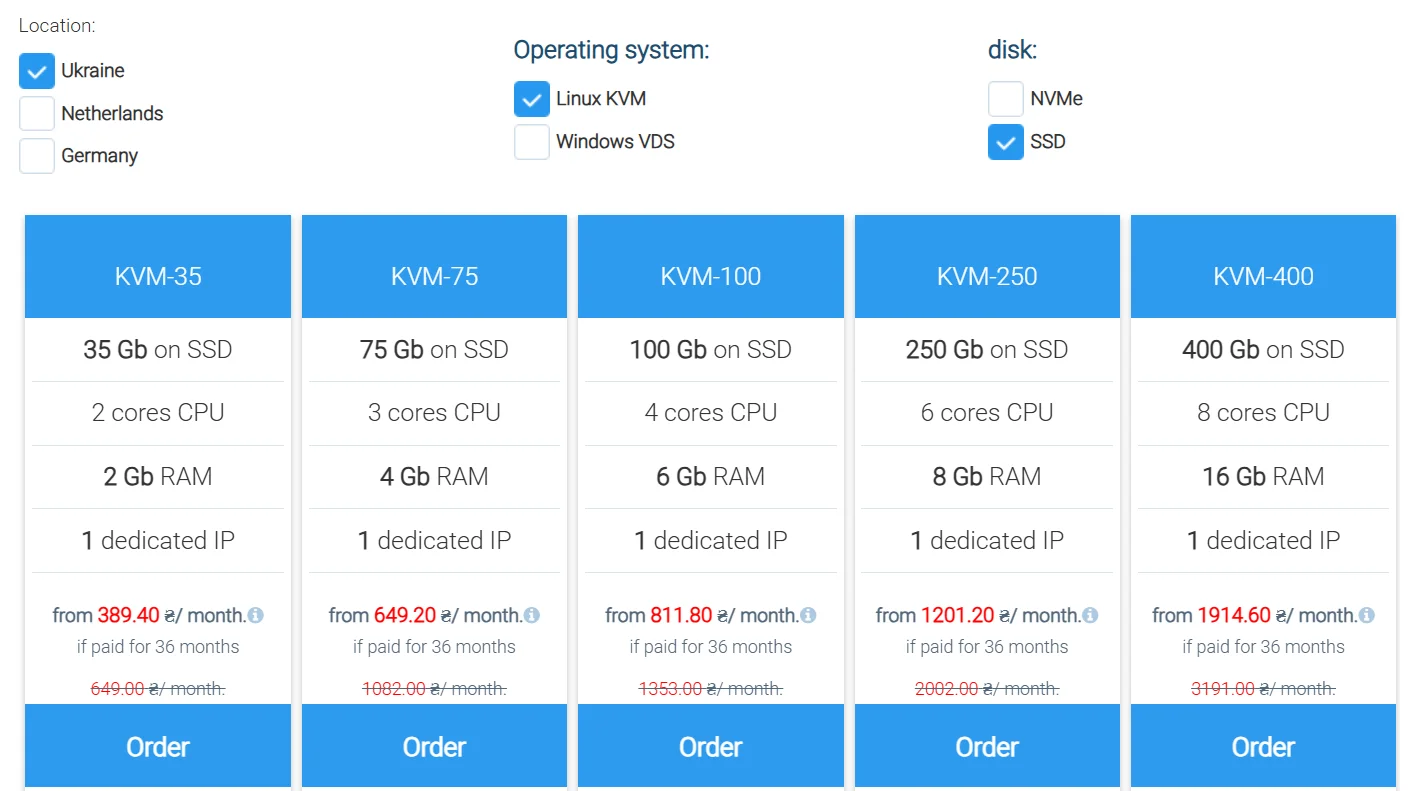
Although on the Cityhost service page, they separated the choice of operating system, in both cases hardware virtualization KVM is used. The only difference is in price:
- Linux — is a free operating system by itself, so on the Linux tariff, you only pay for the server rental, and the KVM hypervisor does not add any additional cost.
- Windows VDS requires a paid license. To run Windows on a virtual machine, the same KVM hypervisor is used, but in the tariff price, the provider has to immediately include the cost of the Microsoft license. That is why, for your convenience, Windows tariffs are placed in a separate tab.
What opportunities does VPS provide for business
Full root access, choice of operating system, dedicated IP address, unlimited number of mailboxes, domains, and traffic — classic advantages of a virtual private server. This sounds good, but in practice, it is unclear why full root access is needed or what the choice of operating system gives, as the business owner is more concerned with the development of the business rather than the technical specifications themselves.
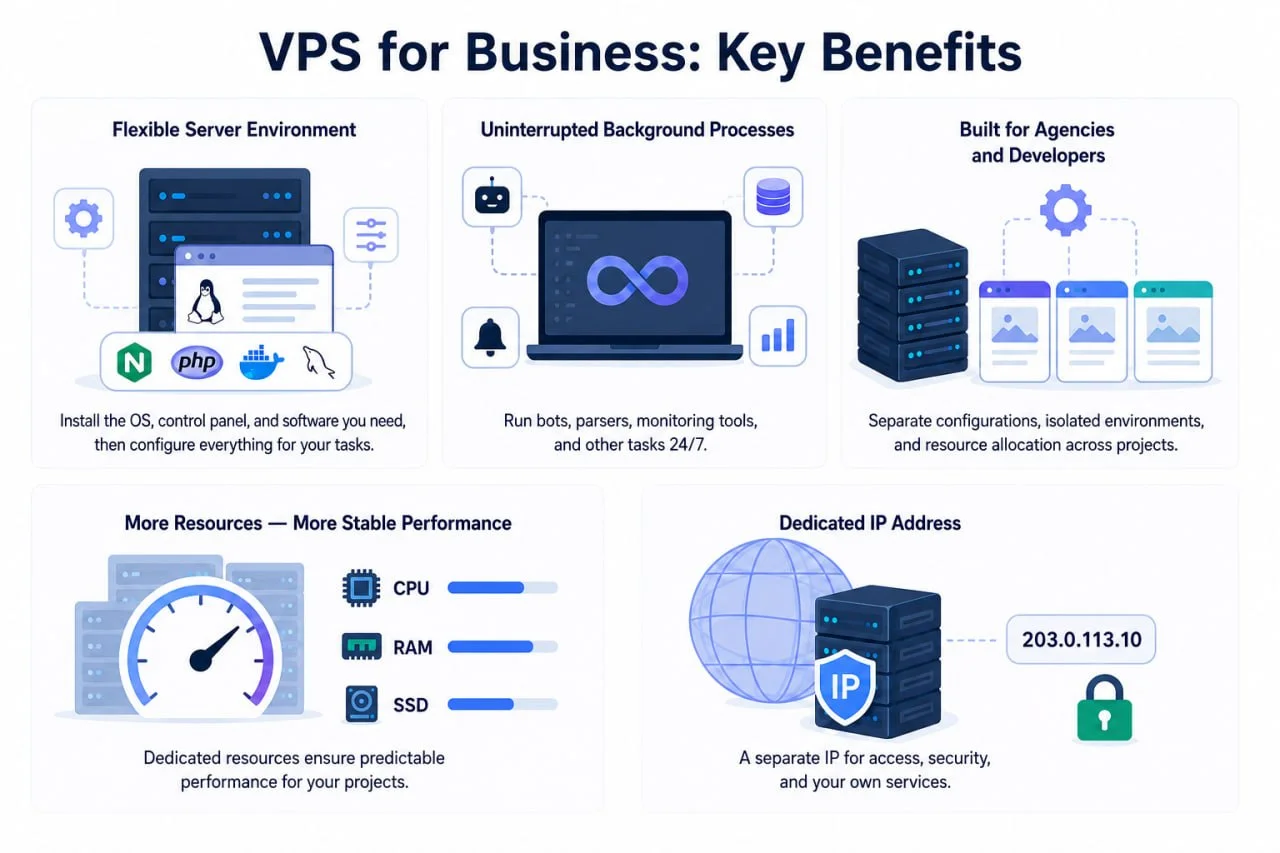
So I suggest we analyze the practical advantages of renting VPS for business:
- Freedom in choosing the server environment. On regular hosting, the provider predefines the available versions of PHP, databases, web servers, and other components. VPS allows you to independently choose the operating system, install the necessary stack, and configure it for a specific project. This is important, for example, for deploying applications in Docker containers, automation systems, non-standard databases, or tools for working with artificial intelligence.
- Continuous operation of background processes. Some business tools need to perform tasks regardless of whether someone opens the site: receiving and processing requests, sending messages, collecting data, or monitoring the status of other services. On regular hosting, the duration and method of executing such processes are limited by the provider's rules. On VPS, you can configure the continuous operation of bots, parsers, monitoring systems, and other server programs.
- Managing client projects. On one regular hosting tariff, you can often host several sites, but they will all operate within the available server environment and shared account limits. VPS gives an agency or freelancer more control: for different projects, you can use separate versions of software, create isolated environments, and independently allocate server resources. This is convenient when client sites have different technical requirements or one of them requires more power.
- More control over resources. On regular hosting, the resources of the physical server are distributed among many accounts according to the limits set by the provider. For VPS, the amount of RAM, disk space, and processing power are predetermined. Thanks to the isolation of virtual servers, the project receives more predictable working conditions, although actual performance also depends on the type of virtualization and the provider's resource allocation policy.
- Separate IP address. On regular hosting, one IP address is often used by several sites, while VPS usually receives a separate public IP. This may be necessary for certain network settings, access rules, or running your own server services.
Also read: TOP-11 advantages of the domain registrar and hosting provider Cityhost
When should you switch to VPS
The first thought: more visitors → more load → need to switch to a virtual private server. In reality, an internet project hits a ceiling not from the number of people, but from what these people are doing on it.
The key reason — is caching. When caching is enabled on the site, most visitors receive a ready HTML file: the server does not execute code and does not query the database, but simply delivers the file. However, there are pages that show different content to different people, making them impossible to cache. For example, the shopping cart, order checkout, personal account, recommendation feed.
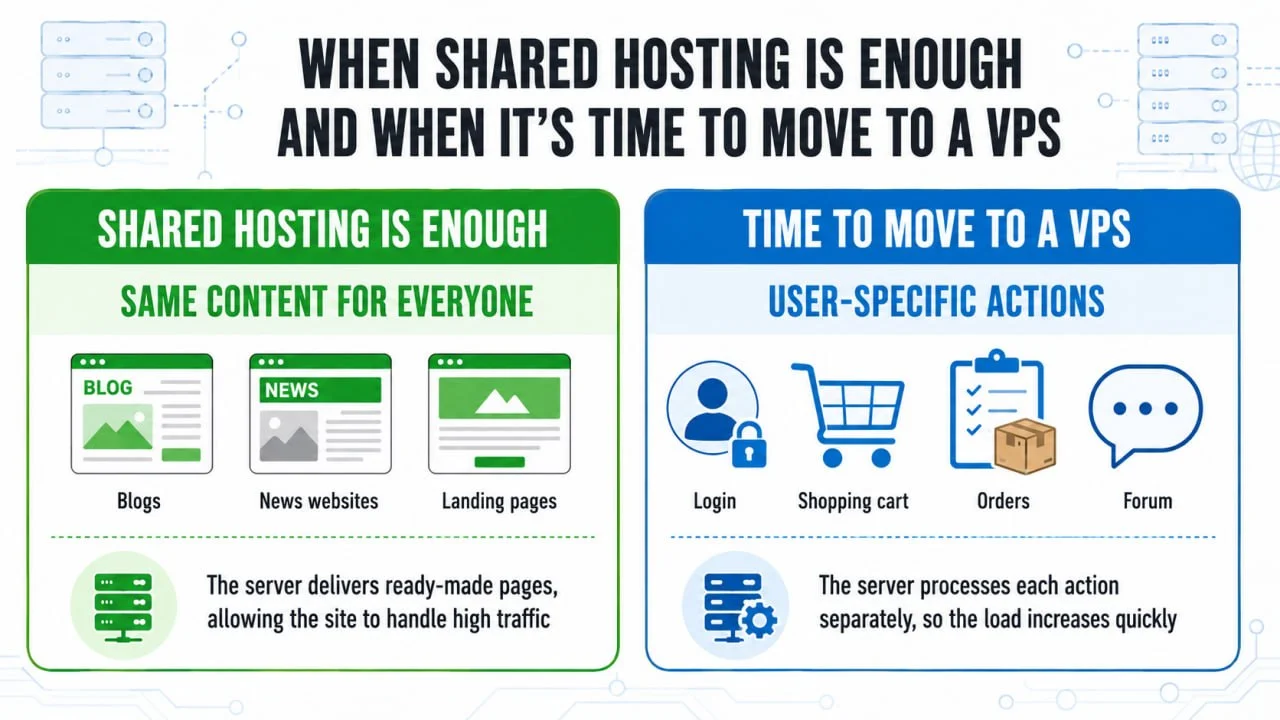
This explains why an online store with a thousand buyers can load the server more than a blog with ten thousand readers: in the blog, everyone sees one saved page, while in the store, each buyer forces the server to work separately. And it is the behavior of users on your site that divides projects into two categories:
- All visitors see the same thing: blog, news site, landing page, business card, catalog without online ordering. Such sites can withstand very high traffic even on virtual hosting because the server hardly works.
- Visitors have personal actions — registration, account login, cart, orders, forum. Here the load increases not from the number of visitors, but from the number of actions, and resources even on the highest tariff of virtual hosting may simply not be enough.
If your project is currently hosted on virtual hosting, you may see the first signs of switching to VPS in its behavior:
- pages are served slowly, although nothing has changed on the site;
- the admin panel works noticeably slower than the public part of the project;
- the site stops working during peak traffic hours and recovers on its own when the number of visitors decreases;
- the hosting control panel shows exceeded limits, which the provider also notifies you about via email;
- you want to install additional software, and the provider responds that this is not possible on virtual hosting.
Important! The last point — is the only one that indicates the need to switch to VPS immediately. All previous signs can initially be treated with caching, image compression, connecting CDN, removing unnecessary plugins, or switching to a higher hosting tariff. Moving a slow site to VPS gives a slow site on VPS, just more expensive. Therefore, first try to optimize the web resource, and only after that, if resources are still insufficient, switch to a virtual private server.
Who needs VPS: analyzing specific scenarios
The key reason — your project has gone beyond «a site that is read». A regular blog, even with tens of thousands of visitors, is sufficient with inexpensive virtual hosting, while a web resource with thousands of visitors may need VPS if various actions are performed on it daily. For better understanding, let’s analyze several scenarios, one of which is based on my own project.

Content site or blog
If you have a classic blog or content site where people come to read articles — VPS may almost never be needed. For example, I have an English-language site with reviews of mobile applications, where I publish materials with dozens of images. And it seems that there are many images, so the load is high. In fact, the images are served as regular files, without executing code and without database queries, meaning from the server's perspective, I have the lightest type of site that exists.
If problems do arise, they are not due to the server, but due to the speed of loading pages — ten images on a page affect Core Web Vitals metrics. However, to solve them, I do not need to switch to VPS immediately; it is enough to convert images to WebP or other modern formats, set up lazy loading, connect CDN, etc. And virtual hosting will be sufficient even with an increase in pages.
At the same time, in March 2026, I told you about Vibe Coding opportunities for improving the site. At that time, I created interactive surveys and individual app selections with Claude, which significantly increased the load on the server. That was just an experiment, but if I had kept that functionality, plus added a closed area with registration or launched automatic data collection on new items, I would not have been able to avoid switching from virtual hosting to VPS, as the very nature of the project would have changed.
Thus, for classic blogs and sites where people just read articles, good virtual hosting is sufficient. For web resources where people are already performing certain actions (registering, ordering, interacting), VPS is needed.
Online store
The very type of project «online store» does not obligate you to purchase a virtual private server, as you can create a small web resource with a few hundred products, with payment through an external payment service and simple navigation without complex filters. Especially when it comes to a new store in the development stage, without a large number of simultaneous buyers.
At the same time, the following signs indicate that you should host the online store on VPS:
- thousands of products with filtering by many parameters, where each filter turns into a heavy database query;
- dozens of buyers simultaneously placing orders on peak days;
- constant synchronization with the accounting system or warehouse;
- multiple stores or language versions on one engine.
The most common real reason for moving stores — is not total traffic, but sales. The site may function smoothly all year, but stops working on Black Friday, during the New Year holidays, or at peak season when everyone simultaneously adds products to the cart. If you have a seasonal business, focus on the peak, not on the average day.
Service on low-code tools
Returning to vibe coding, no-code and low-code tools — this is a case where a virtual private server is needed from day one, regardless of scale. If you are building your own service from ready-made blocks on n8n, NocoDB, Baserow, Appsmith, or similar tools, virtual hosting simply won’t give you the capabilities to use them.
These tools are not scripts for a site. They are separate programs that work continuously: receiving webhooks, executing scheduled tasks, maintaining connections. The official n8n documentation describes self-hosting via Docker Compose or cloud platforms like AWS or Google Cloud — none of these methods work on classic hosting.
For example, if you have built an automatic application reception from the web resource on n8n, checked them through AI, and sent them to CRM — this is no longer a classic «site», but a service that must work even when no one is visiting it.
Automation services
Any project that needs to operate without your involvement requires VPS. For example, a script that updates prices from a supplier's site every night, a parser, your own analytics instead of Google Analytics, a local language model for internal tasks. If you are using programs that do not wait for someone to open the site, but work autonomously 24/7, the only way to ensure their operation is a virtual private server or a dedicated server for more complex projects.
Any project that needs to operate without your involvement requires VPS:
- a script that updates prices from a supplier's site every night;
- a parser for competitors or new items in the niche;
- your own analytics instead of Google Analytics, which receives and processes events from the site in real time;
- a local language model for internal tasks that keeps the model loaded in memory between requests, which no hosting will allow.
If your programs do not wait for someone to open the site, but work autonomously 24/7, only a virtual private server can ensure their operation. Or a dedicated server, if the project has grown so much that it is already cramped on VPS.
How to manage VPS in 2026
There are two types of control for a virtual private server — unmanaged («self-management») and managed («managed server»). In the first case, the company ensures the uninterrupted operation of the equipment, network, and power supply of the data center, while you need to configure the server, databases, security, firewall, backups, and control all of this yourself. In the second case, you pay a certain amount monthly for the hosting provider's team to do all the technical work, including operating system updates, server monitoring, protection against viruses and DDoS attacks, and backup creation.
In any case, you will not need to physically sit by the server and blow dust off it. A configured VPS works by itself for weeks without your involvement, and physically nothing needs to be done: equipment, electricity, cooling, channel, and disk replacement remain with the provider, even if you refuse paid management.
Self-managing a virtual private server is similar to a WordPress site. When I created my first web resource, there were constantly some unpleasant issues:
- I installed a cracked version of a paid plugin, causing the blog to stop working;
- I found code on a forum for automatically creating surveys in articles and added it to the page without programming skills, after which it stopped opening;
- I deleted an «unnecessary» module from the template, after which the app reviews disappeared;
- I left the site unattended for several months, with automatic plugin updates enabled, and upon returning, noticed that the entire layout was broken.
That is, WordPress itself provided me with many useful tools, but due to a lack of experience, knowledge, and skills, I constantly created problems for myself. The same goes for VPS: you get an incredible number of opportunities that require careful handling, otherwise there is a risk of breaking the internet project in which you have invested a lot of time and money.
However, do not be afraid that you will be given a virtual private server and you will be left alone with it. You receive a convenient control panel, where you can even without deep technical knowledge configure the firewall, update and reinstall the OS, make backups. Technical specialists of the company monitor the equipment and warn in advance about any technical work. You can always contact customer support and get basic help. And if you still do not want to manage VPS yourself, then you can use paid services for standard, extended, and premium administration or connect monitoring of the virtual server.
Also read: Cityhost.ua Technical Support — how it works
How to choose VPS configuration for your own business
On the page for renting a virtual private server at Cityhost, you can choose the country of placement, operating system, and disk. The system will automatically generate current tariffs, where the name (KVM-35, KVM-75, KVM-100, KVM-250, KVM-400) indicates the number that reflects the disk size in gigabytes. Along with the disk, the processor and memory change, which determine how powerful your VPS will be.
For better understanding, let’s analyze each parameter of the virtual private server configuration:
- Location: Ukraine, Netherlands, Germany. Choose the country that is closer to your visitors: a server in Ukraine will give a faster response to the Ukrainian audience, a European one — to the European audience. If the audience is mostly foreign or you are concerned about the physical security of the equipment during shelling, it makes sense to look towards Europe.
- Operating system: Linux KVM or Windows VDS. Take Linux if you have a site on WordPress, OpenCart, Drupal, or any other standard content management system — this is the standard choice for most. Windows is only needed if there is a specific program written for it, and you know for sure about it. It is not worth taking Windows just like that: it is more resource-intensive and more expensive.
- Disk: NVMe or SSD. NVMe works faster than SSD due to direct connection to the motherboard. The difference is noticeable where there are many database queries, including online stores, forums, services with filters, sites with interactive content.
- Tariff. Focus on RAM, not on disk. For one WordPress site with moderate traffic, the starting tariff is sufficient. If you plan several sites, a store, or Docker containers, then take from 4 GB of memory, as each running service takes its share. The disk is almost never a bottleneck: 35 GB is a lot for a site that does not store videos.
Important! The tariff can be changed later, but there is no point in overpaying «just in case» from day one. Start with the minimum that covers the task, and increase as needed.
How to test VPS without unnecessary costs
The easiest way to check if a virtual server suits you is to conduct testing. Cityhost offers a trial period of 5 days for $2.16 on the KVM-35, KVM-75, and KVM-100 tariffs. There is no trial period on larger tariffs: such a volume of resources is usually transitioned to after long-term use of VPS, not taken right away «from scratch».
These 5 days will be enough for key actions:
- Evaluate management. You can transfer a copy of your online project to the server to see how much time it takes to configure specifically for your business, whether you were able to set everything up yourself, and whether it is convenient for you to manage the web resource at all.
- Compare loading speed. You can check the site speed for free through PageSpeed Insights or GTmetrix, comparing the metrics of the copy on VPS and the working project on hosting.
- Run your programs. Try to activate what you are considering moving to a virtual private server for, such as a container or a bot.
The trial period can be used to deploy a copy of the site on VPS, check software compatibility, and compare the speed of typical operations. However, such testing requires preliminary setup, and the results without real or simulated load will not show the full picture. If the project is planned to be temporarily transferred to a virtual private server along with traffic, you also need to take care of data synchronization, backup, and the ability to quickly return to the previous server. The obtained metrics will help understand whether the transition to VPS is justified or whether the project's needs are still covered by the corresponding hosting tariff.