- How A/B Testing Works: Six Steps from Hypothesis to Conclusion
- How Traffic is Divided: Methods and Tools
- How Split Testing is Conducted on Social Media
- Common Mistakes in A/B Testing
- When A/B Testing Makes No Sense
In digital products, even small details can influence user behavior — from the wording of a button to the photo on the first screen. The problem is that it is rarely clear in advance how a particular change will work. Even when a decision seems obvious, people may react quite differently than expected. Therefore, instead of predictions, at some point it makes more sense to just look at what users are actually doing.
This approach is what gave rise to A/B testing — as a way to test ideas in real conditions rather than discussing them theoretically.
Usually, one variant is the current version, while the other differs by just one detail. If that detail matters, the difference will show up in the results.
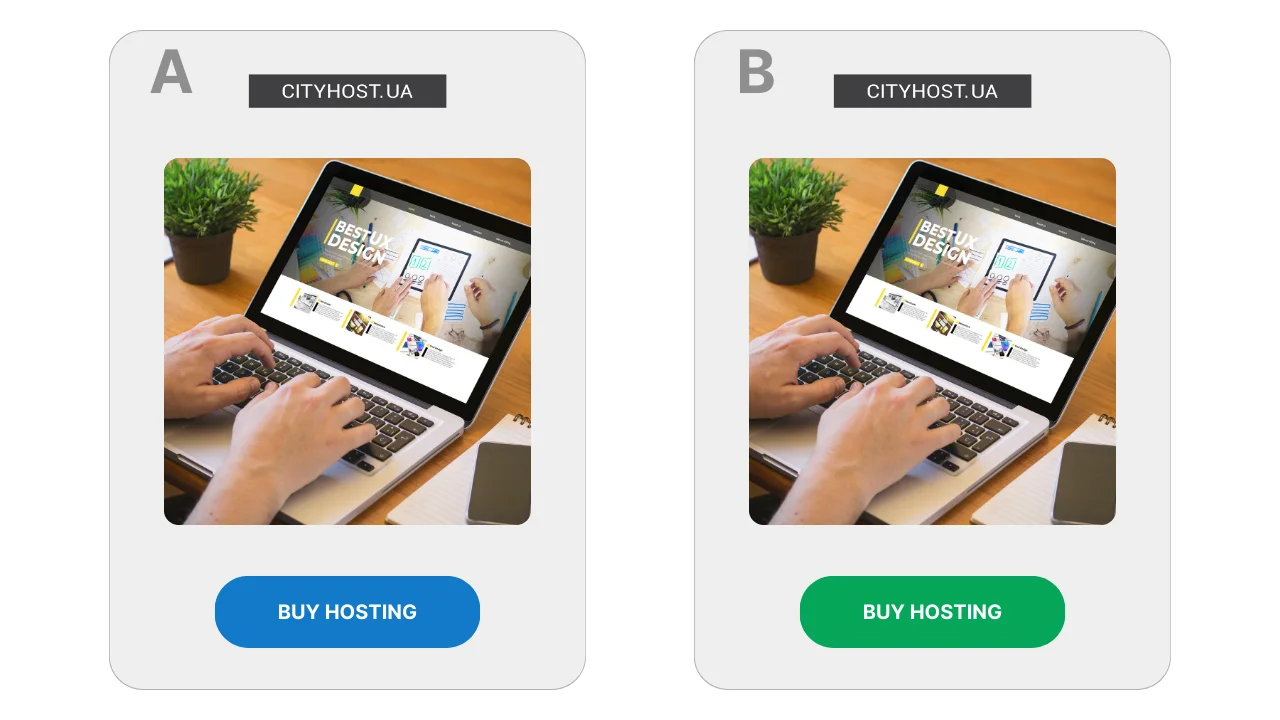
For example, on a page selling website hosting, the button is designed in two variants: blue and green. If one of them leads to a higher number of clicks — that’s the one they keep. This is not about the "correct" design; only the audience's reaction matters.
The principle of comparing two variants was established long before the internet appeared. It has been used in scientific research, medicine, and industry — everywhere objective answers were needed rather than relying on intuition. In the digital environment, A/B testing became widespread in the 2000s when it became possible to quickly collect data on user behavior.

Read also: What is Website Traffic, How to Know It, and Why to Control It
How A/B Testing Works: Six Steps from Hypothesis to Conclusion
Split testing rarely looks like a complex experiment with formulas and graphs. Usually, it is a sequence of simple steps that are repeated from test to test, regardless of what exactly is being tested — a page, an ad material, or a specific interface element.
- A doubt or idea arises. Testing usually starts with a feeling that a page or ad material could work better. Formally, everything looks fine: people visit, read, sometimes proceed further. But the question remains — would users react differently if the presentation were slightly changed?
- A hypothesis is formulated. At this stage, a specific assumption emerges about what might influence user behavior. For example, that an abstract illustration on the first screen looks nice but does not create a sense of engagement — why not replace it with a photo of a real person? Or that a block with answers to frequently asked questions should be shown earlier to alleviate some doubts before making a decision.
- Two variants are prepared. One variant remains unchanged and serves as a baseline. The other differs by just one detail, which is what is tested. If several elements are changed simultaneously, it will be difficult to explain the result, even if it seems positive.
- The test is launched and observations are made. The system remembers which variant was shown to a specific user, and on subsequent visits, it shows the same one. This is important for the purity of the experiment — a person should not "jump" between versions.
- A metric is chosen and the test is given time. It is predetermined what exactly will be looked at: whether users proceed further, interact with the content, or reach the desired step. The first results are usually not indicative, so the test is allowed to run long enough.
- A conclusion is made. When more data is available, it becomes clear whether there was a significant difference between the variants. Sometimes it is obvious, sometimes it is so minor that changing anything does not make sense. There are also cases where the test does not provide a clear answer, and this is also a result: it means that the specific change did not affect user behavior.
This approach allows changes to be tested without the risk of breaking the working version: while the test is ongoing, part of the users continues to see the familiar version. This is especially important when it comes to pages that already generate applications or sales.
Read also: How to Prepare a Website for Connecting a Payment System
How Traffic is Divided: Methods and Tools
- The Main Principle of Traffic Distribution
- Why You Should Not Split Traffic Across Two Different Pages
- Tools for Traffic Splitting
In any A/B test, the key is not the idea of the change itself, but how users are directed to the different variants. If this stage is organized incorrectly, the test results lose meaning, even if the numbers look convincing.
Traffic is almost never divided manually. The reason is simple: people may return to the site multiple times, access it from different devices, or arrive at the page from different sources. Without special tools, it is impossible to guarantee that the same person does not see both variants.
The Main Principle of Traffic Distribution
In classic A/B testing, a single URL is used, and the testing system decides internally which variant to show to a specific user. This usually happens randomly, for example, in a 50/50 ratio.
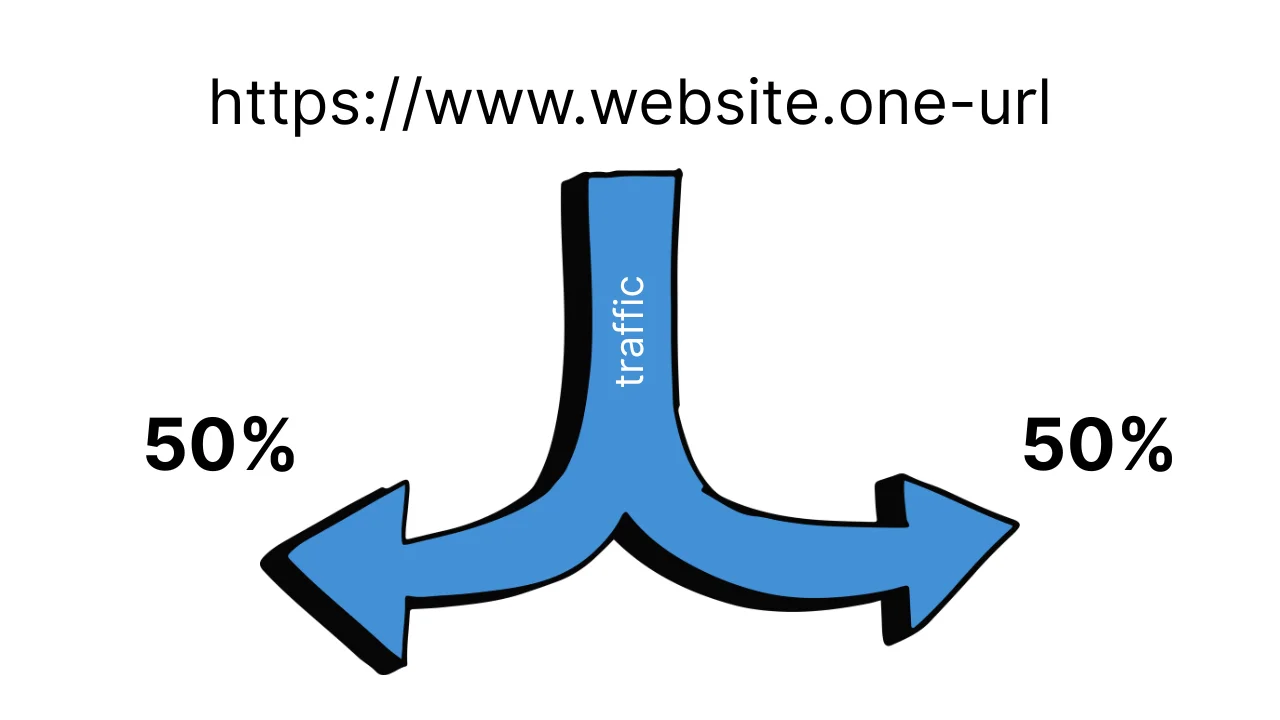
Important point: after the first display, the choice is fixed. If a user returns to the page, they see the same variant as before. This helps avoid confusion and does not influence people's behavior with artificial "switching".
Why You Should Not Split Traffic Across Two Different Pages
A common mistake is to create two pages and simply direct traffic to them from different ads. Formally, this looks like a test, but several problems arise when trying to implement it:
- one user may see both versions;
- audiences in ads may overlap;
- results heavily depend on the traffic source, not the change itself.
In this format, it is difficult to understand what exactly influenced the result — the page, the ad, or randomness.
Read also: Traffic + CPA Marketing: How to Earn on Affiliate Offers
Tools for Traffic Splitting
To avoid these problems, special services for A/B testing are used. They handle traffic distribution, variant fixation, and statistics collection.
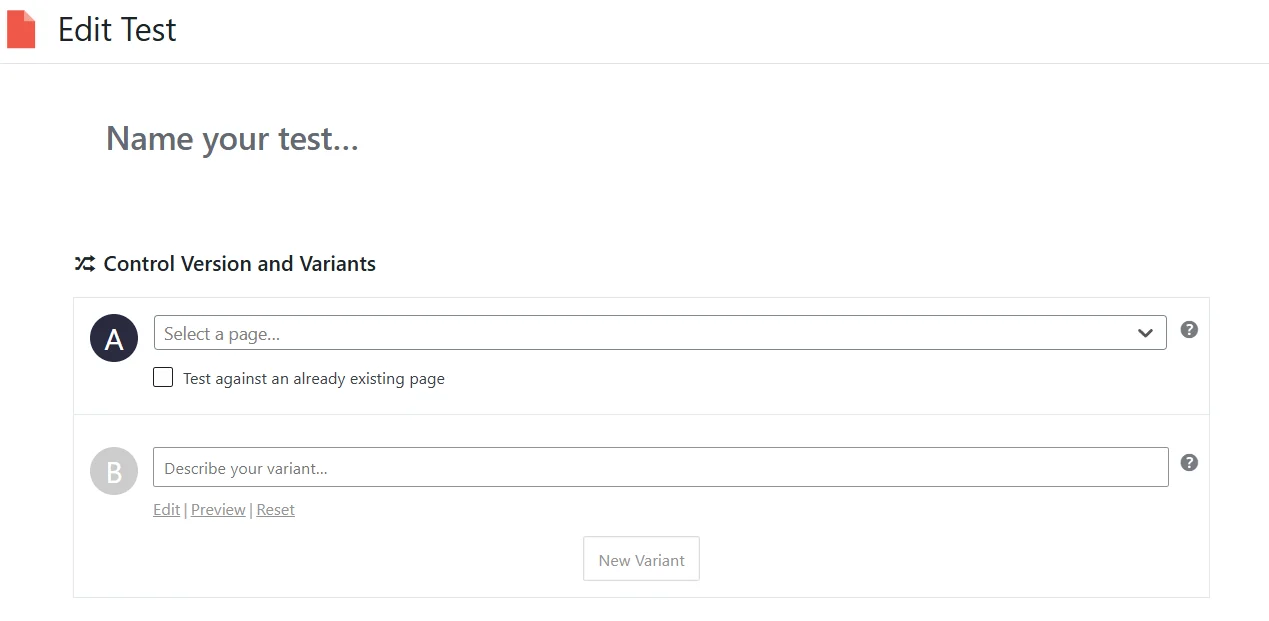
For WordPress sites, Nelio A/B Testing is often chosen. This is a plugin that allows testing pages, headlines, and individual elements without working with code. Variants are created directly in the admin panel, and traffic is split automatically.
For landing pages and marketing pages without complex logic, Split Hero is suitable. The service works on the principle of page substitution and automatically ensures that users see a stable variant.
A more universal solution is VWO. It allows testing both entire pages and individual elements through a visual editor. Such services are often used in marketing teams where it is important to quickly launch tests without involving developers.
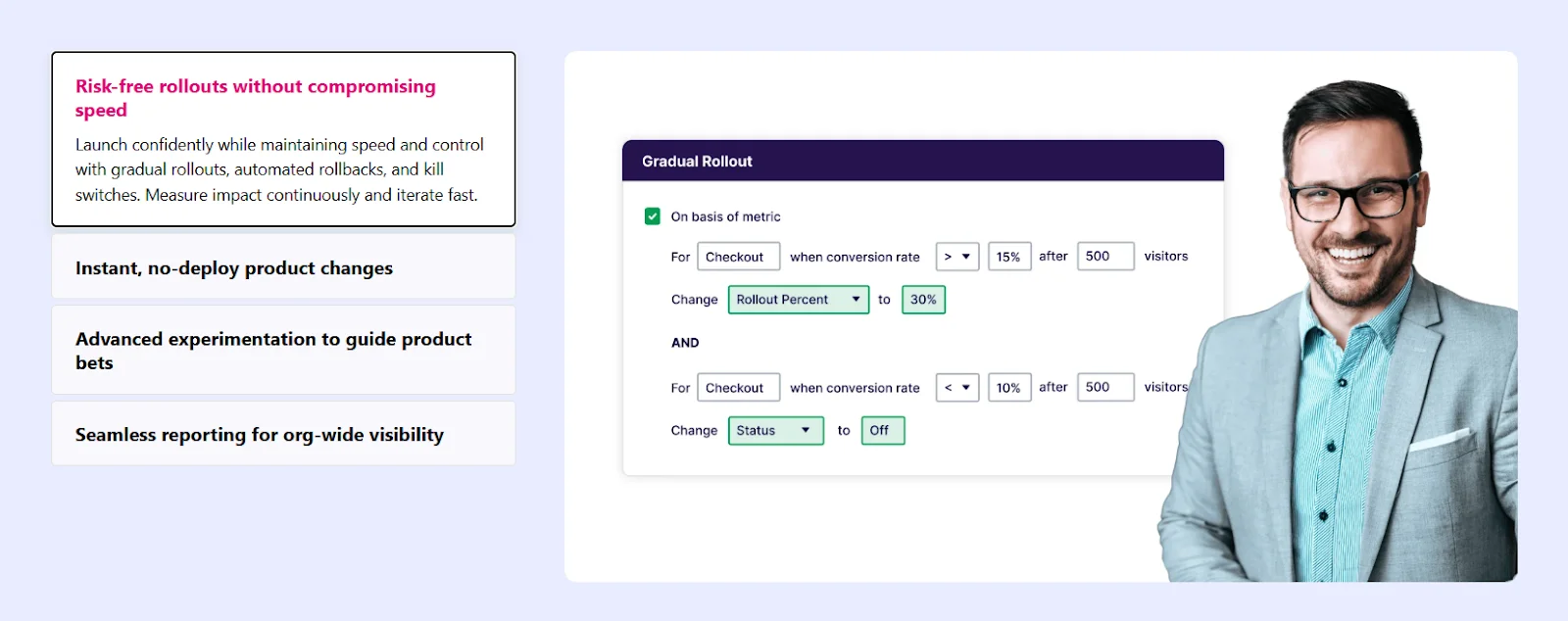
For large projects and complex products, there are solutions like Optimizely, where traffic distribution can occur at the server level. This provides cleaner results but requires technical resources and expertise.
How Split Testing is Conducted on Social Media
- How Advertising Split Testing Works on Facebook
- How to Launch Advertising Split Testing on TikTok
- How to Conduct A/B Testing on YouTube
In social media, split testing has a fundamental limitation: for organic posts, Facebook, Instagram, TikTok, and YouTube do not have A/B testing tools. Social networks do not allow controlled audience division between two versions of a post, fix displays for specific users, or ensure even distribution of views. Therefore, it is technically impossible to properly test organic content.
The idea of simply publishing two similar posts with different presentations seems logical, but in reality, it does not yield reliable results. The same users may see both posts, and at different times and in different contexts. Social media algorithms further interfere with displays: if one post quickly gains reactions, it starts to be shown more actively, while the other almost disappears from the feed. The result is also influenced by the time of publication, day of the week, overall informational background, and current audience activity. In the end, what is compared is not the effectiveness of two variants, but a combination of external factors and algorithm decisions.
At the same time, individual platforms are gradually implementing built-in automatic experiments for specific content formats. For example, Meta offers A/B testing for Reels. In this case, the platform allows creating several variants of the cover or caption for one video. The system then divides the audience into subgroups, evaluates the reaction over a short period (usually by the number of views), and automatically selects the variant that showed better results.
It is important to understand that this mechanism is not classic A/B testing. The user does not control the audience distribution, the duration of the test, or the set of metrics — all decisions are made by the platform's algorithm. Essentially, this is a quick algorithmic selection of a variant for further dissemination, not a full-fledged experiment with detailed analysis.
Full-fledged split testing in social media is only possible in advertising. Advertising cabinets of platforms like Meta and TikTok have special experimental modes, where the platform itself divides the audience between variants. In this format, each user sees only one version of the ad, and results are collected in parallel without overlapping displays.
In advertising split testing, usually one parameter is changed: creative, text, headline, call to action, or audience. The other conditions remain the same, allowing the result to be linked specifically to the change made.
How Advertising Split Testing Works on Facebook
It is worth noting that advertising split testing on TikTok and Facebook is only available in the browser version of the advertising cabinet. Mobile apps do not support creating A/B tests, so it is impossible to launch them from a phone.
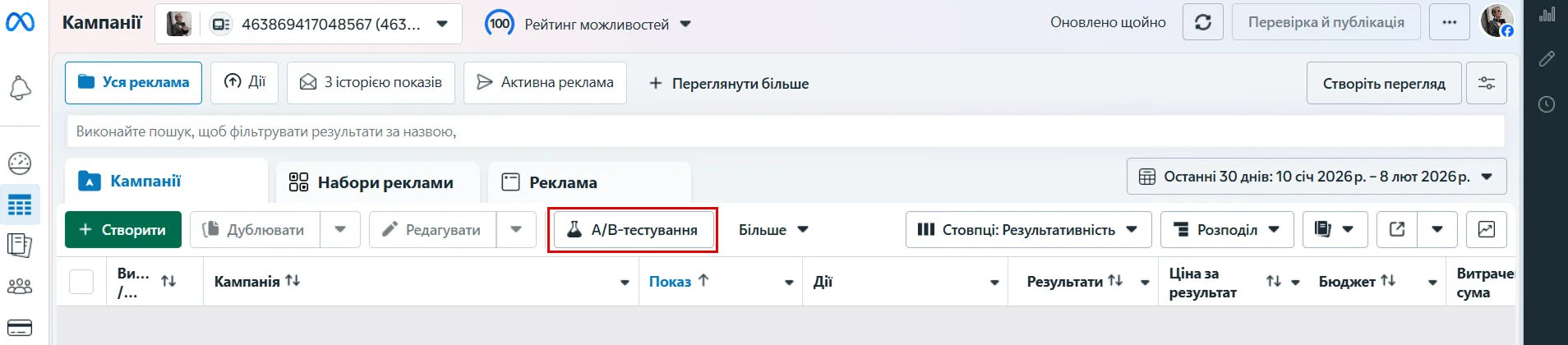
In the Facebook advertising cabinet, this function is launched via the "A/B Testing" button in the top panel of Ads Manager. Testing is always created based on an existing advertising object — a campaign, ad set, or specific ad post.
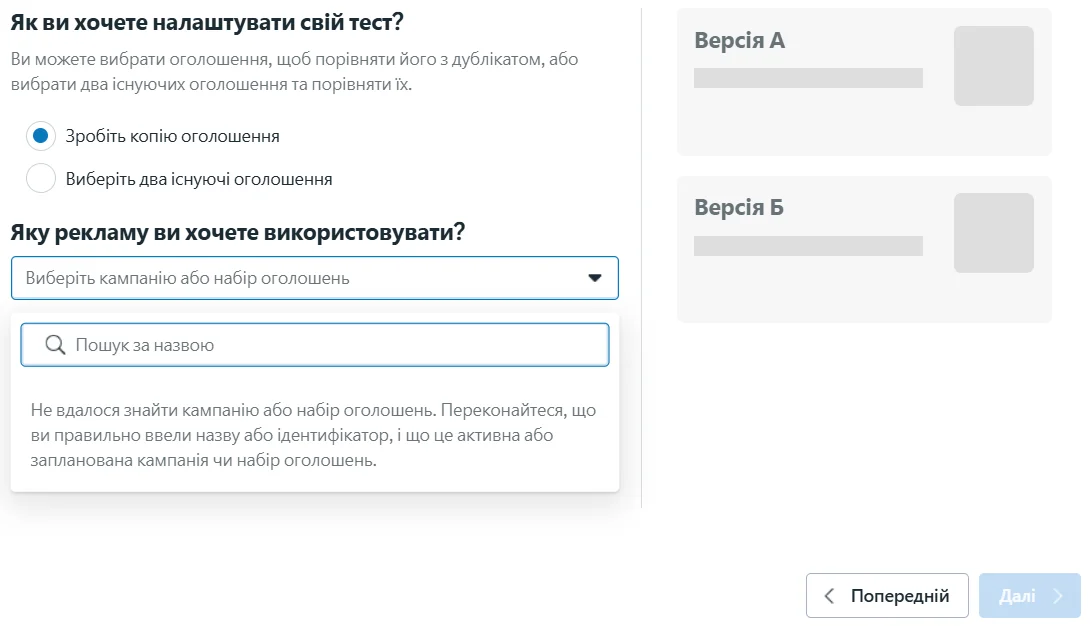
After pressing the button, Facebook offers to choose how the test will be set up. There are two options: either take one ad and create a copy for comparison, or select two already created ads. In any case, the system asks to specify the campaign, ad set, or specific ad post that will serve as the basis for the test.
Next, the logic of the test is standard: the system forms two versions of the ad, divides the audience between them, and shows each variant to a separate group of users. After the test is completed, Facebook compares the results and shows which variant performed better.
How to Launch Advertising Split Testing on TikTok
To launch A/B testing on TikTok, you need to work with the browser version of the advertising cabinet. The TikTok app or TikTok Studio does not have this function, so the first step is to go to the website ads.tiktok.com and log into your advertising account. If you do not have an account yet, the system will guide you through the standard registration process, selecting the country, type of business, and payment settings.
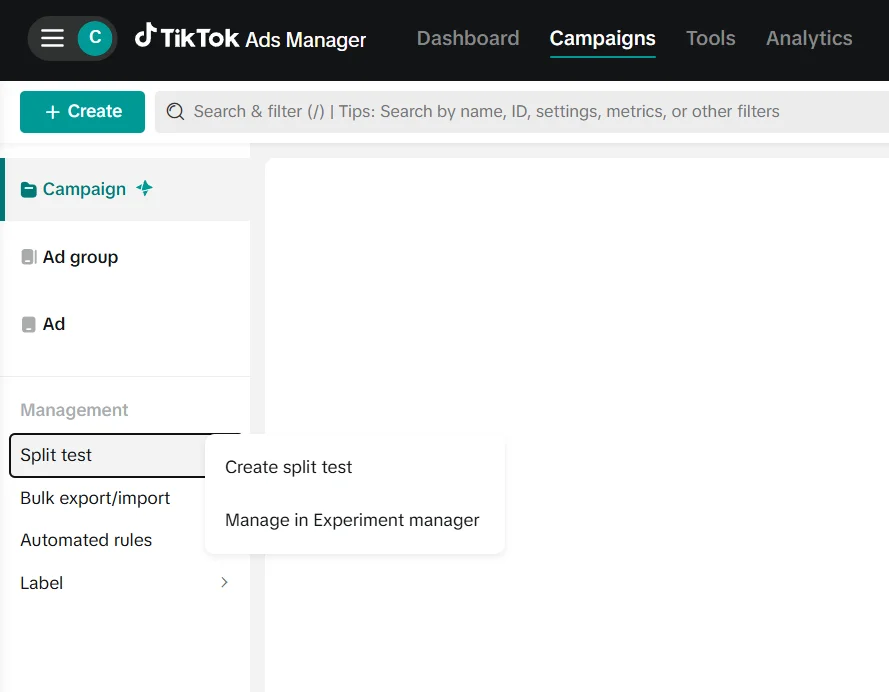
After logging in, TikTok Ads Manager opens. In the top menu, you need to go to the Campaigns section. This is where all campaigns, ad groups, and advertising management tools are located. In the left column, below the main campaign structure, there is a Management block. In it, there is a Split test item — this is the entry point to split testing.
By clicking on Split test, you need to select Create split test.
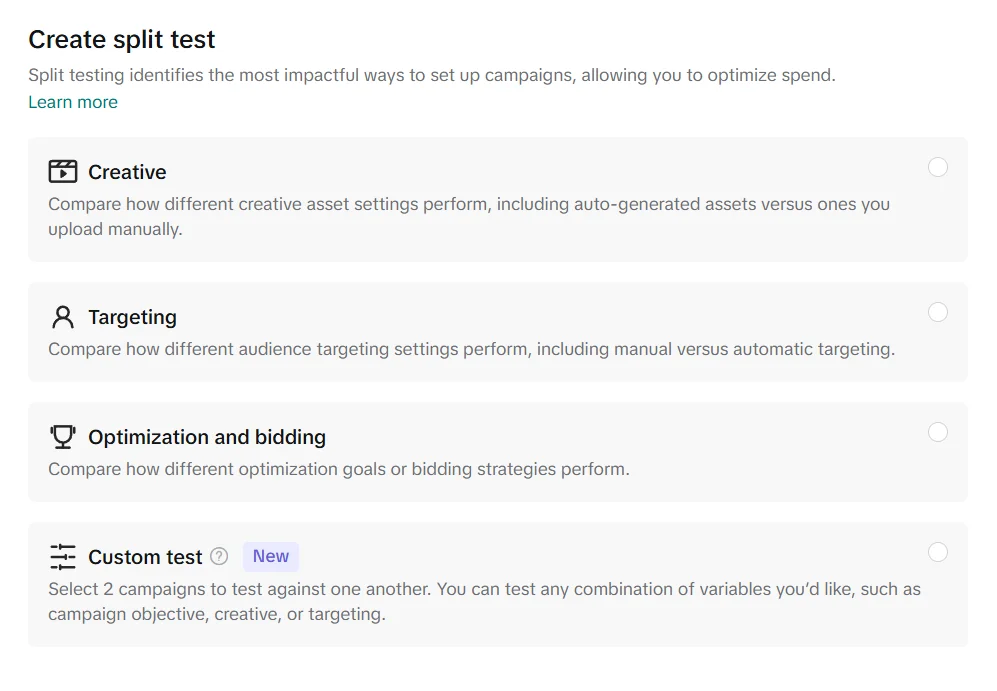
Next, you need to choose what will be tested. TikTok offers several options: testing creatives, audience settings, or optimization and bidding strategies. There is also a Custom test mode, which allows comparing two campaigns with any combination of changes.
On the next step, you need to select the advertising object for comparison. The system offers to define Campaign A — an existing campaign that will be used as the baseline version. Campaign B is automatically created by copying the first campaign, after which only the parameter chosen for testing can be changed. Thus, both campaigns have the same settings, and the difference between them is reduced to one controlled change.
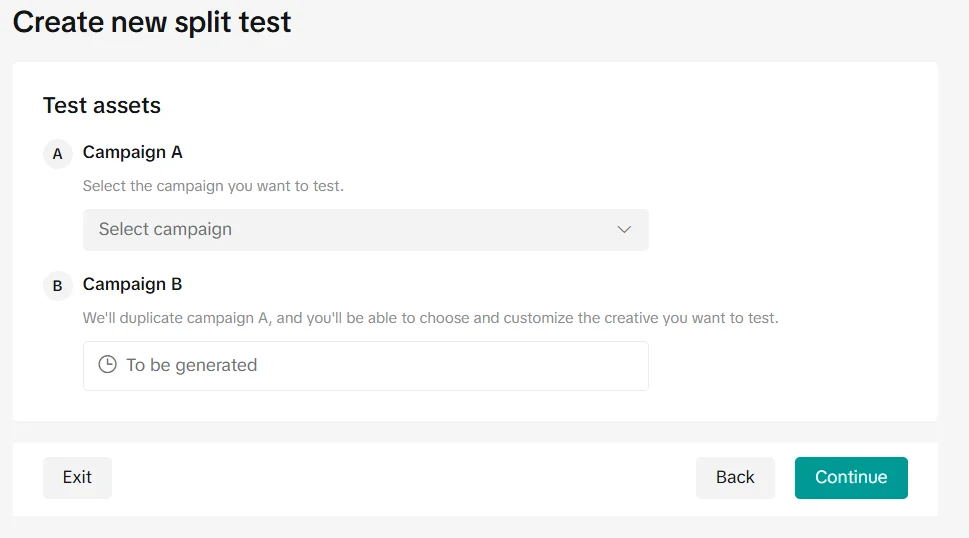
After confirming the settings and clicking Continue, the split test is launched. After testing is completed, the system shows which variant turned out to be more effective according to the chosen metric.
Read also: How to Promote a Website Using Social Media
How to Conduct A/B Testing on YouTube
Split testing video ads on YouTube is conducted not in YouTube Studio, but through the Google Ads advertising cabinet.
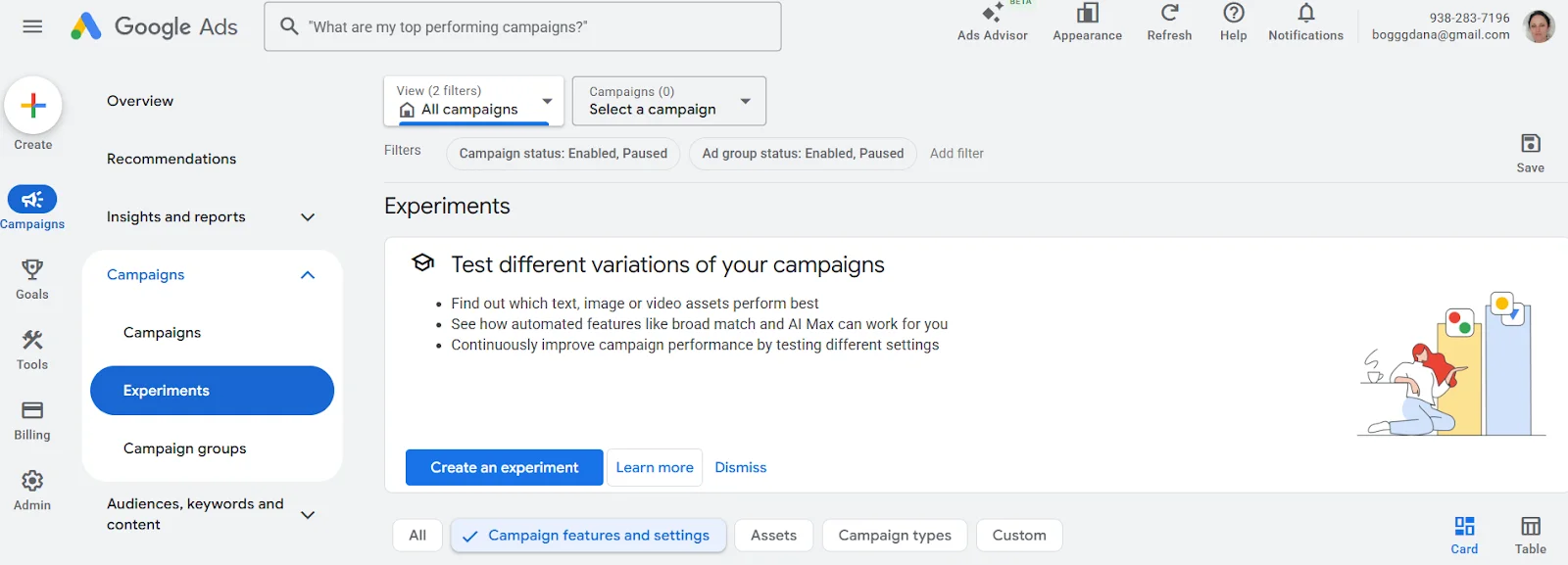
The first step is to go to the website ads.google.com and log into your Google Ads account. After logging in, you need to go to the campaigns section and ensure that you already have a video campaign for YouTube created or at least a creative prepared that you plan to work with.
After navigating to Campaigns → Experiments, a page opens for creating experiments. This is where Google Ads offers to test different variations of campaigns — creatives, settings, or individual display parameters. To launch a split test, you need to click the Create an experiment button.
Next, the system asks you to select a base campaign that already exists in the account. Based on it, Google Ads creates a test version, in which one or more parameters can be changed depending on the type of experiment. After that, the traffic distribution between the original campaign and the test version is set, as well as the duration of the experiment.
The results of the experiment are displayed in the same Experiments section and allow you to see which version of the ad showed better results according to the chosen metrics.
Common Mistakes in A/B Testing
Even properly set up A/B testing can yield false conclusions if mistakes are made during the planning or analysis of results. Most often, problems arise not due to the tools, but due to haste and incorrect interpretation of data.
- Testing several changes simultaneously. When multiple elements are changed in one test, it becomes unclear what exactly influenced the result. Even a positive outcome in this case is difficult to apply in practice.
- Testing for too short a time and with too small a data set. The first results often look convincing, but usually, they are just random fluctuations. If the test is stopped early or data from a small sample is analyzed, the conclusions may be false.
- Changing conditions during the test. Adjusting the budget, targeting, or other settings during the testing process disrupts the equality of conditions. In such a situation, comparing variants is no longer valid.
- Expecting a large effect from minor changes. Not every tweak significantly affects user behavior. A lack of difference between variants is a normal result, not a sign of failure.
- Believing that the test must always provide a clear answer. Sometimes A/B testing merely confirms that both variants work equally well. This signals not to "look for a winner," but to formulate new hypotheses.
When A/B Testing Makes No Sense
A/B testing is often perceived as a universal tool for decision-making. However, there are situations where it either does not provide useful information or creates an illusion of control, not bringing real understanding of the problem closer. This most often happens in the following cases.
- When there is not enough traffic. If a small number of users visit a page or advertising campaign, the results of the test will be unstable and random.
If a landing page receives 20-30 visitors a day, and two button variants are tested, then after a week one variant may have four clicks, while the other may have six. Formally, there is a difference, but it can easily be explained by randomness rather than a real advantage.
- When the product or offer is unclear to the audience. If people do not understand what is being offered and why they need it, changing the headline, button, or image will not influence their decision.
For example, a service sells domain names, but uses vague wording on the first screen of the page. The team launches an A/B test of two headlines:
- «Infrastructure Solutions for Online Presence»
- «Launch Your Project Online Today»
Both variants show similar results because users still do not understand what is being offered: a domain, hosting, VPS, or a comprehensive service. In this situation, the test does not reveal a better variant, as the problem is not in the specific wording, but in the clarity of the offer itself.
- When testing the wrong level of the problem. If the ad does not work due to an unsuccessful audience or a weak idea overall, checking minor tweaks will only confirm the lack of results.
Imagine that the ad is shown to a very broad audience that has no need for the product. Instead of reviewing the targeting, an A/B test of two ad texts is launched. Both variants perform poorly — and the test merely records this without addressing the cause.
- When the campaign has a short life cycle. Advertising campaigns or pages that exist for a few days or weeks simply do not have enough time to gather sufficient data.
- When ready-made answers are expected from testing. A/B testing does not suggest what to do next if both variants show similar results.
In conclusion, A/B testing works best where there is a clear product, a stable flow of users, and a clear hypothesis to test. In other cases, it may be premature — and this is not a mistake, but a hint to change the focus of work.
A well-set test shows whether a specific change has a noticeable impact. Sometimes it reveals a better variant, sometimes it confirms that there is no difference. Both results are useful if interpreted correctly.