
- What is keyword cannibalization
- Why does cannibalization occur in SEO
- How cannibalization affects the site
- How to find cannibalization on the site
- What to do with cannibalization on the site
- How to prevent new SEO cannibalization
Your pages may be competing with each other for a spot on Google, and you may not even realize it. The search engine simply does not understand which one to rank first for a specific query, resulting in neither securing a stable position. I checked this on my personal site, where I saw not a real problem, but noise in the data. So I suggest we figure out what keyword cannibalization is and what it is not, how to use free and paid tools to find it. And let's look at my algorithm that helps me decide what to do with each case I find.

What is keyword cannibalization
Keyword cannibalization is a situation where two or more pages of the same site compete for the same search query with the same user intent. Google cannot determine which page is more relevant, so it either alternates them in the results or lowers the positions of both at once.
John Mueller, Google Webmaster Trends Analyst, stated this clearly in response to a question on Reddit:
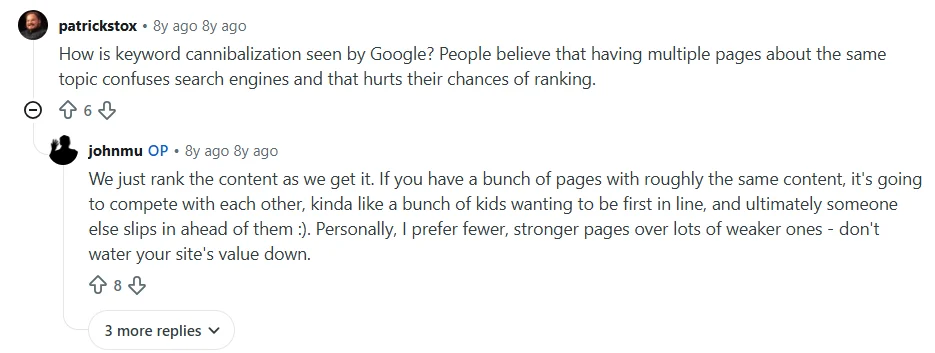
«We simply rank content as it comes in. If you have several pages with roughly the same content, they will compete with each other — it's like a group of kids wanting to be first in line, and in the end, someone else slips in front of them :). Personally, I prefer fewer strong pages rather than a large number of weak ones — don't diminish the value of your site.»
However, it is important to note the keyword — intent (search intent) in the definition. Two pages with the same keyword «affordable reliable hosting» do not necessarily compete with each other: one may be a service order page, while the other is an article about the impact of hosting on site speed. These are different user intents, accordingly, different pages in the results, and no cannibalization. But if you have written articles «What are WordPress plugins: installation, settings, removal» and «How to remove unnecessary WordPress plugins», targeting the same informational query — this is direct competition between your own materials.
Beginners often confuse cannibalization with two similar but fundamentally different problems:
- Keyword cannibalization — one keyword and the same intent. Your pages are truly competing with each other for one spot in the TOP.
- Content cannibalization — similar topic or intent, even if the exact keywords are different. Harder to detect, but just as harmful to overall topical authority.
- Duplicate content — literal text duplication between pages. This is a technical SEO error with different symptoms and its own treatment methods.
This distinction is very important, as, in life, an incorrect diagnosis leads to an incorrect decision. Website owners who have removed pages with different intents because they had the same keywords will lose traffic instead of increasing it. So first, we determine the essence of the problem, and only then we act.
Why does cannibalization occur in SEO
Until 2022, keyword cannibalization was mostly a result of negligence: someone forgot to check if there was already an article on the topic and wrote another one. In 2026, the problem escalated due to mass content generation using artificial intelligence without a clear strategy. Some website owners and agencies create full-fledged content factories without proper setup and verification of the end result, producing 100-200 new articles, a significant portion of which partially or completely overlap with each other in topic and intent.
Google sees these pages, indexes them, and then does not know which one to show. As a result, the website owner sees not just a drop in individual articles but a degradation of the site's topical authority, wasted money and time on automation. Such a source is harder to trust than an internet project with fewer materials, where each article fully reveals its topic.
However, do not forget about other reasons for the appearance of cannibalization on the site:
- multiple authors or editors writing about similar topics without a common keyword base and without checking existing materials;
- blog, product pages, online store categories simultaneously targeting one commercial query;
- WordPress tag and category pages may rank for the same queries as main articles, especially if the tag or category name matches the keyword;
- advertising landing pages created for a Google Ads campaign remain active after the promotion ends;
- serious changes on the site, when old and new URLs exist in parallel without a redirect;
- filters in online stores generate thousands of URLs, which Google indexes as separate pages for the same query.
And this is not just a theoretical problem — the March 2026 Core Update showed what it leads to. According to SE Ranking's research, 90.7% of pages in the TOP 10 experienced changes after the update, and 79.5% of URLs changed in the TOP 3. According to SEO analysts' observations, one of the key signals that this update strengthened was the so-called Information Gain — «information gain». Now Google is more actively filtering pages that paraphrase the same material without added value.
But what does classic rewriting and keyword cannibalization have to do with it? If you have two articles on a similar topic and neither offers unique data, then after the March 2026 Core Update, both have less chance of staying in the TOP than before. Thus, cannibalization and the lack of original content in 2026 amplify the negative consequences of each other.
Also read: How to pull a site out of the traffic pit after Spam Update and AI Overviews
How cannibalization affects the site
Keyword cannibalization creates serious problems for promotion in traditional search: from constant position changes and wasted crawler resources to loss of investment in link authority. It also affects artificial intelligence systems that build the site's «knowledge graph»: they visit one page and, through internal links, understand which other materials confirm the source's credibility. If there are two similar pages without a clear hierarchical connection between them — the AI agent does not understand which one is authoritative. As a result, the site is either not cited at all or cited unpredictably, each time from a different URL.
I especially want to highlight such negative consequences of cannibalization in SEO:
- unstable ranking — Google cannot choose the «correct» page and constantly swaps them, which looks like chaotic position fluctuations without visible reasons;
- dilution of link authority — external links that could go to one strong page are distributed between two weak ones;
- drop in clicks even without a drop in impressions — both pages appear in search, but the user sees similar titles from one site in the results. This lowers CTR because it is unclear which one to open, and it is generally easier to go to a competitor;
- wasted crawling budget — especially critical for online stores and large sites like Cityhost. Google spends the budget crawling duplicate pages instead of new materials or relevant promotional URLs.
In contrast, fixing keyword cannibalization positively affects the site. Look at Backlinko: two articles with overlapping keywords were merged via a 301 redirect into one, and in 8 weeks they received +466% clicks compared to the same period a year ago. Without technical adjustments, without new links, without changing content — just eliminating internal competition.
How to find cannibalization on the site
For initial searching, you can use Google with the operator site:yourdomain.com, and to prevent the appearance of new cannibalized pages, free versions of Rank Math and Yoast SEO plugins will suffice. The most effective methods are Google Search Console with Looker Studio or Excel extension, professional services Semrush and Ahrefs.
- Checking through Google as insurance against cannibalization in SEO
- Accurate diagnosis of keyword cannibalization with Looker Studio
- Quick data collection with the Search Analytics for Sheets extension
- Rank Math and Yoast SEO for insurance against new cannibalization
- Paid automatic Cannibalization Report from Semrush
- Finding keyword cannibalization using Ahrefs
Checking through Google as insurance against cannibalization in SEO
Enter in the Google search bar: site:yourdomain.com “keyword”. You will see all indexed pages of the site where Google found this phrase. This is the fastest way to understand how many materials touch on the topic you plan to write about or have already written.
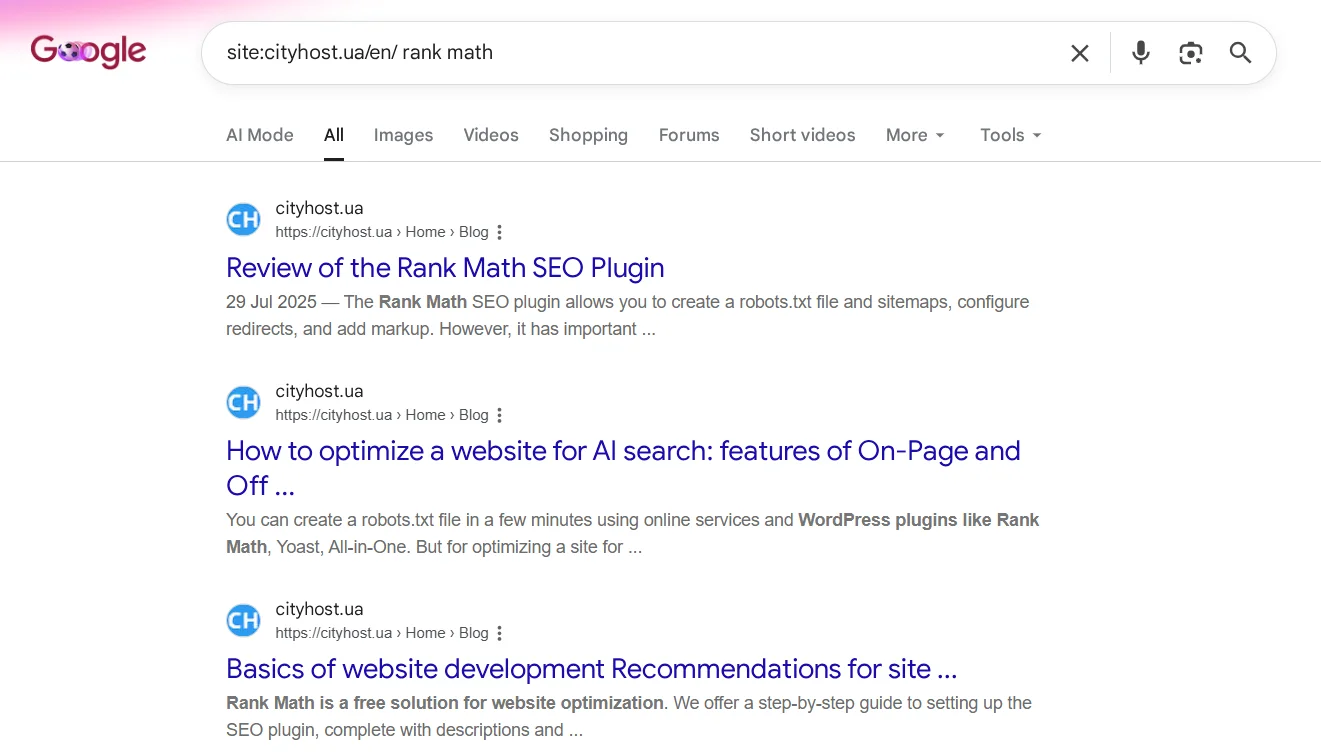
But there is a fundamental limitation that needs to be understood: the operator «site:» finds any mentions in all possible places. If you search for «rank math» — this query will appear on dozens of Cityhost pages: in the menu, footer, «Also read» block, in other articles as a mention. But this does not mean that all these pages are competing with each other for this query.
So this method is ideal for checking before writing a new article. If the result shows 2-3 URLs with similar titles and a direct match of the topic — it is worth opening each and checking if you are writing what already exists. For example, as I mentioned earlier, when there is a large material about plugins with a separate section on their removal, and here you decide to write another separate article «How to remove WordPress plugins». There will be no sense in this, as you will only dilute the attention of both the target audience and search engines.
Accurate diagnosis of keyword cannibalization with Looker Studio
Google Search Console is already a full-fledged tool that allows you to accurately find cannibalization on the site through real impressions for specific queries. It is here that you can see the real competition between URLs, not just simple mentions of keywords.
And you can use this method with Looker Studio — a free visualization tool from Google. Its advantage over the standard export from GSC is the ability to see the query and landing page in one table, which is impossible to do in Google Search Console without clicking on each query.
Important! When connecting GSC in Looker Studio, there are two types of tables: Site Impression and Url Impression. I initially used Site Impression, wasting time without finding the data I needed. So for finding cannibalization, you need exclusively URL Impression, as it is the only one that has the Landing Page parameter.
Let's go step by step on how to find keyword cannibalization through Looker Studio:
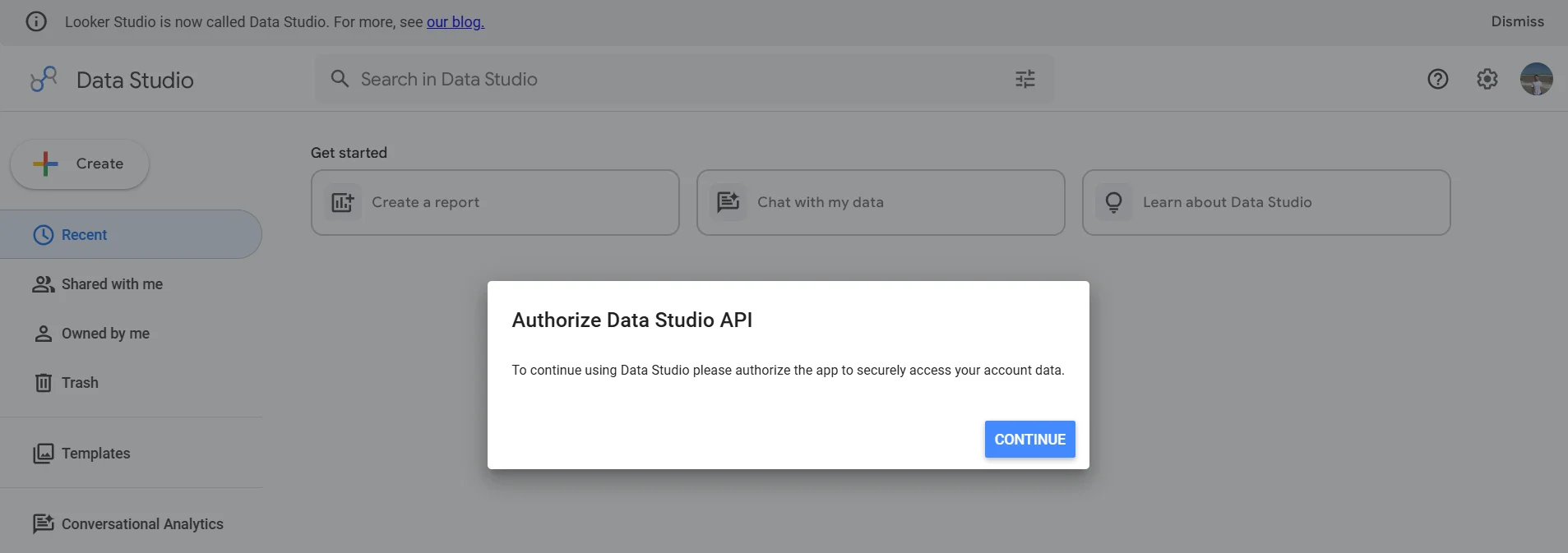
- Go to datastudio.google.com and authorize, where you will need to specify the country and company (you can use your site name).
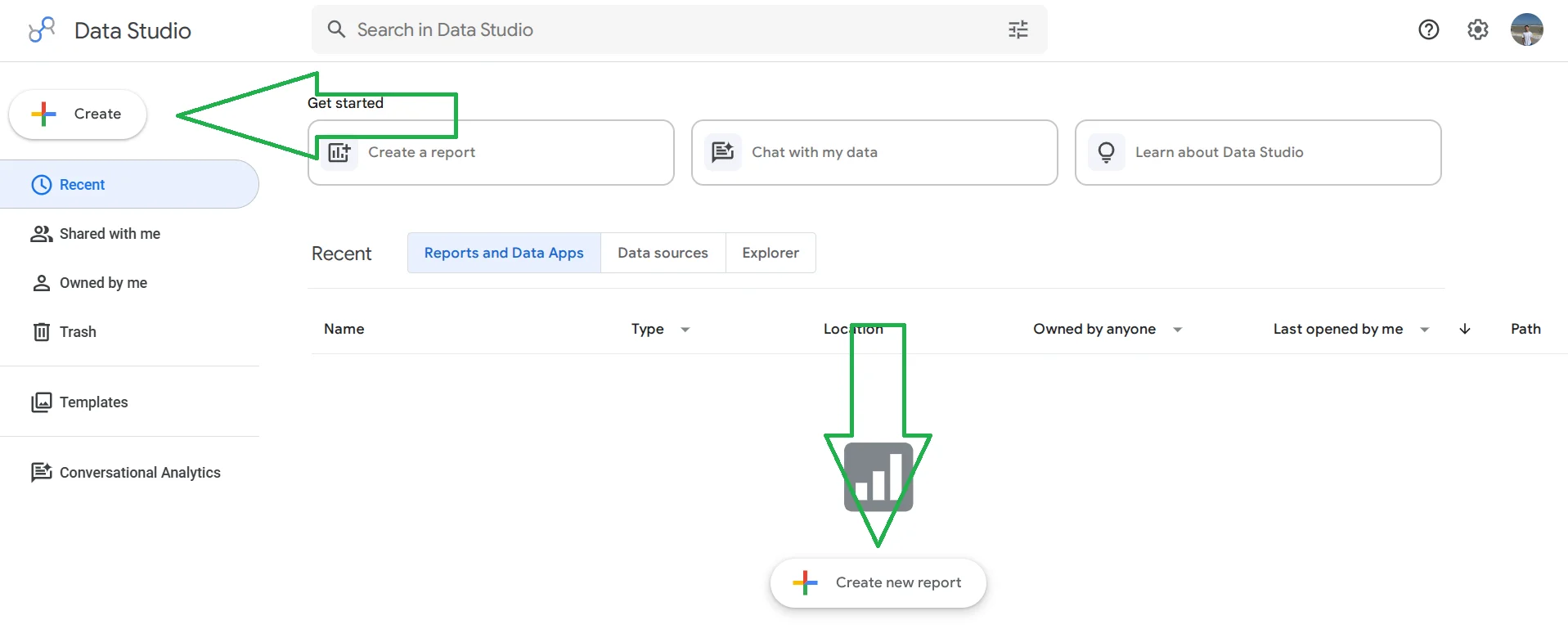
- Click + Create → Report or immediately Create new report.
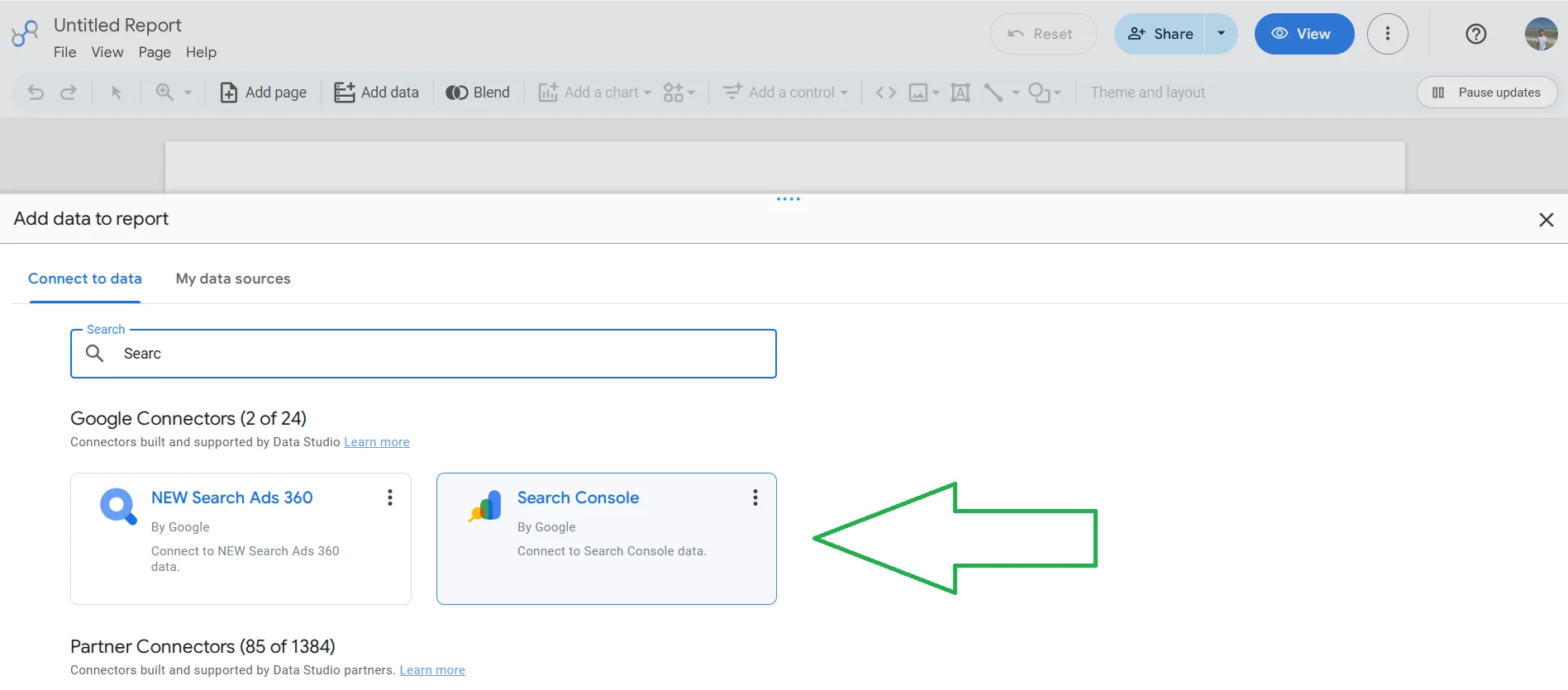
- In the Add data to report window, find Search Console.
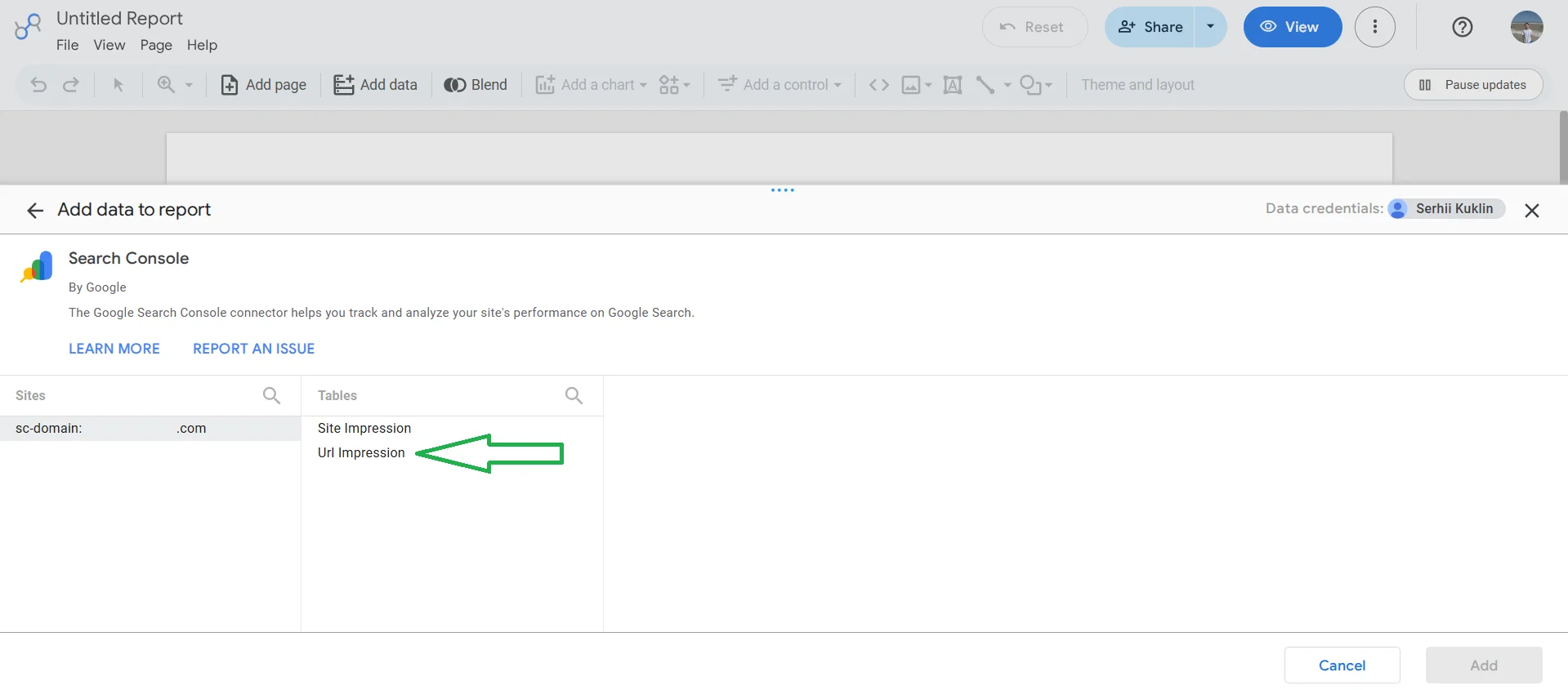
- After authorization, select your site → in the Tables column, select Url Impression → Search type: web → Add.
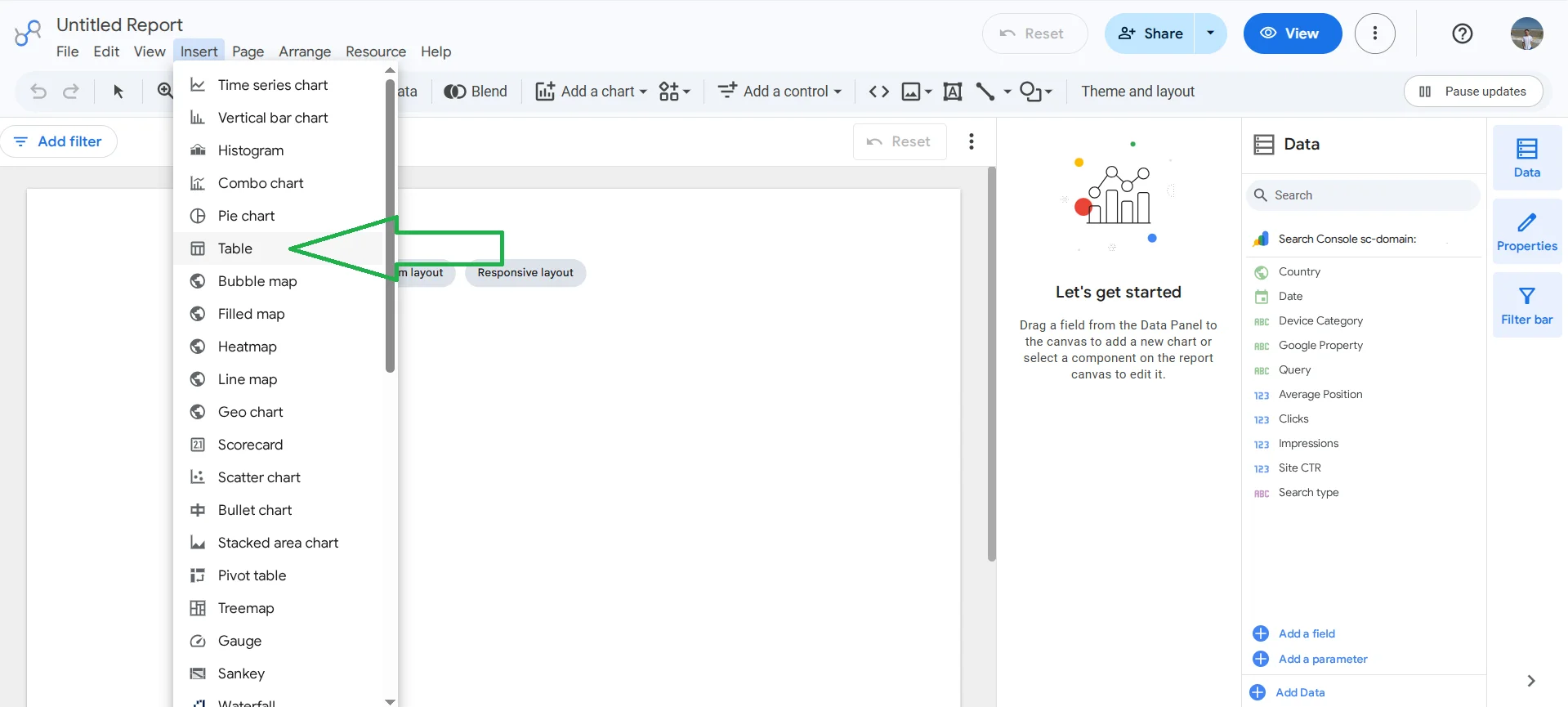
- Click Insert → Table, draw a rectangle on the canvas.
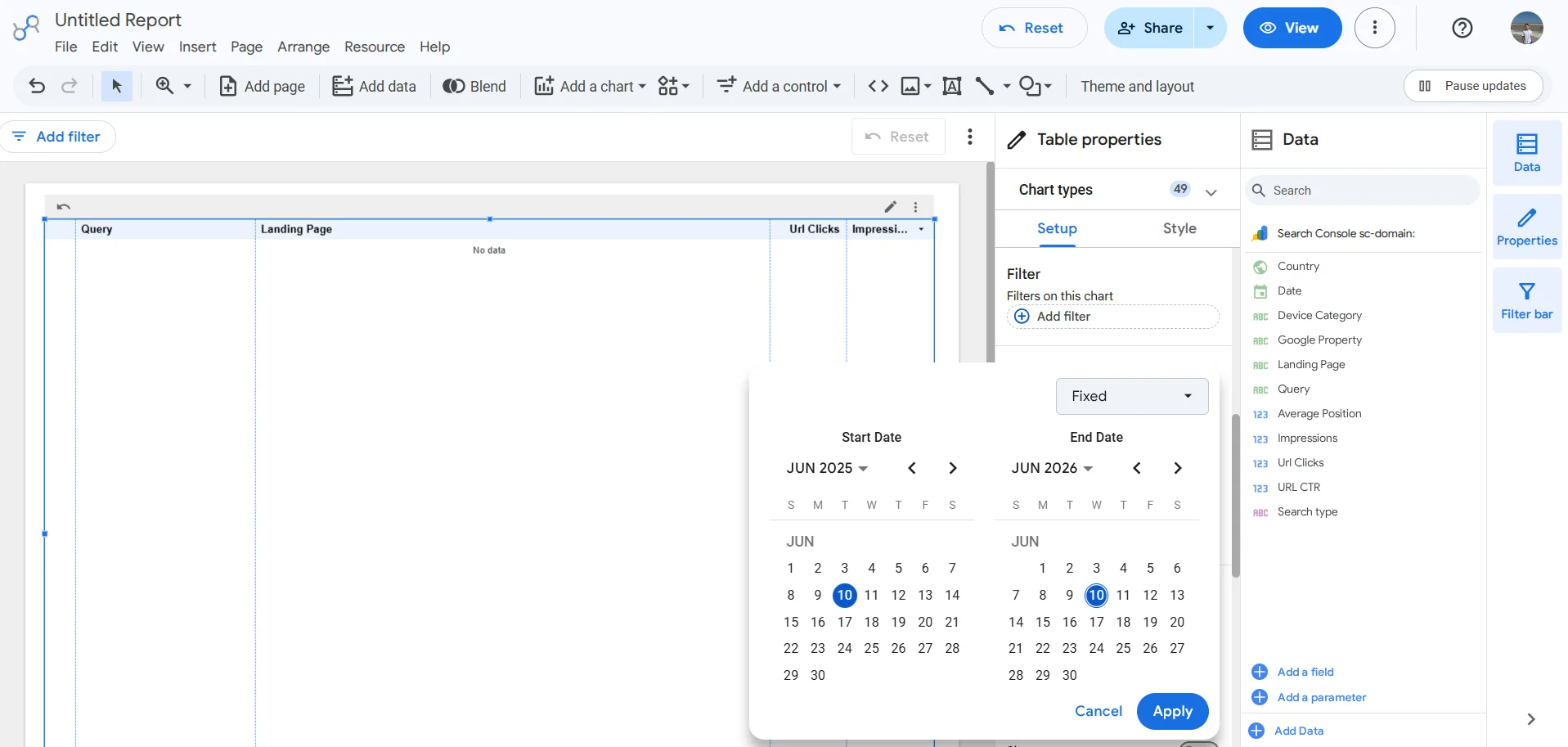
- In the right panel in the Dimension section, add Query and Landing Page. In Metric — Impressions and Clicks. Sorting — Impressions from highest to lowest. I chose a date range of one year.
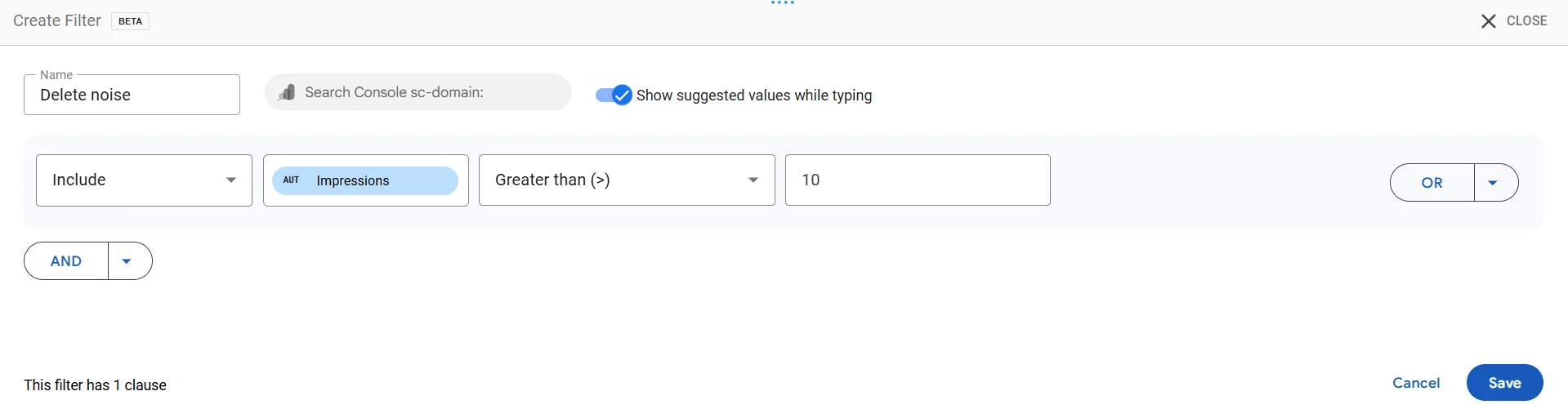
- Add a filter Impressions > 10 to remove noise. We set it to 10 because this is the minimum value for participation in the analysis, and only then we will spend time manually checking results with 20+ impressions.
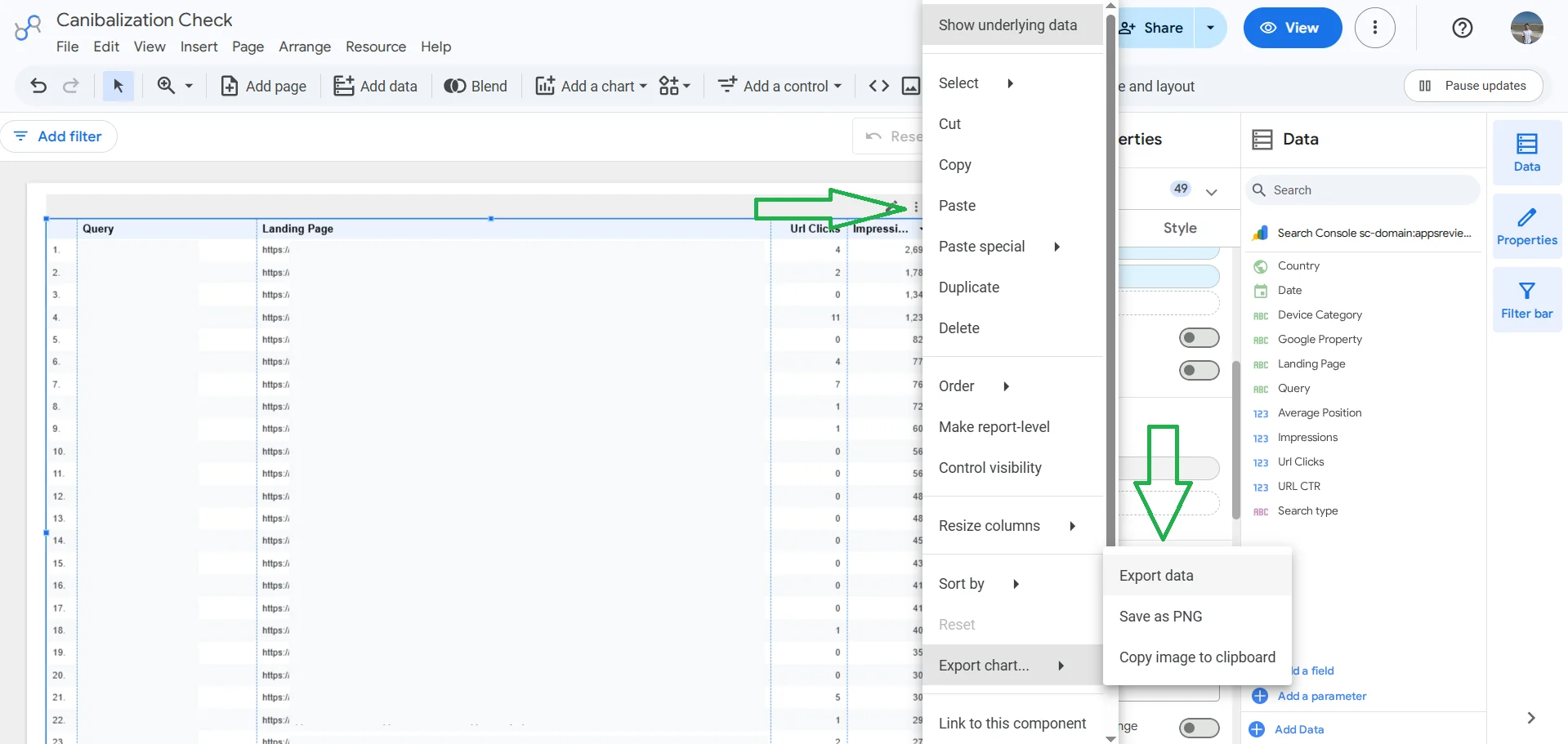
- Hover over the table → three dots in the corner → Export chart → Export Data → Google Sheets.
Now you have a table with four columns: Query, Landing Page, Impressions, Clicks. We proceed to create a pivot table to narrow down the search for keyword cannibalization:
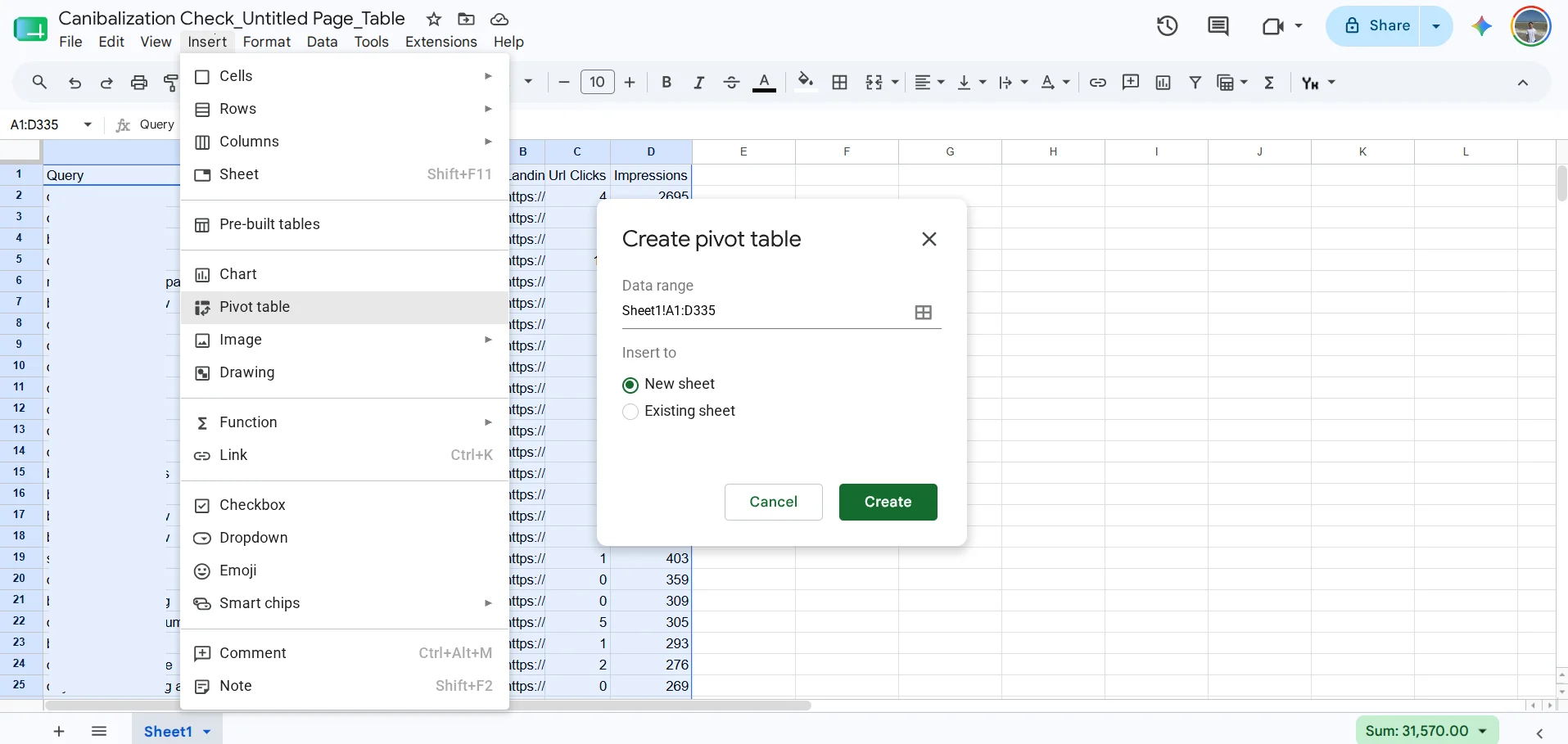
- Select all data (Ctrl+A) → Insert → Pivot table → New sheet → Create.
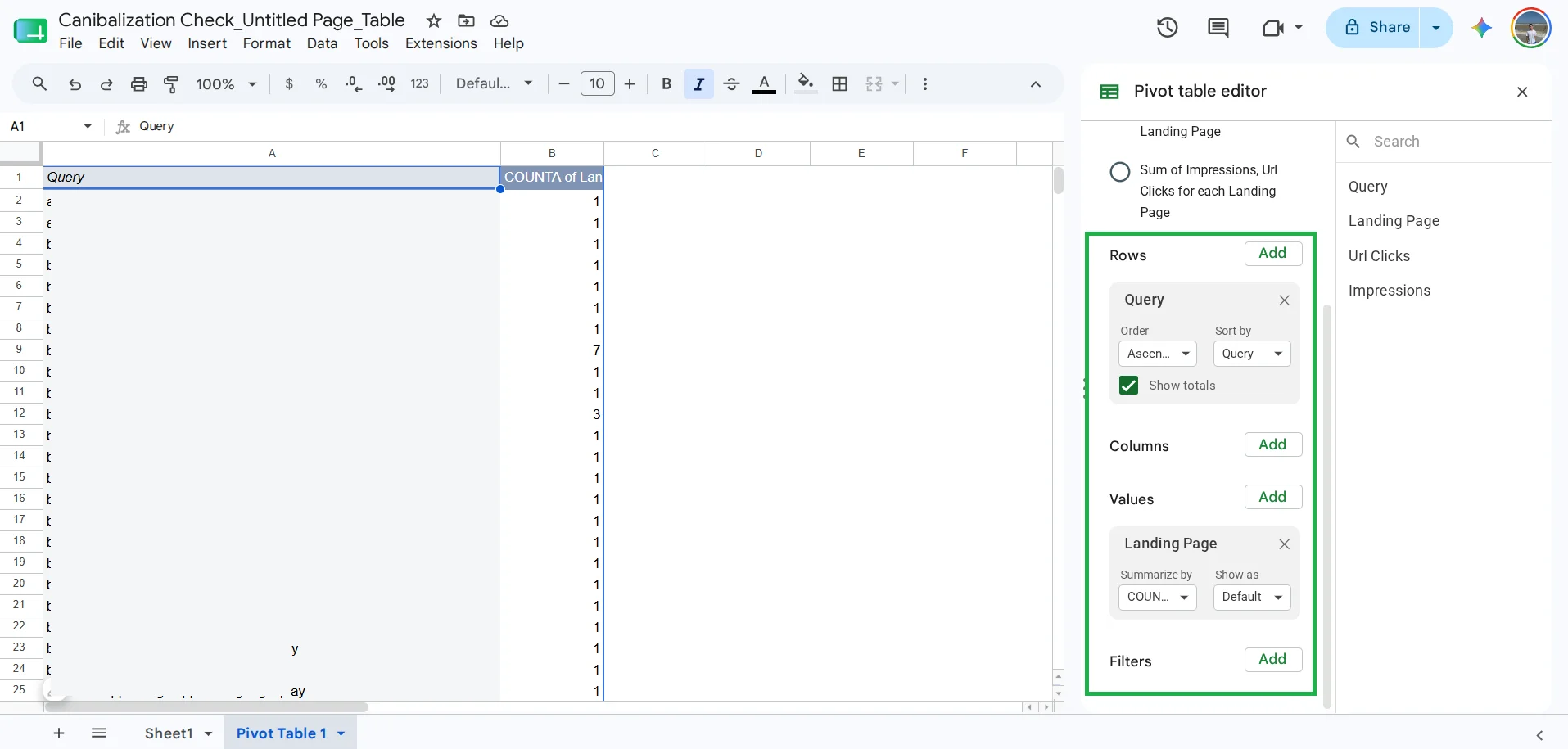
- In the pivot table panel, add Query to Rows, Values → Landing Page with COUNTA.
In the pivot table screenshot, you can see two columns: on the left — queries, on the right — the number of URLs. Rows with a value of 1 — no problems, 2 or more — should be checked.
Return to the main sheet (Sheet1) and filter by suspicious queries. If all URLs have the same path but differ only by #-fragments — this is not cannibalization, but Google indexes anchors of one long article. Similarly, do not worry about 5-10 impressions that may arise simply due to mentions of the query in other articles on the topic. If two different paths have significant impressions (20+) — then there may be a problem.
On my English-language site about mobile applications, no keyword cannibalization was found, but there are indeed these anchor links (#-fragments), when Google indexes separate sections of a long article as independent URLs. For example, /blog/notion-review/ and /blog/notion-review/#how-to-use-the-app — this is one article, not two. Search engines can index such in long materials with a clear heading structure. These URLs in the report look like «cannibalization», but in fact, they are not.
Quick data collection with the Search Analytics for Sheets extension
If you do not want to work with Looker Studio, you can get data directly from Google Search Console into Google Sheets through a free extension. To do this:
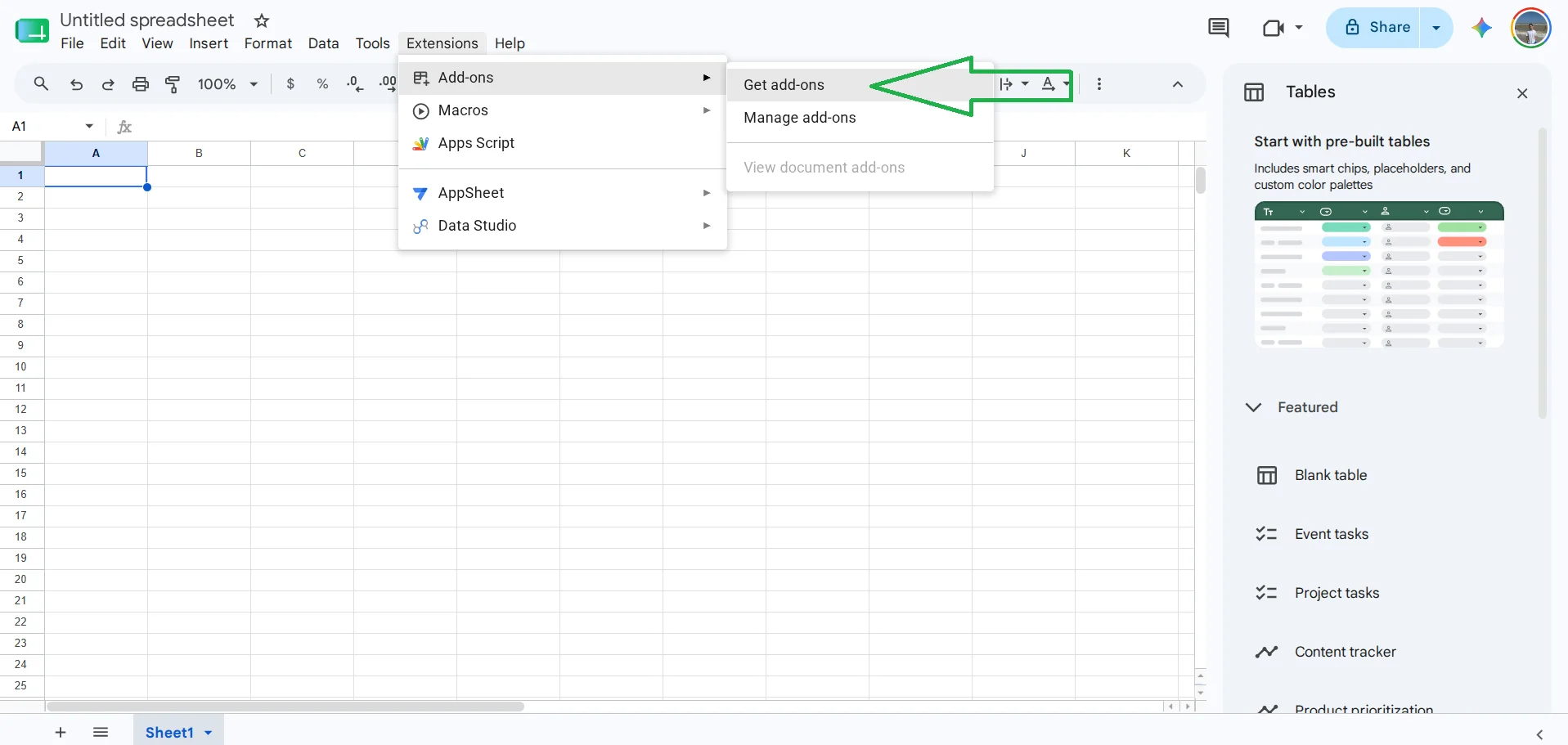
- In Google Sheets, go to Extensions → Add-ons → Get add-ons.
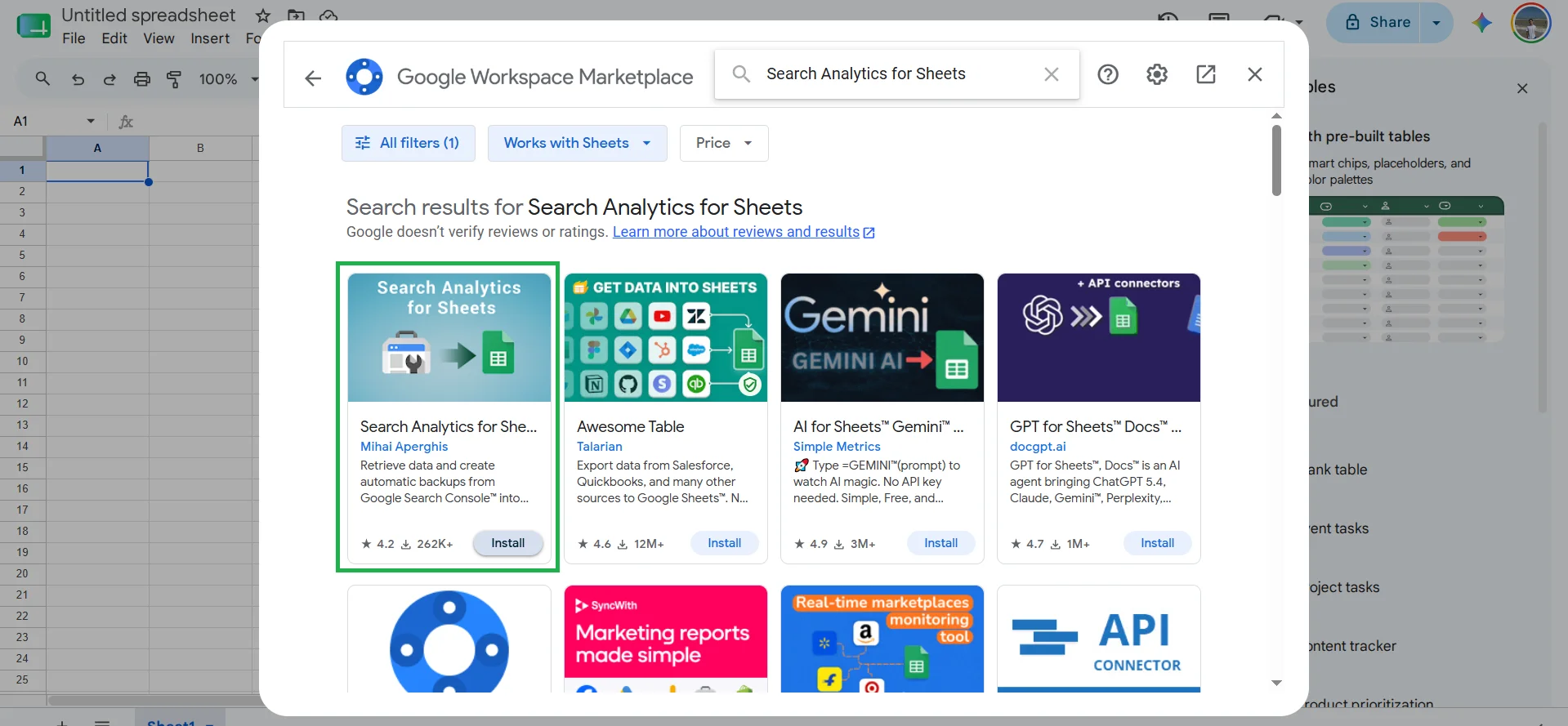
- In the search, enter Search Analytics for Sheets and click Install.
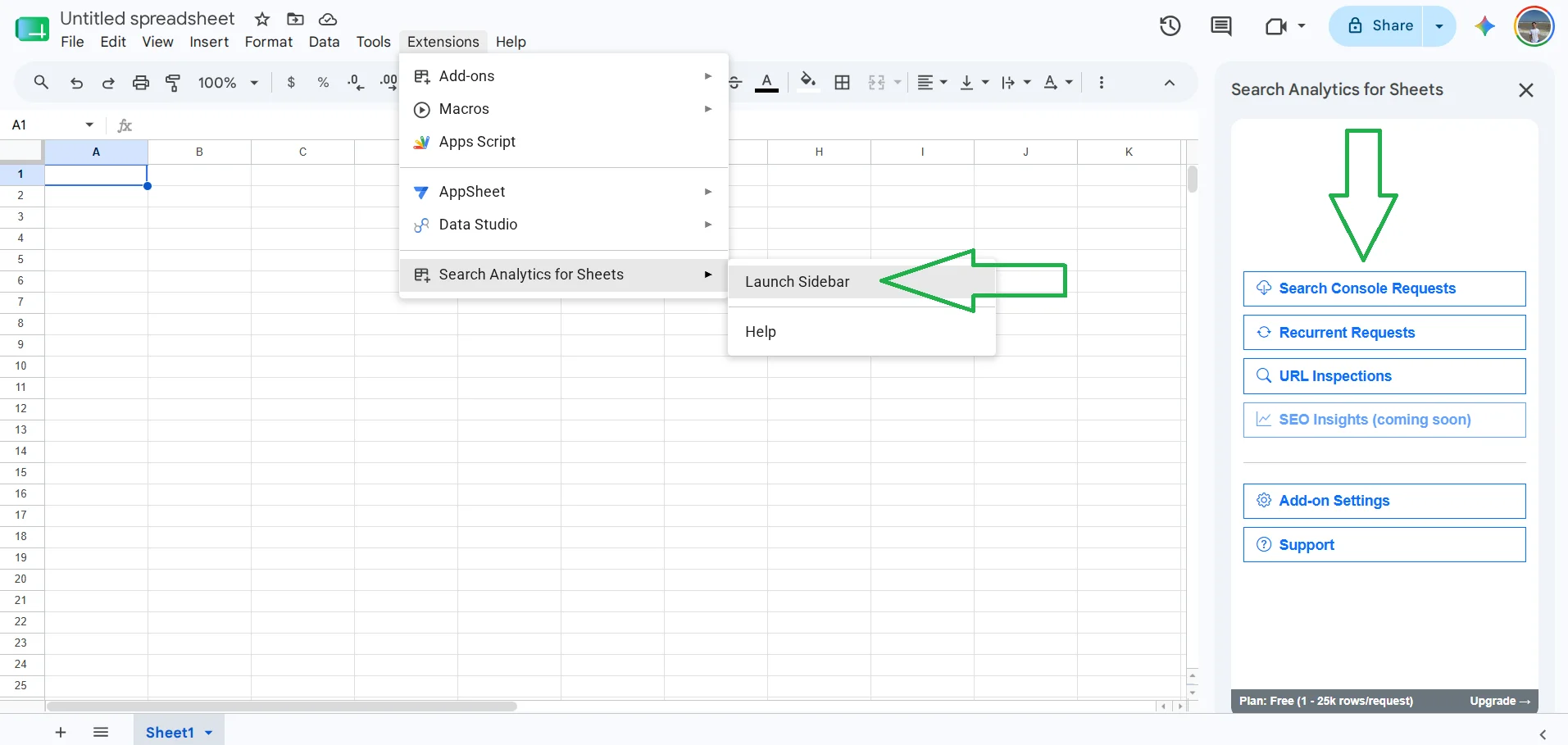
- After installation, click Extensions → Search Analytics for Sheets → Launch Sidebar and in the sidebar select Search Console Requests.
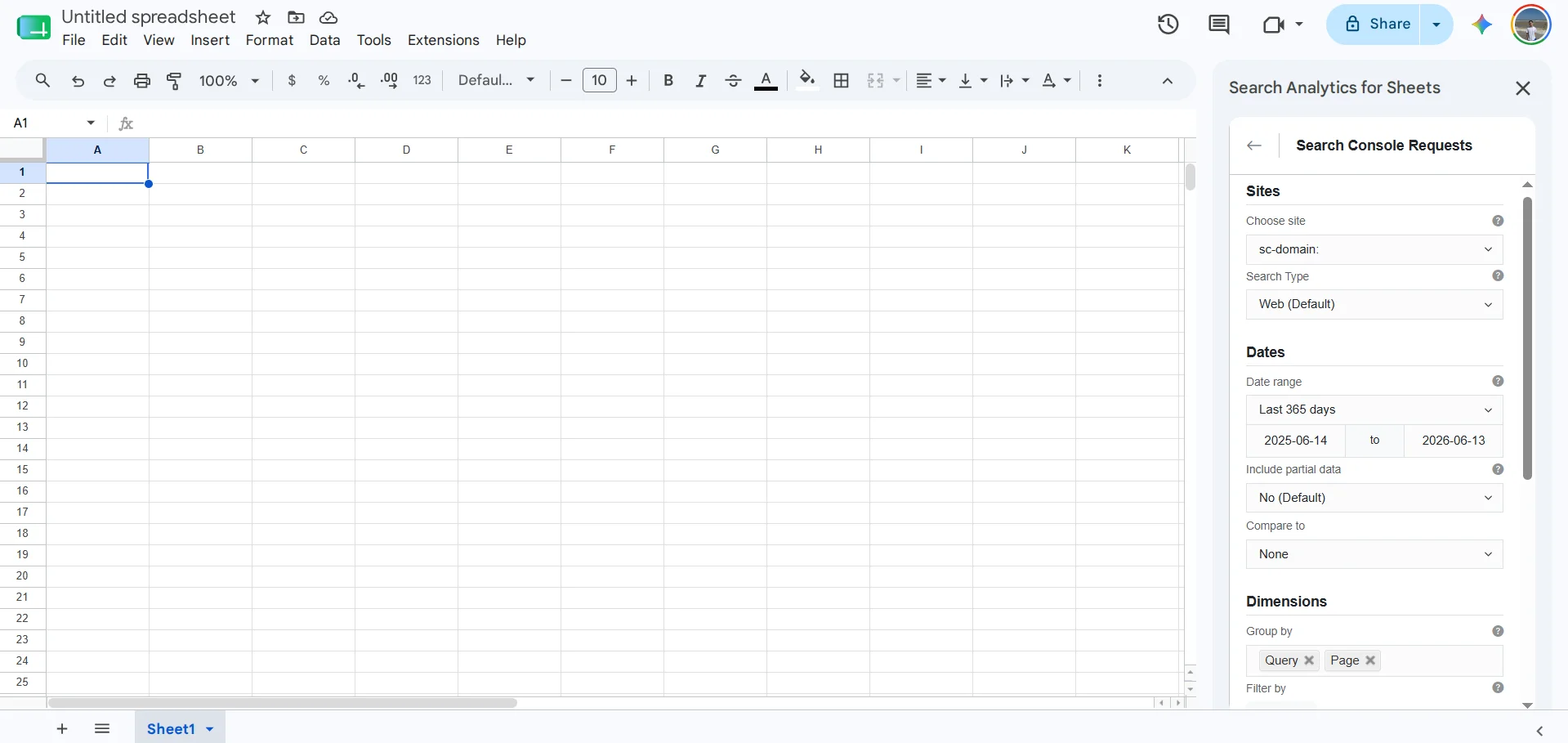
- All data will be automatically entered, but just in case check: site — your domain, Search Type — Web (Default), Date range — Last 365 days, Dimensions section → Group by Query and Page, Rows returned — Up to 25,000 rows.
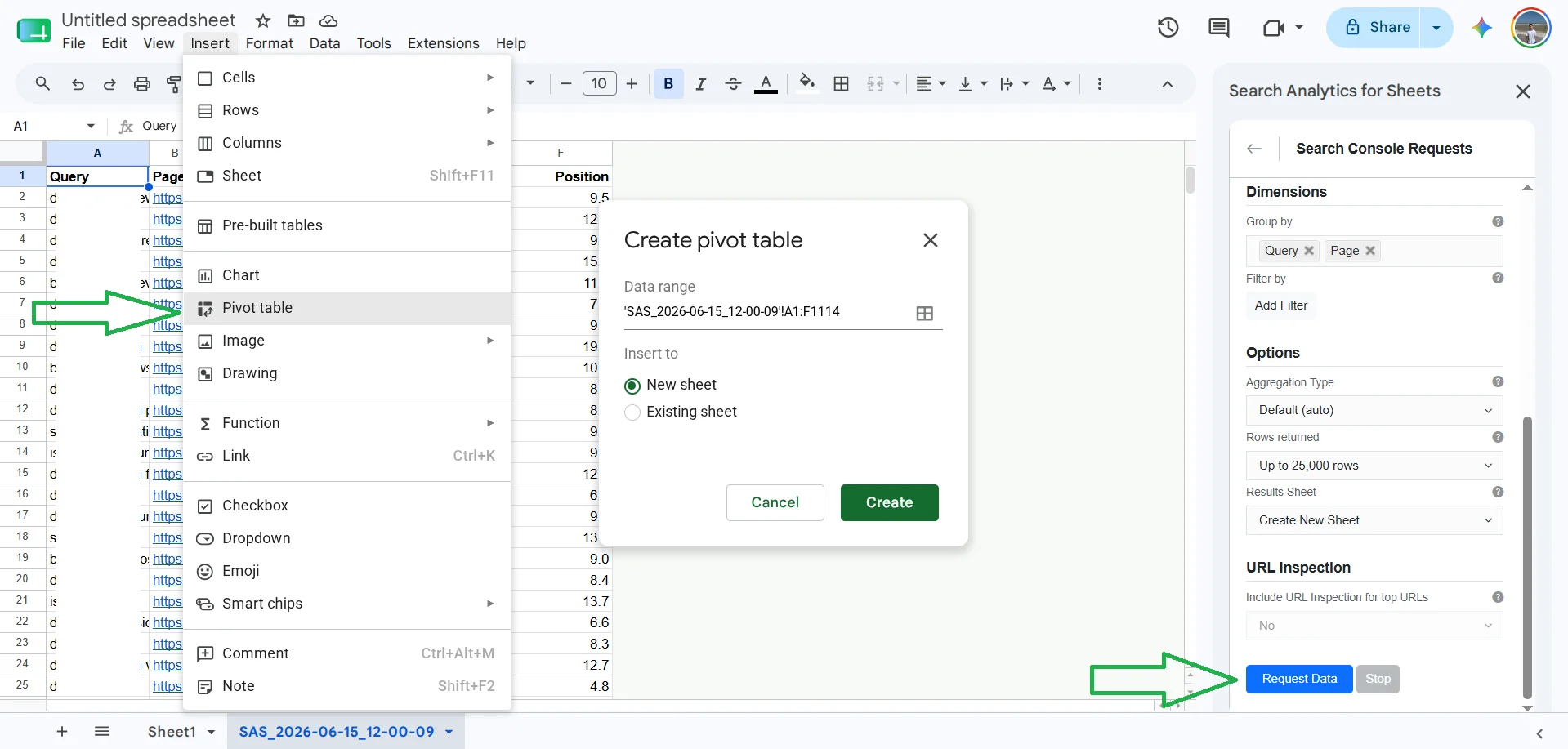
- Then click Request Data, and the data will load into a new sheet. After that, you can also create a pivot table as in the previous method.
Important! The free version of the extension is limited to 25,000 rows per request. This is sufficient for most sites. If your site is large and has more queries — use Looker Studio.
Rank Math and Yoast SEO for insurance against new cannibalization
Both plugins do not audit the entire site for cannibalization. Their role is to warn you about keyword conflicts directly while working on new material.
I do not have Yoast SEO, so I will show using Rank Math as an example, but the principle is the same:
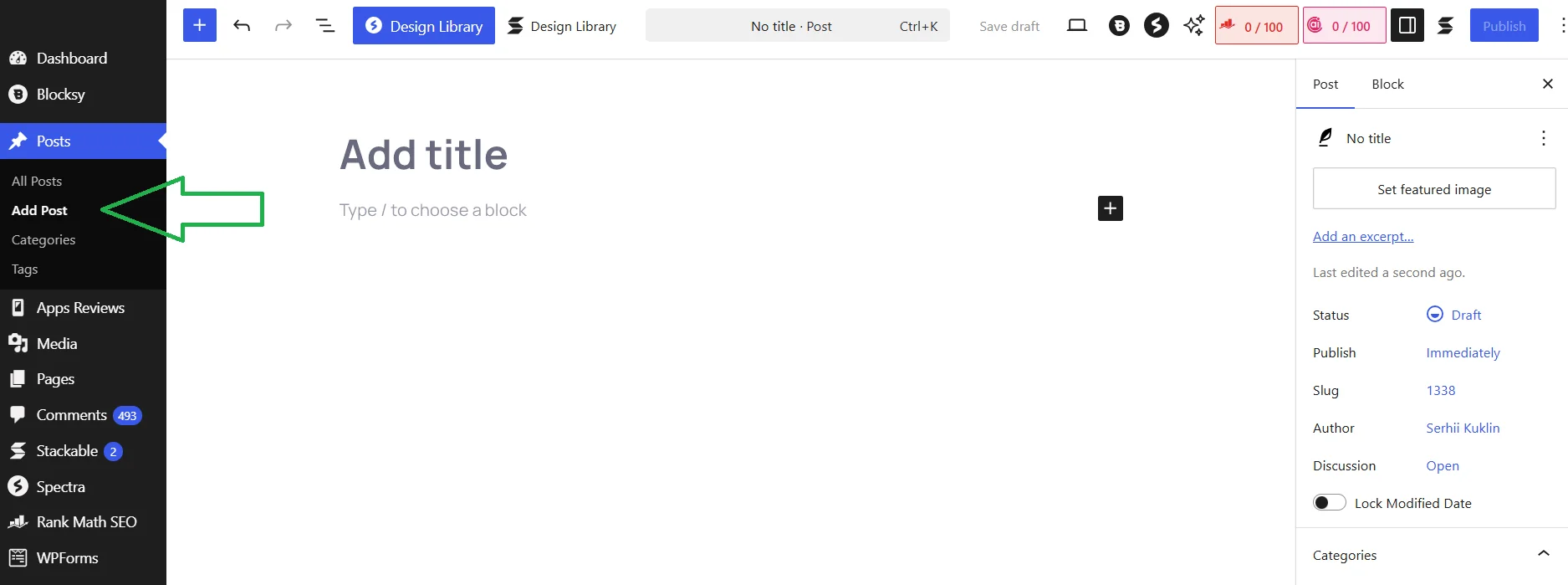
- Go to Post → Add Post.
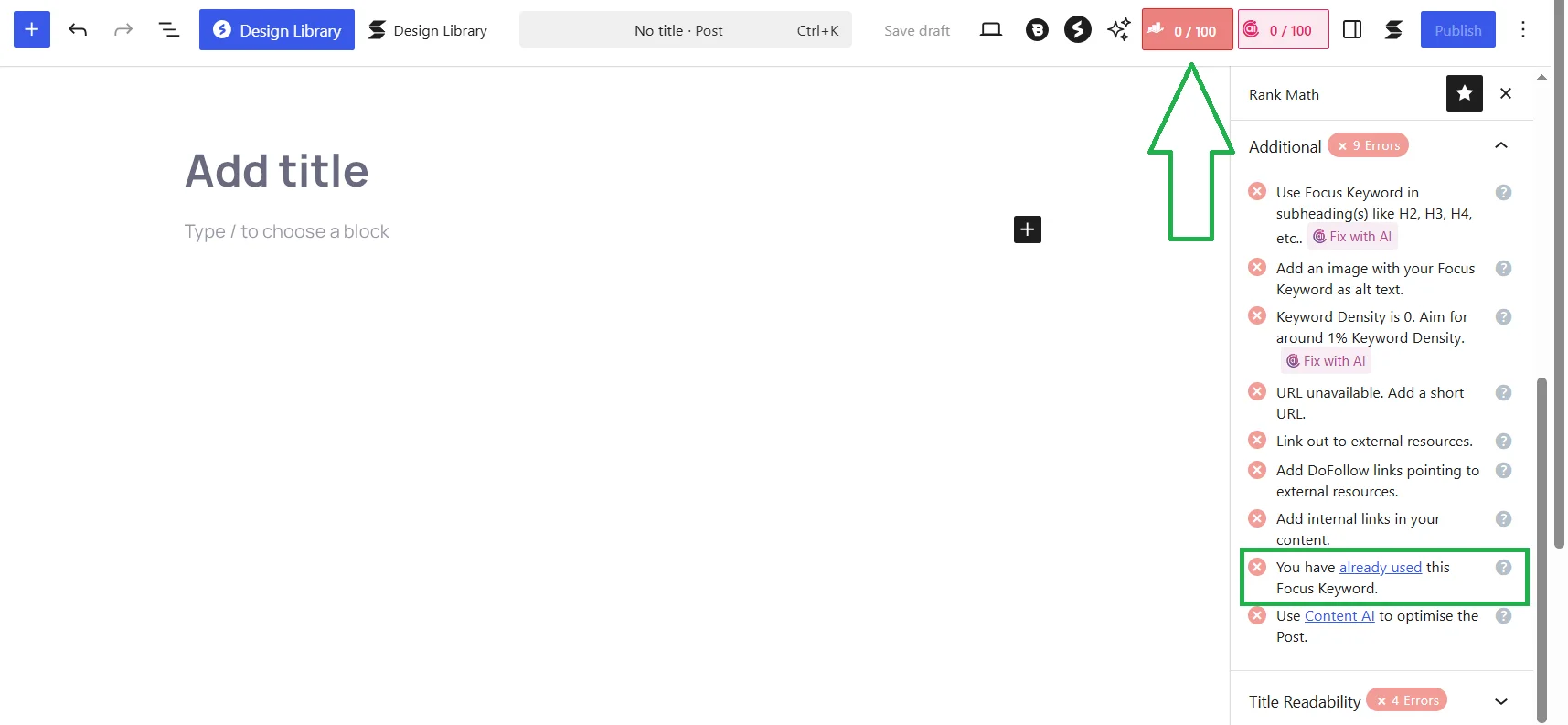
- Open the Rank Math panel, assign a keyword and you will see in the Additional section «You have already used this Focus Keyword» (You have already used this keyword).
This does not replace an audit through GSC or paid tools, but it is a convenient backup, as the editor or SEO specialist immediately sees that the topic is already covered. After you have identified and fixed existing cases of cannibalization, Rank Math or Yoast becomes a quick defense against the emergence of new ones.
Paid automatic Cannibalization Report from Semrush
Semrush has a built-in Cannibalization Report in the Position Tracking section. It automatically detects keywords for which two or more of your pages rank simultaneously in the TOP 100 Google, shows the «Cannibalization Health Score» of the entire campaign, and allows you to view issues by queries (which keywords conflict) and by pages (which URLs compete with each other for multiple keywords).
Important! The Cannibalization Report is available only on Guru plans (from $250 per month) and Business. On the Pro plan ($139.95 per month) and free account, this report is not available. Next, you will see how I unexpectedly encountered this problem.
If you have a Guru or Business subscription, here is a step-by-step guide:
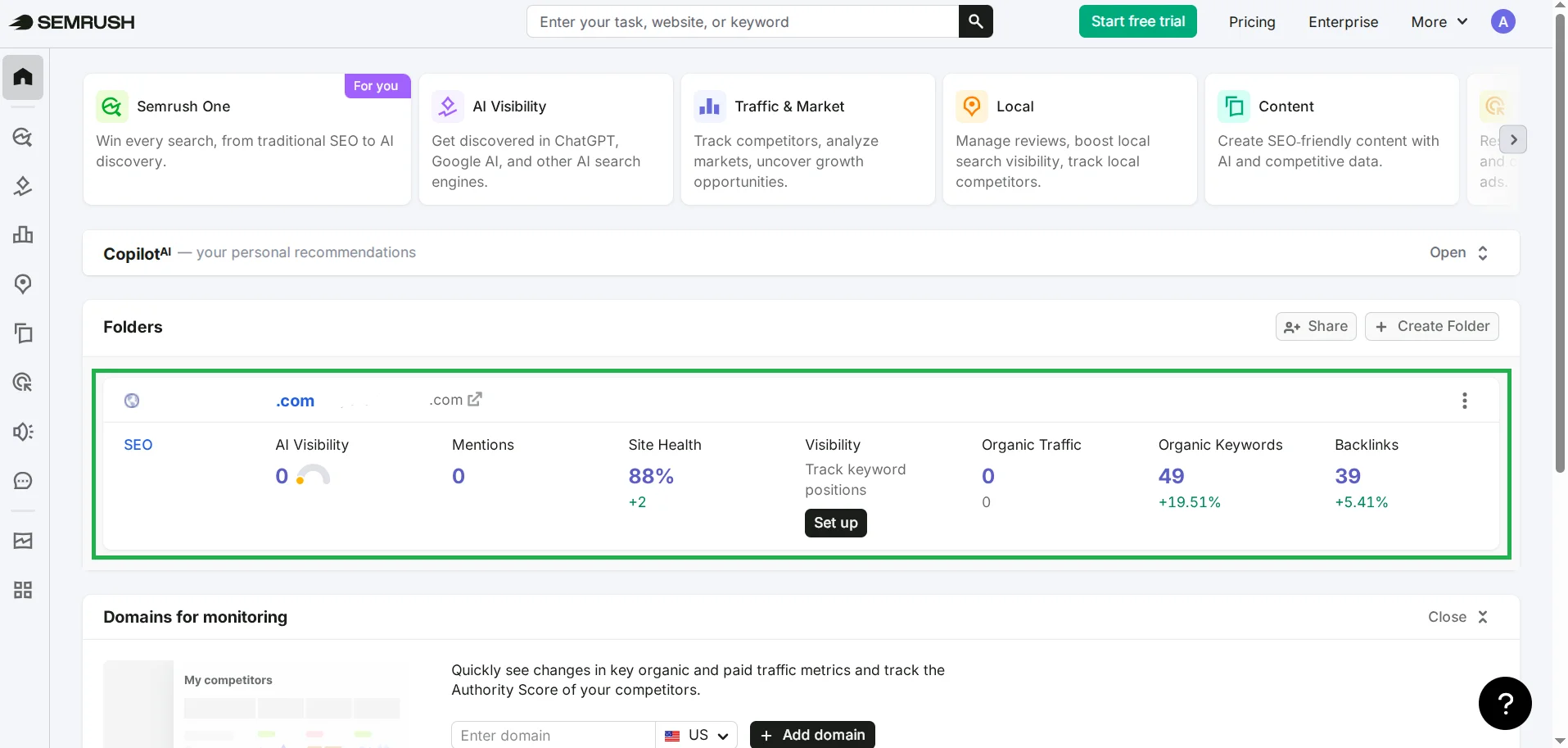
- In Semrush, go to Projects → Create project → enter the domain. Or, if you have already added a project, just click on it.
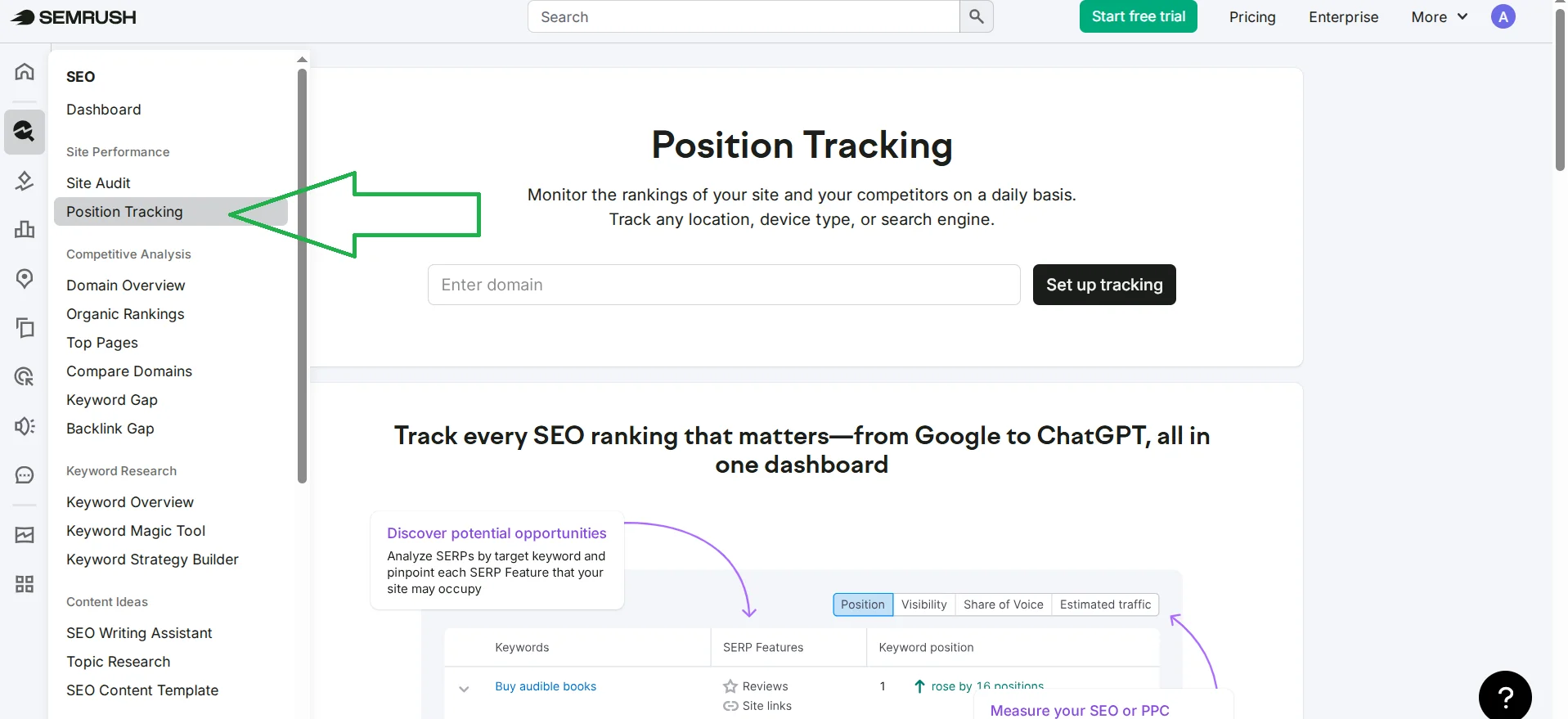
- Inside the project, find Position Tracking, specify the domain and click Set up tracking.
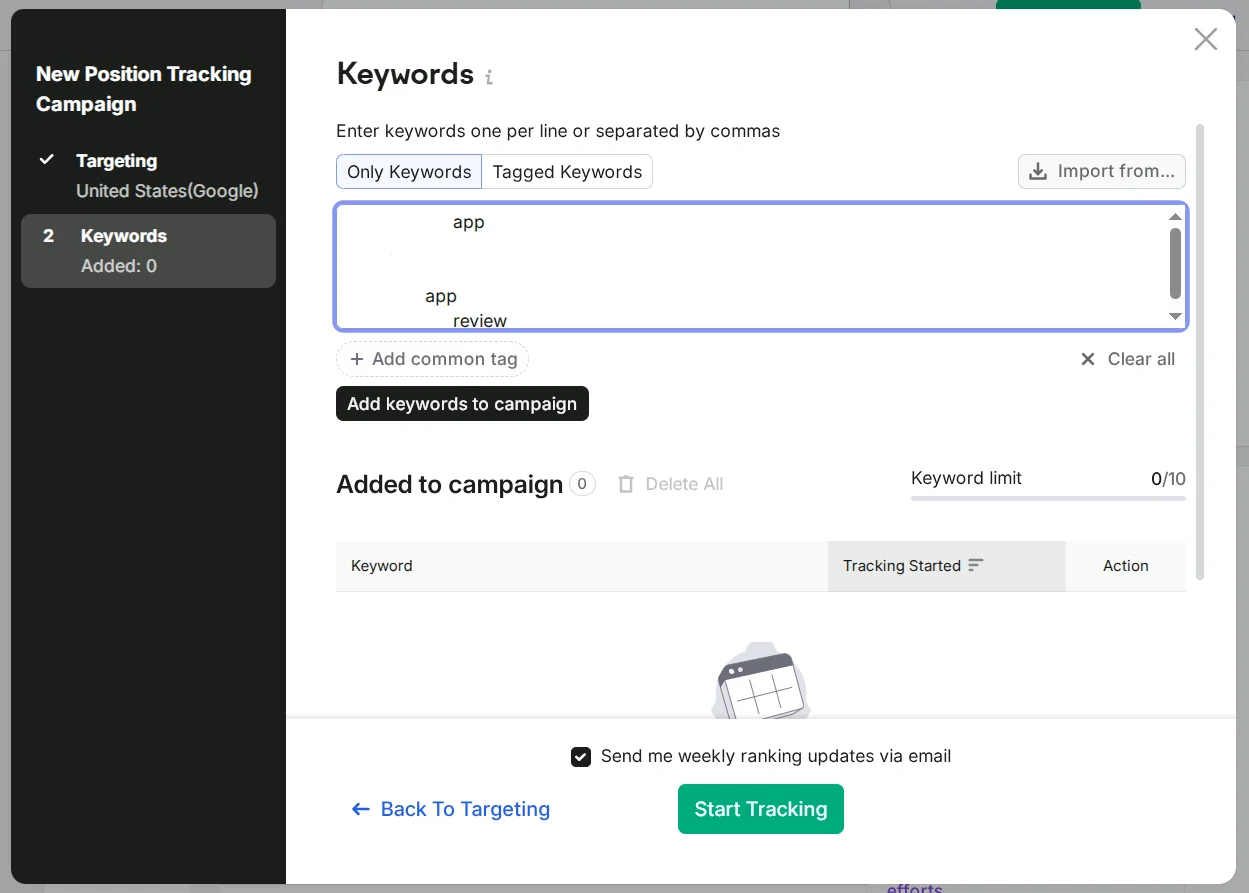
- Specify the country, language, search engines, and devices, then add the keywords you want to track: manually, in a list, or import from CSV. Some keywords were automatically pulled by the system. Just be sure to click Add keywords to campaign after adding keywords, and then Start Tracking.
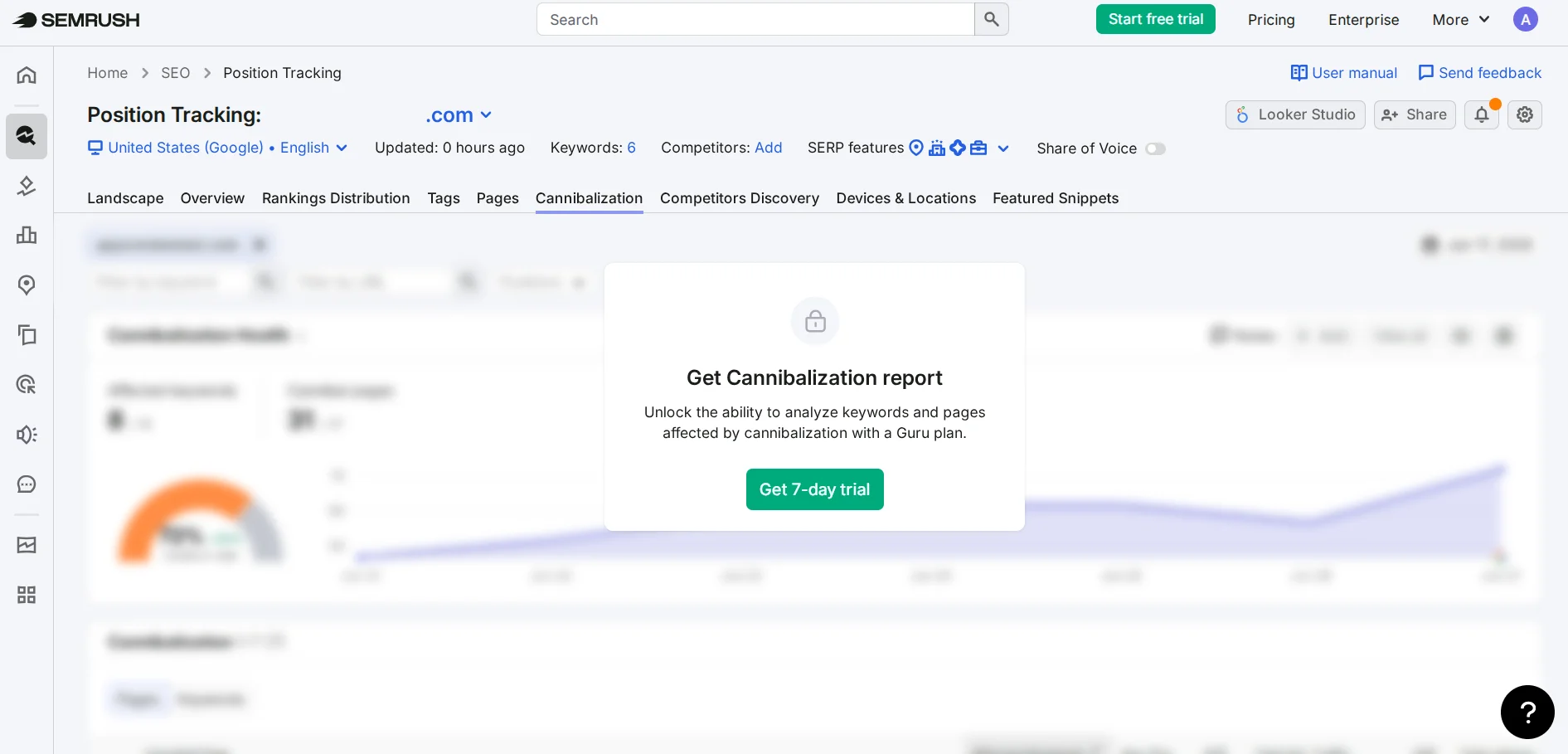
- Go to the Cannibalization tab in Position Tracking. And here, if you do not have a subscription, you will only see an offer for a free trial for 7 days when switching to a paid plan. So the next steps I had to take from Semrush's official documentation.
- Look at Cannibalization Health at the top. If you see 100% — there is no cannibalization problem for the tracked keywords.
- Select View by Keywords and see all keywords with competing URLs. Or View by Pages — pages that conflict with each other for multiple queries.
The main advantage of Semrush over GSC methods: the data is updated daily, and you receive notifications when new conflicts arise. This means the system monitors the site itself and does not require manual checks, which significantly saves your time while allowing you to instantly find new cases of keyword cannibalization. But the main problem is that it is very expensive, so let's look at an alternative that is partially available for free.
Finding keyword cannibalization using Ahrefs
Ahrefs has a convenient built-in filter for detecting cannibalization in Site Explorer. The good news is that if you are checking your own site, this can be done for free through Ahrefs Webmaster Tools — after verifying the domain through GSC or an HTML file.
To find SEO cannibalization in Ahrefs:
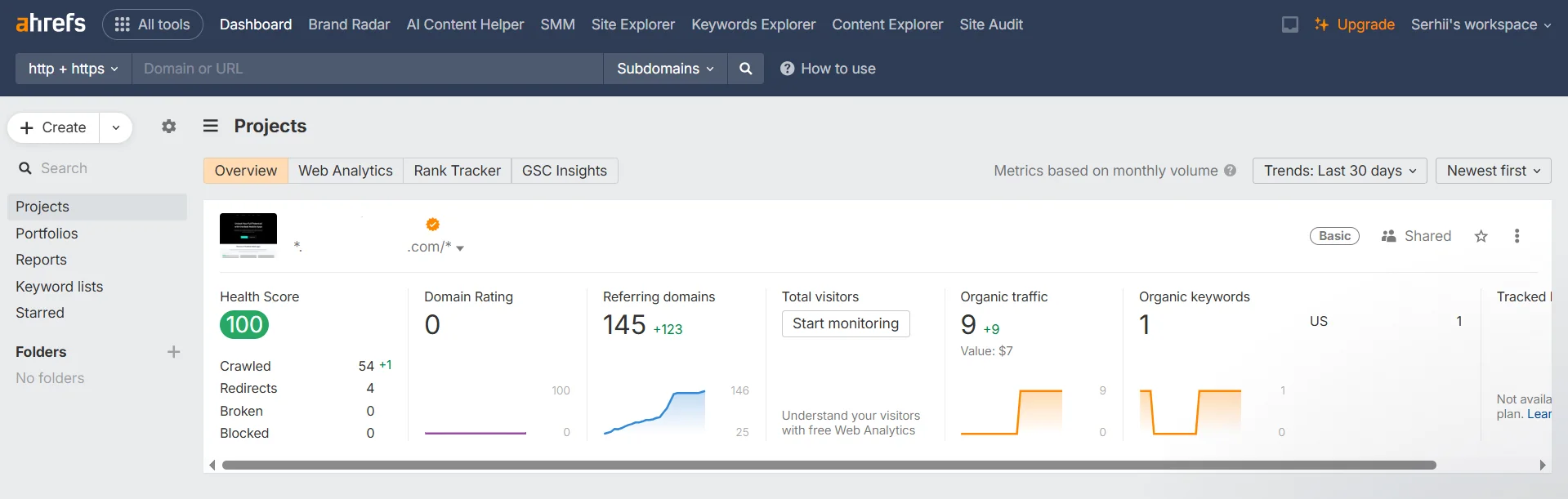
- Go to Ahrefs and select (or add) your project.
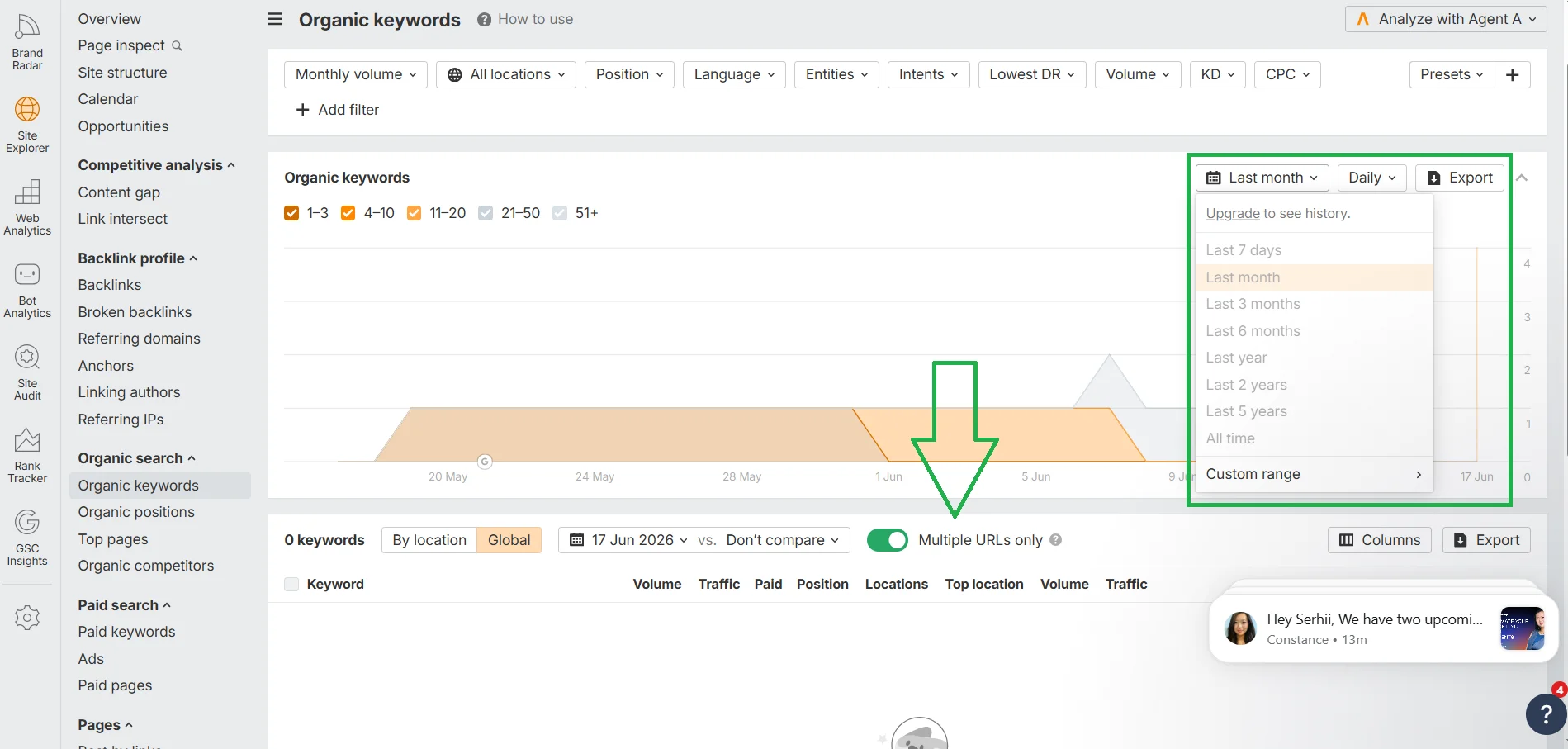
- In Site Explorer, go to the Organic Keywords section and turn on the Multiple URLs only switch so that it turns green. Unfortunately, my site is currently on pause after serious technical changes, so there is no data for the last month. Plus, on the free plan, you cannot change the date range. So the site's editor Bohdana Haivoronska shared Cityhost's data from a paid Ahrefs plan.
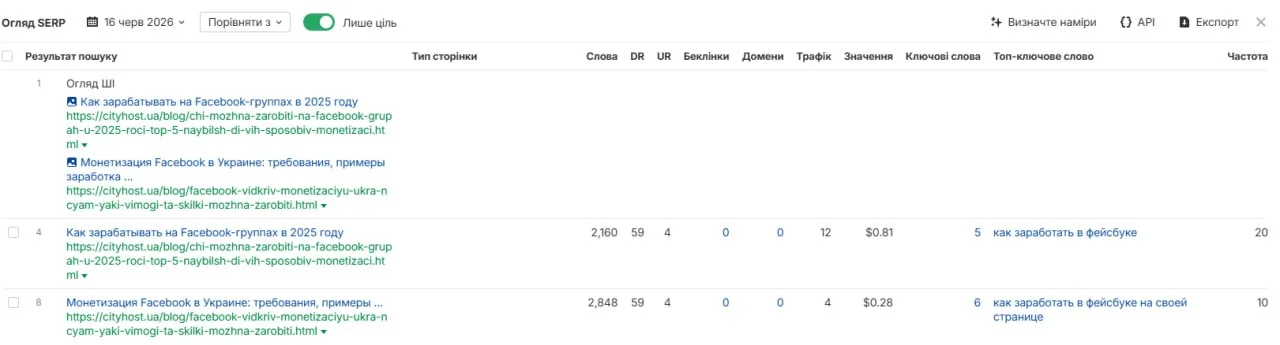
- For each suspicious query, you will need to click on it and see which URLs are competing, their positions, and how much traffic each receives.
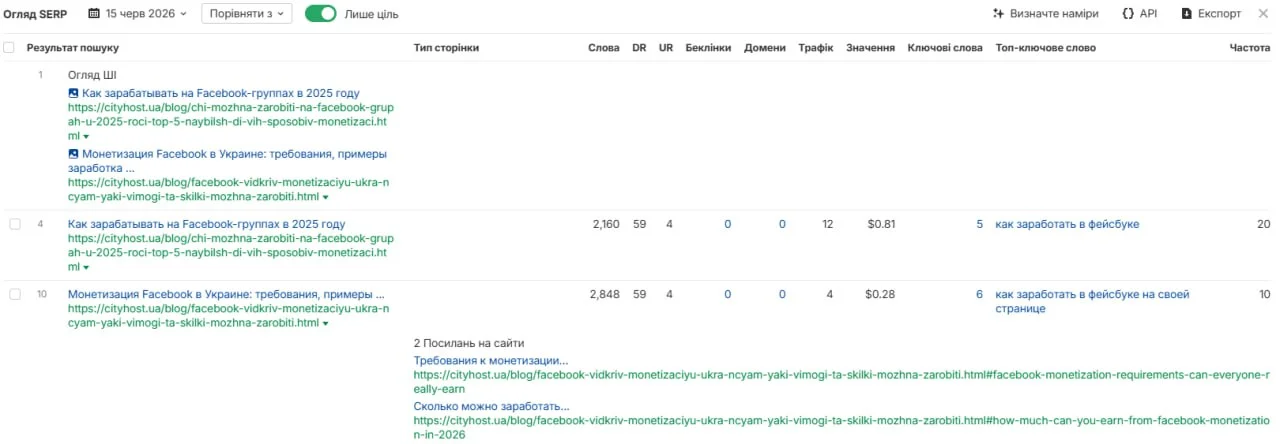
- Cityhost operates on a paid Ahrefs plan, where you can add a date range for display and other advanced information. But the free plan will be quite sufficient for basic data analysis for the current month.
In these screenshots, we see that Cityhost has two articles on a similar topic of earning on Facebook. And although they are different in essence — one is dedicated to content monetization, which has recently become available to Ukrainians, and the other discusses ways to earn from groups — Google shows them for two identical keywords.
Ahrefs displays real rankings, not just impressions like in Google Search Console. This means that the list of candidates is immediately more targeted: there are no URLs that «appeared together» due to a low-frequency query with 1-2 impressions. If two URLs made it through the filter, they are genuinely ranking for the same keyword.
And as you have already seen, there are limitations on the free account regarding the number of queries per day and data depth. For a full audit of a large site, a Lite plan will be needed — starting at $129 per month. There is also a Starter plan for $29, but with significantly limited limits.
What to do with cannibalization on the site
When you have a list of pages with cannibalization that you obtained from GSC or Ahrefs, you need to make a decision about each. First, ensure that it is indeed cannibalization: do both pages have the same search intent, or are these anchor links from one article that Google indexes separately, or do both have 20+ impressions per month in GSC? If it is indeed cannibalization, then assess the current state of each page, namely — its traffic, clicks, and backlinks, the depth of topic disclosure.
Only then make decisions based on the situation:
- One page is clearly stronger. Review the content of the weaker page — if there is unique information, transfer it to the stronger one. Then set up a 301 redirect from the weaker URL to the stronger one. This can be done instantly through Rank Math or Yoast.
- The pages are equivalent but truly overlap. Merge them into one comprehensive article. Identify the main page (usually the older one or the one with more backlinks), transfer all unique content there, and make a 301 redirect from the second.
- The pages can be divided by intent. If one page is informational («how to choose a dedicated server»), and the other is commercial («rental of a dedicated server»), they can reasonably target similar keywords with different intents. So clearly separate the headings (H1, Title), meta descriptions (Description), and content structure so that Google can unambiguously distinguish their purpose. Add internal linking between them with descriptive anchors.
- An old or irrelevant page with no traffic. If a page receives no impressions, clicks, or backlinks — remove it with a status of 410 Gone. Not 301, but specifically 410 — this is a signal for bots that the page no longer exists and will not return. How to do this through Rank Math I described in the article about orphan pages.
When we searched for keyword cannibalization with Ahrefs, you saw an example from Cityhost. Bohdana Haivoronska shared plans regarding these two articles:
Google clearly favors the article about Facebook monetization in Ukraine (687 clicks vs. 119), so we will keep it as the main one for the broad cluster of queries like «earn on Facebook». The article about Facebook groups will be narrowed down to the topic of monetization specifically for groups and we will add internal linking between them. Although Ahrefs triggers due to similar words in titles, URLs, and content, Google Search Console clearly shows that Google has already identified the main page.
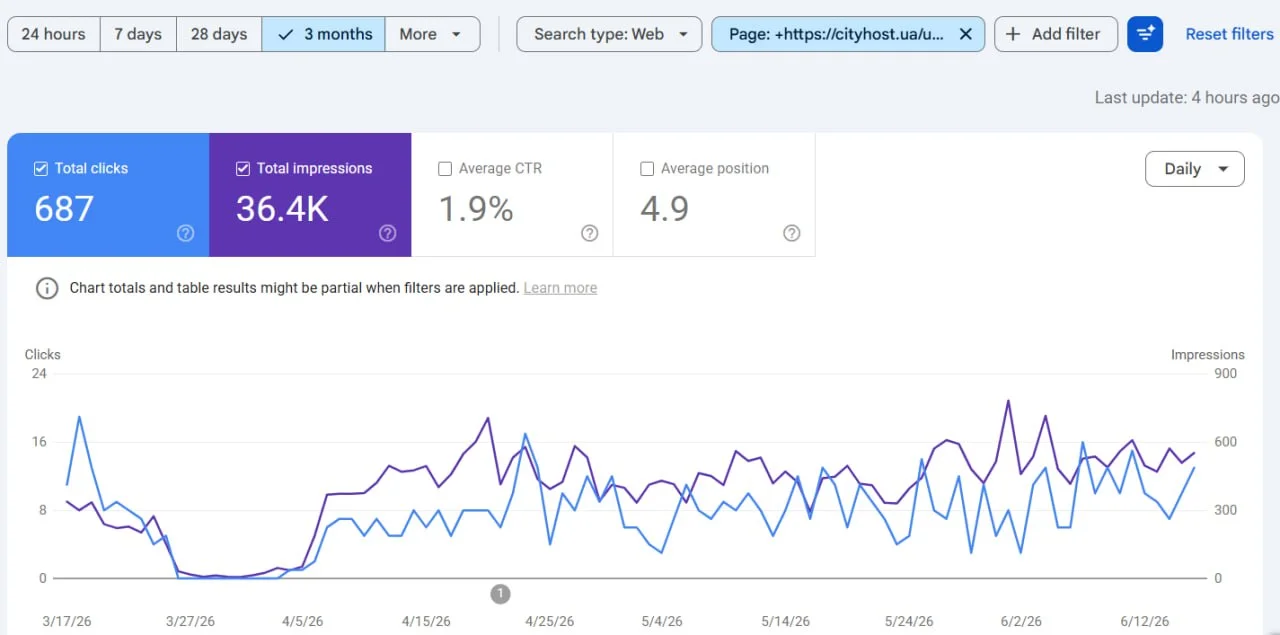
Data from Google Search Console on the article about Facebook page monetization
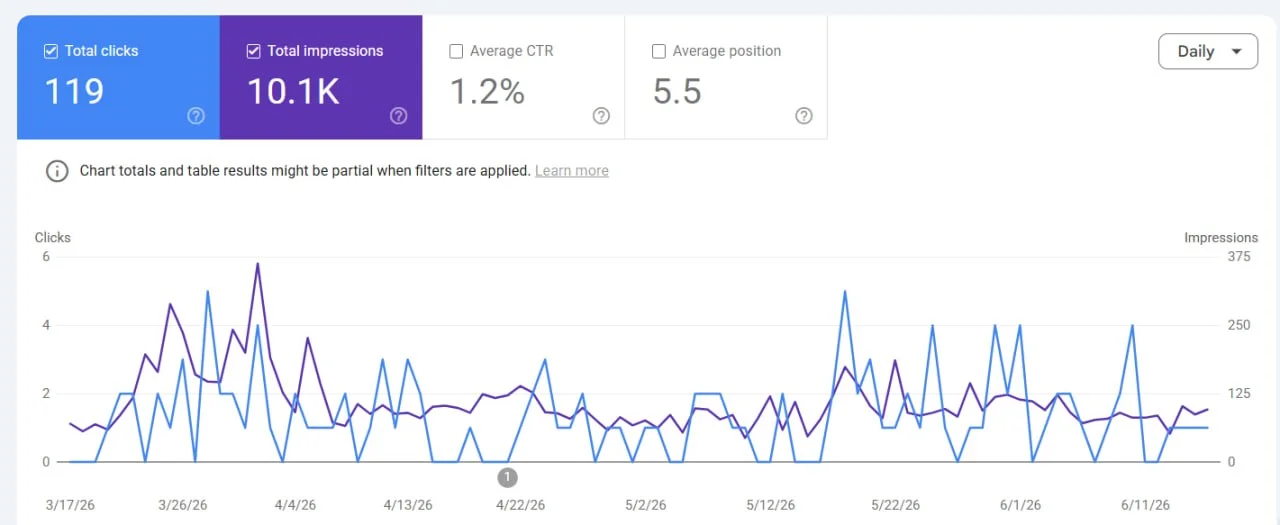
Data from GSC on the article about monetizing groups on Facebook
How to prevent new SEO cannibalization
Found and fixed — that's good. Now the main thing is to prevent recurrence! And although it is impossible to completely insure against new cases, they can be significantly minimized. To do this, it is worth changing the very approach to writing content: develop a keyword and topic map, create a content plan, check queries before starting work through Google results and GSC, and conduct regular audits.
Let's break down each way to avoid keyword cannibalization on the site:
- Create a keyword map — a document where each URL is assigned a unique primary keyword. This can be a simple table in Google Sheets with columns «URL», «Primary Keyword», «Intent», «Cluster». Before writing new material, check this document: it will take only 10 seconds, while saving an hour of auditing later and avoiding problems.
- Check existing content before writing new. This can be done for free: site:domain.com "topic" in Google plus searching the query in GSC. If both show relevant existing pages — either expand the existing one or clearly define what unique intent the new one will differ by.
- Assign a Focus Keyword to each new post. When Rank Math or Yoast shows a duplicate warning — stop and check manually.
- Conduct regular audits. For a small site with occasional publications — once a quarter. For an active content project with weekly publications — monthly. After any migration or technical work — immediately after their completion.
- Enhanced control over AI-generated content. If you use automated content generation, add a step to check the keyword map before publication.
In reality, cannibalization is not always the disaster it seems at first glance. From my experience: 749 «potential conflicts» in GSC and no real cases after filtering #-fragments. This does not mean that the problem does not exist — it does, and in some niches, it is very noticeable. But correct diagnosis is more important than the number of candidates found. Use the methods described above to find real conflicts, and then act precisely. Three correctly fixed cases will yield more than a hundred mistakenly identified.