- What is cloud hosting
- What types of cloud hosting are there
- What advantages does cloud hosting have compared to traditional hosting
- What disadvantages does cloud hosting have compared to traditional hosting
- So what should I choose: web hosting or cloud hosting
Cloud hosting is a modern technology used by many clients for data storage and website hosting. There is even a widespread belief that cloud services have surpassed traditional hosting in all parameters and will completely replace it over time.
However, in practice, things are not so straightforward. We are talking about two different models with different approaches to stability, scalability, and infrastructure management, each of which has its advantages and limitations. Therefore, when choosing between cloud and traditional hosting, it is worth answering not the question "which is better," but looking at it more broadly — "which is better for me and my project."
Indeed, the cloud has several strengths: the ability to build a fault-tolerant environment thanks to multiple servers in a cluster, duplicate data, and dynamically scale resources. The payment model is also an advantage — for the actual resources used. At the same time, such flexibility often means a more complex financial model, increased requirements for resource control, and a high level of automation that does not always leave room for manual intervention.
As a result, cloud hosting can present surprises in the form of unexpected costs or automatic blocks due to security rules that the user learns about only after the fact. The cloud is primarily an automated service with strictly defined algorithms, while traditional hosting usually emphasizes stable configuration and "human" support, where many issues are resolved individually with specialists.
So, do you still believe that the cloud is better in everything? But we are not trying to devalue this technology — on the contrary, we consider it a powerful and effective tool in the right scenarios. In this article, we will objectively examine the pros and cons of both approaches and try to determine which one better meets specific tasks and business expectations.

What is cloud hosting
Cloud hosting is a type of web hosting that operates on the principle of virtualizing physical resources: the power of one or several servers is combined into a cluster, creating a flexible environment for hosting projects. In other words, the resources of a website or application (processor, memory, disk space, etc.) are distributed among different servers in the "cloud."

Read also: Preparing the website for traffic: a guide for business
What types of cloud hosting are there
Cityhost focuses on traditional web hosting, offering several of its options. We have affordable virtual hosting (shared hosting), where you share resources and an IP address with hundreds of "neighbors." It is perfect for business card websites, landing pages, small catalogs, and small content projects, but becomes cramped for those looking to create larger internet projects. For such people, we offer virtual (VPS / VDS) or dedicated servers, which allow for the installation of specific software.
Based on a similar principle, there are different types of cloud hosting:
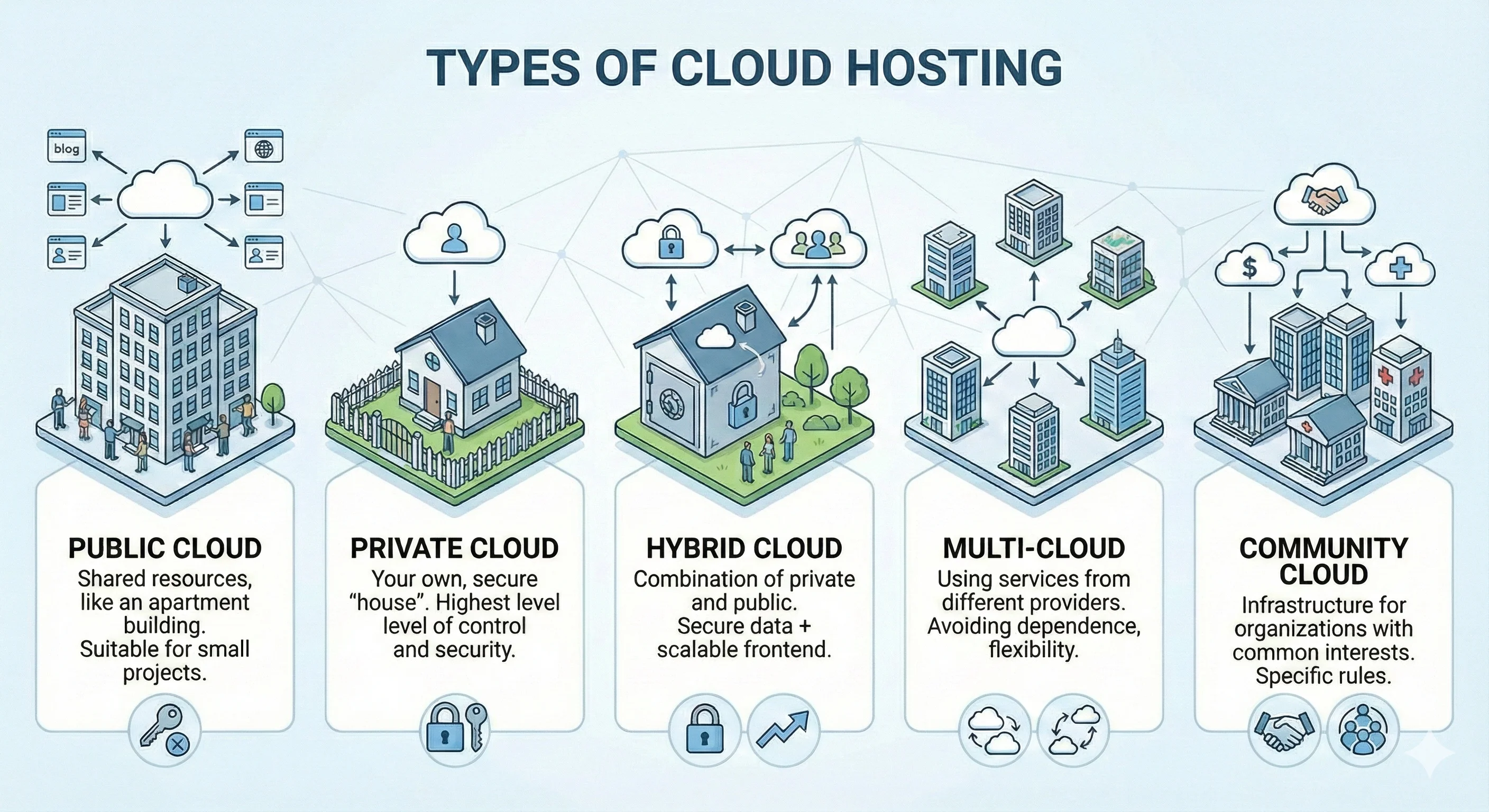
- Public Cloud. Available resources are shared by thousands of other users. This resembles traditional shared hosting and is thus suitable for small blogs and content projects, business cards, and one-page websites.
- Private Cloud. The ideal option for those looking for a "private house" to not share resources with anyone. You get the highest level of control and security, but you also pay the most.
- Hybrid Cloud. A combination of the two previous types. You can store, for example, a customer database in a private cloud for higher security, while the website's frontend is in a public cloud for easy scaling.
- Multi-cloud. The use of services from different providers simultaneously. This allows you to avoid dependence not just on one server but also on one service provider. For example, you can host a website with one hosting provider and analytics with another.
- Community Cloud. This is a separate infrastructure for a group of organizations with common interests, such as the banking sector or medical institutions. They have specific internal rules and procedures that do not suit all companies, but within one community, it offers its advantages.
Most often, companies choose between public and private clouds — depending on the scale of the project, security requirements, and control over resources. At the same time, it is important to consider the approach of the specific provider, as cloud service models can vary significantly. Some providers offer several standard tariff solutions aimed at different usage scenarios — from small business projects to high-load systems. Others build the cloud based on flexible resource configurations with payment for conditional units or actual consumption.
That is why before choosing cloud hosting, it is worth carefully studying not only the technical specifications but also the logic of pricing for services from a specific provider.
Read also: Debunking myths about hosting provider services
What advantages does cloud hosting have compared to traditional hosting
The main advantages of cloud hosting are high fault tolerance, meaning the project continues to operate stably even if one of the servers fails. This is complemented by the ability to instantly increase or decrease the volume of resources, pay only for the resources used, enhanced security, and improved performance.
However, each advantage has its specifics that should be understood before renting cloud hosting:
- Scalability — the readiness of the internet project for any changes
- Pay-as-you-go — pay only for the resources used
- Fault tolerance — stable operation even in case of problems
- Increased security — complete automation and strict rules
Scalability — the readiness of the internet project for any changes
A huge advantage of cloud hosting is the ability to instantly increase capacity according to current demands. The system automatically adds processor power and memory volume exactly when needed. This allows it to reduce the number of resources to a baseline level.
Imagine you have a gift online store. On regular days, you have 500 visitors, but before the holidays, their number suddenly increases by 10-20 times. If the site is hosted on web hosting, it may not necessarily crash during such a spike, but it will start to work slowly, lagging. In contrast, if the project is in the cloud, the system will simply add the necessary resources, and you won't even notice anything (until the bill arrives, but we will discuss that in the disadvantages).
Cityhost.ua also has a mechanism for automatic tariff changes in cases where the site consistently exceeds the allowable load limits. If such an excess is recorded for several days, the client is warned, and the tariff may be changed to a higher one. At the same time, the remaining funds in the account are recalculated according to the cost of the new tariff plan.
It is important to understand that this process does not happen instantly. This approach allows avoiding erroneous upgrades due to one-time peak loads, but at the same time means that during the period of resource excess, the site may operate unstably or with delays. That is why in cases of increased traffic or load, it is recommended to respond in advance to the system's signals and initiate a tariff change yourself — this allows maintaining stable project operation without downtime.
Pay-as-you-go — pay only for the resources used
Suppose you plan to launch a large entertainment portal with a specific operating system and your own software and decide to rent a VPS from Cityhost.ua. You choose a tariff and receive a clearly defined server configuration: disk space, number of CPU cores, RAM, dedicated IP, and other parameters.
In this model, you pay a fixed amount for a guaranteed set of resources that are fully reserved for your project and do not change automatically depending on the current load. Some of these resources may remain unused during certain periods — this is normal practice for VPS and a consequence of planning the configuration with future needs in mind.
Typically, resources are selected with a margin, focusing not only on average but also on peak load. Such a reserve effectively acts as a safety cushion: it allows the site to withstand traffic growth, advertising campaigns, or seasonal spikes in activity without an immediate tariff change or risk of performance degradation. If necessary, the server configuration can always be changed, but until that moment, the resources remain stably available specifically for your project.
In the cloud hosting model, payment is usually made for the actual resources consumed or for short billing periods — hours or days. If the project at a certain moment requires a minimal amount of computing resources, the costs remain proportional to that level of consumption. In case of increased load — for example, due to increased traffic or active use of functionality — the system automatically allocates additional resources, and the cost of the service temporarily increases. When the need for resources decreases, expenses return to a lower level.
This approach provides high flexibility and allows adapting the infrastructure to the current needs of the project without prior capacity reservation. That is why cloud hosting is often chosen for launching startups, testing new products, or projects in the early stages of development, when the load is still difficult to predict accurately and it is important to quickly receive feedback from the first users.
Fault tolerance — stable operation even in case of problems
The fault tolerance of the infrastructure is evaluated not by declarative promises but by specific measurable indicators. One of the key ones is uptime — the coefficient of uninterrupted service operation. For most modern hosting solutions, a target level of 99.99% is considered, although actual values may vary depending on the provider and SLA conditions.
Even with such a figure, limited downtime is allowed: up to approximately 4 minutes per month or about 52 minutes per year. In most cases, this time is allocated for planned maintenance, which is performed during periods of minimal load — usually at night. Internet project owners are typically informed about such work in advance, which helps reduce their impact on users and business processes.
There is also an SLA (Service Level Agreement) — a legal obligation of the provider to maintain the established level of service.
Another important indicator is the reliability level of the data centers servicing the hosting provider's server park. There are 4 Tier levels from the Uptime Institute:
- Tier I — minimal infrastructure, where planned maintenance or even a minor problem requires a complete shutdown of servers.
- Tier II — has partial redundancy (spare components for power supply and cooling), but serious technical work still leads to prolonged interruptions in the functioning of internet projects.
- Tier III — offers parallel servicing, meaning key nodes are reserved, and power distribution paths are duplicated, allowing repairs or component replacements to occur without stopping client sites.
- Tier IV — provides the highest level of security due to the presence of two working sets of equipment and an additional backup component (2N+1 scheme), meaning even a critical failure does not stop the system's operation.
Of course, the highest level of reliability is provided by Tier IV data centers: their allowable downtime is only about 26 minutes per year. At the same time, not all data centers can meet such requirements, and the cost of hosting in Tier IV facilities is quite high.
That is why the optimal choice for most projects is hosting providers that use Tier III partner data centers. They guarantee a high level of availability — up to 99.982% (a maximum of 96 minutes of downtime per year) — and provide a balanced ratio between reliability and cost.
In this context, one of the characteristic features of cloud hosting is the automatic recovery of services. The cloud infrastructure can rely on several servers located in different data centers, so in the event of a failure of a single node, the load is automatically redistributed within the cluster. This allows for the restoration of project operation without manual intervention and with minimal delays.
In traditional hosting, fault tolerance is usually achieved through other methods — through the reliability of equipment, redundancy of key components, and preventive measures at the data center level. This approach does not provide for instant automatic switching between nodes, but emphasizes the stability of the infrastructure and reduces the likelihood of failures overall.
However, it is incorrect to assert that cloud hosting is always more fault-tolerant than traditional hosting. Much depends on the specific provider and how its infrastructure is built and maintained. For example, if the actual uptime level of a cloud service is 99.94%, and that of traditional hosting is 99.99%, then in this regard, the advantage will be on the side of the traditional solution.
Therefore, it is primarily worth analyzing the declared reliability indicators, reading reviews on third-party resources (there are often results of independent testing of parameters), and customer feedback on independent platforms.
Increased security — complete automation and strict rules
In cloud hosting, security is usually enhanced due to a high level of process automation. Modern cloud platforms use deep system monitoring at the operating system kernel level, particularly based on eBPF. This allows for the analysis of system calls, network connections, and other critical events in real-time with minimal impact on performance.
In the event of unauthorized access attempts to protected resources, such mechanisms allow for the immediate capture of suspicious activity and block it at the kernel level before it affects the system or user data.
Additionally, cloud providers typically use automated SOAR-class response systems that integrate various protection tools into a single incident response chain. For predefined attack scenarios, the system can automatically restrict access, block subnets for a certain period, and generate reports for administrators.
This approach significantly reduces dependence on manual intervention and human factors, allowing for faster responses to threats than is possible with traditional administration.
What disadvantages does cloud hosting have compared to traditional hosting
The key disadvantage of cloud hosting is that you do not always know how much your costs may rise or fall. This is compounded by the complexity not only of setup but also of choosing a tariff plan, as each provider, as we have already shown in two examples, offers different proposals. But each provider wants to stand out, so they offer many specific "features," making migration to another platform extremely expensive and complicated.
However, not everything is as terrible as it seems, so let's take a closer look at each disadvantage of cloud hosting:
- Unpredictability — companies find it difficult to form a budget
- Complexity — you will have to figure it out or pay more
- Ruthless system — the need to adhere to strict rules
Unpredictability — companies find it difficult to form a budget
The flexible payment model in cloud hosting indeed looks attractive, especially when it is known what power the project needs in normal operation. It was created for scenarios where the load can temporarily spike sharply, and any drop in performance will directly impact the business's reputation and income.
However, this model has a downside. Increased resource consumption can be caused not only by a real increase in traffic but also by technical experiments or errors. For example, during testing a new plugin, incorrect code optimization, or inaccurate infrastructure settings, the load can increase dramatically. In such cases, the system automatically allocates additional resources — and also automatically increases costs. As a result, instead of the expected few dozen dollars, the bill can quickly rise to several hundred.
That is why cloud hosting requires not only technical readiness for scaling but also constant monitoring of resource consumption and expenses. Without set limits, alerts, and a clear understanding of the project's behavior, the flexibility of the cloud can quickly turn into an unpleasant financial surprise.
To better understand, let's break down the key components of cloud hosting costs:
- Disk operations. You pay not only for the disk volume, i.e., the number of available GB, but also for the access speed — the number of read and write operations per second (IOPS). Take a popular online store with a large product database, where hundreds of people are searching for something simultaneously. Such visitor behavior creates a high level of IOPS, which often costs more than the disk space itself.
- Outbound traffic. Usually, inbound traffic, i.e., uploading data to the cloud, is free, but you have to pay for every gigabyte that goes out to users (outbound traffic). The price depends on the provider, but on average, you have to pay $0.09 for each GB. And if you have a site with a lot of high-quality video or photo content, your costs in this area can account for 30-50% of the total bill.
- Traffic between zones. In cloud hosting, considering AWS, Google Cloud, and Azure, traffic between different availability zones or regions is usually chargeable. The amount is usually small, about $0.01, but it adds an additional unpredictable burden to the budget.
- API requests and operations. For each micro-interaction with cloud storage, for example, to check for the presence of a file, you will have to pay. If you have a project with 10,000 small icons, and the server sends a request to the storage each time, the bill can add up significantly by the end of the month.
- Load balancers. Providers have this interesting service that allows distributing visitors among servers, ensuring high availability and scalability. And everything would be fine, but this is a separate paid service. You will have to pay for the hour of the load balancer's activity, for the amount of data passing through it, and often also for data transfer and IP address usage.
It turns out that the pay-as-you-go payment model can be both an advantage if you delve into the topic of cloud hosting, understand all the details, spend a lot of time optimizing costs, and a serious burden, especially for small and medium businesses. Even large companies experience "cloud fatigue," meaning they get tired of solving these financial puzzles every month. They often revert to VPS or even switch to renting a dedicated server from a traditional hosting provider to get the most capabilities for a fixed predictable fee.
Complexity — you will have to figure it out or pay more
Cloud hosting requires a fundamentally different approach to administration. Building a fault-tolerant infrastructure in the cloud involves mastering automation tools, understanding architectural principles, and managing containers. It has more components and settings, which, in the absence of knowledge, skills, and experience, often leads to high costs.
Of course, providers accommodate this by offering two types of cloud hosting:
- Unmanaged. You receive just the resources, for which you usually get a bill at the end of the current or the beginning of the next month. You set up the operating system, perform all configurations and updates. But this is where knowledge and skills, or an in-house specialist, are needed.
- Managed. The provider is ready to take on all the work, including configuration, backups, security, and updates. But this option is more expensive.
Thus, complexity is not a catastrophic disadvantage, as you can delegate all technical aspects to the provider. However, again, the task arises to find the best service provider that will offer all necessary capabilities at an affordable price.
Read also: Business accounting in the cloud: is it worth it or not
Ruthless system — the need to adhere to strict rules
The increased level of security in the cloud environment, often viewed as an advantage, can become a limitation in certain scenarios. The user must adhere to strict operational rules, and high process automation often means minimal human involvement in decision-making.
In the case of suspicious activity, the system reacts automatically. For example, a sudden increase in outbound email volume — even if it concerns a legitimate mass mailing dedicated to an important event — can be interpreted as a potential threat. In such a situation, the server is initially blocked or limited in operation, and only after that does the user receive a notification or report explaining the reasons.
Web hosting often wins in terms of humanity, as system administrators typically inform about problems first, allowing users to resolve them independently without extremes if possible. If it is not a problem at all, the user can simply explain the situation, thus avoiding blocks. And this offers much more freedom compared to the cloud.
So what should I choose: web hosting or cloud hosting
You may have already made a decision for yourself, but let's summarize the features, disadvantages, and advantages of cloud hosting, plus compare it with the traditional alternative. And here it is important to understand that the difference between Web Hosting and Cloud Hosting lies not only in the technical component (cluster or one specific server) but also in predictability.
Different hosting models provide stability and availability of services, but do so with different emphases:
- Traditional web hosting is focused on stable operation within a predetermined configuration of resources. This approach ensures predictable performance and controlled costs, provided the tariff is correctly selected.
- Cloud hosting focuses on dynamic adaptation to changes in load, maintaining service availability even in situations where the project's needs change sharply.
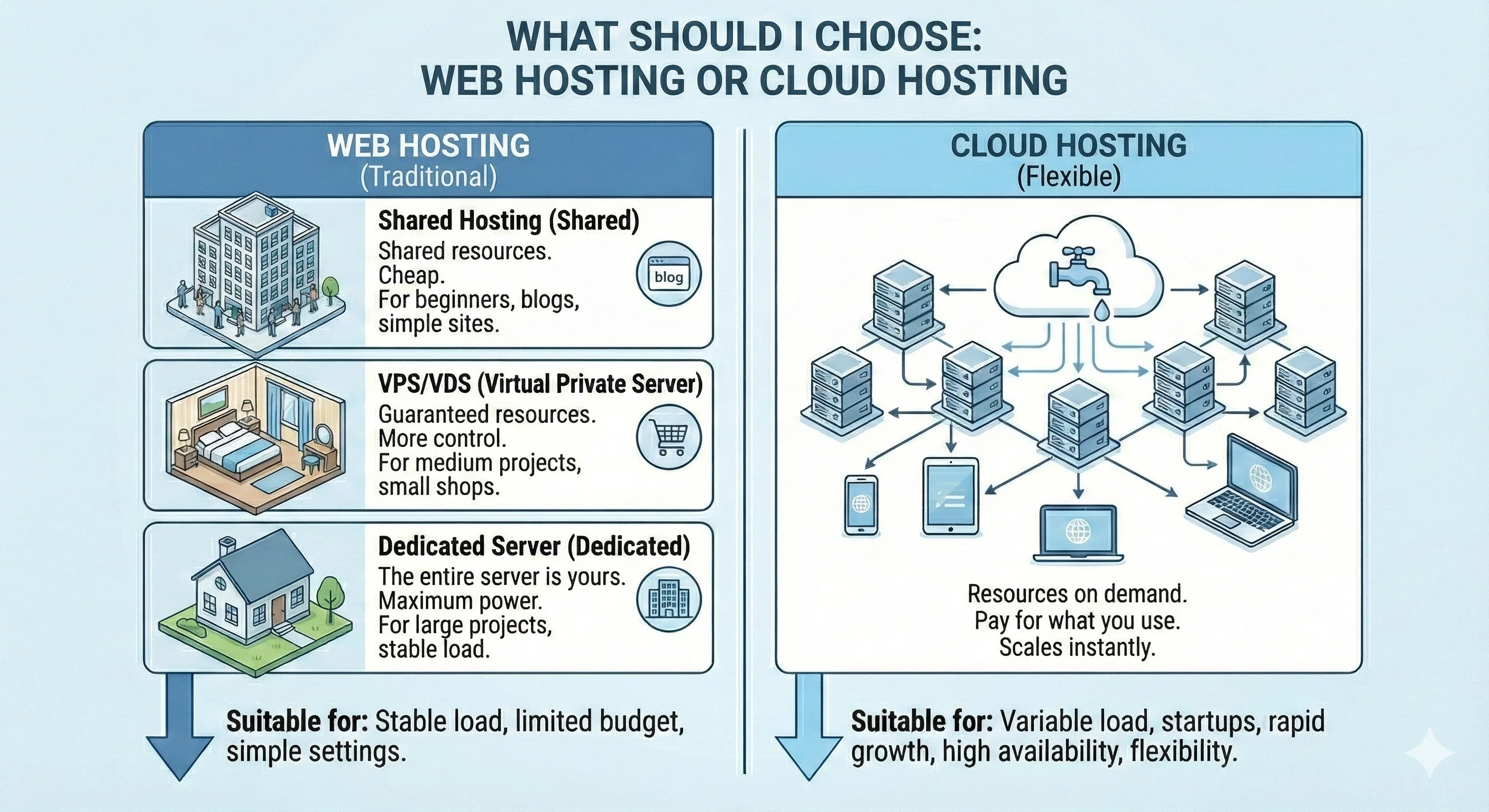
Accordingly, cloud hosting is best suited for projects with non-linear growth and high sensitivity to load, where sharp traffic spikes or even short outages can have significant financial or reputational consequences. These can be SaaS startups, large businesses with frequent sales, or media resources that can receive 5-10 times more traffic due to virality — often at the most unexpected moments.
In such scenarios, the cloud automatically scales resources: for example, increasing their number during peak hours, and during periods of load decline — decreasing them. In the event of failures at the physical equipment level, the project automatically switches to another node in the cluster, allowing for continuity of operation. At the same time, for such flexibility, you have to pay — the final costs depend on the actual resource consumption and can be less predictable.
Traditional web hosting, in turn, remains maximally predictable in terms of costs. The user selects a tariff and receives a fixed amount of resources that do not change until they decide to switch to another plan. This allows for clear budget planning and avoids unexpected expenses.
It is important to note that traditional hosting providers are also focused on high stability and minimizing downtime, using reliable infrastructure, redundancy, and constant monitoring. However, in the case of sharp and atypical increases in load or complex incidents at the equipment level, the possibilities for automatic scaling in the traditional model are limited. That is why for some companies that strive to minimize even minimal risks, cloud solutions may be a more reasonable choice.
Thus, cloud hosting is not a technology that instantly changes everything and inevitably replaces traditional web hosting. It is a tool that is best suited for projects with uneven loads, frequent peaks and drops in traffic, as well as for those cases where even a short downtime is critical for business.
At the same time, for many projects, traditional hosting is quite sufficient — predictable in terms of costs and available resources, whether it is virtual hosting, VPS, or dedicated server. In most cases, traffic grows gradually, and the infrastructure of providers is well protected and designed for stable operation without downtime.