
If the accounting program is installed on your VDS, we recommend regularly creating backups of your data and storing them separately from the server itself.
This instruction is suitable for M.E.Doc, Vchasno, and Master:Accounting.
The process consists of three main stages:
First, create a backup of the data in the program you are using.
M.E.Doc — use the official instruction for creating a backup of M.E.Doc .
Vchasno. Documents in Vchasno.EDO are not stored on your VDS. They are stored in the cloud storage Amazon S3, so losing data or the VDS itself does not lead to the loss of documents in the Vchasno cabinet.
There is no need to additionally create or copy a backup of documents on the VDS. To access documents after data loss on the server, simply log into your Vchasno.EDO cabinet via the browser: https://edo.vchasno.ua/app
All incoming and outgoing documents remain accessible in the cabinet archive and are stored indefinitely.
More information about data storage and security can be found in the Vchasno help.
Master:Accounting — use the backup creation instruction in the Master:Accounting manual on page 68.
Save the created backup in a folder on the VDS. For example:
C:\Backup
MEDOC_Backup_2026-10-01
This will help quickly find the required copy in the future.
To save the backup separately from the VDS, connect Storage to the server. Use the instruction for connecting Storage to VDS.
Find out the IP address of Storage. To do this, press Win + R, type cmd, and execute the command: ping u680913.your-storagebox.de
Instead of u680913.your-storagebox.de, specify your Storage address.
In the Firewall settings on the VDS, create a rule for outgoing traffic:

After that, connect Storage as a network drive according to the instruction for connecting Storage
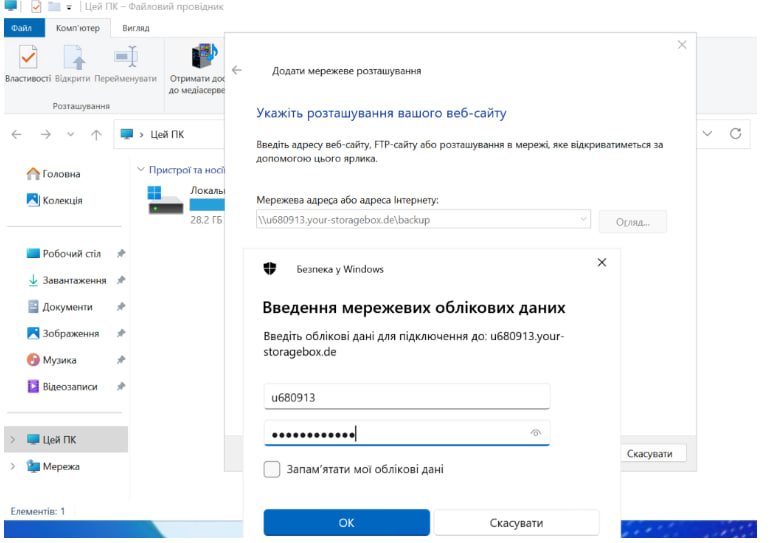
After connecting Storage, open Windows Explorer.
For example:
Storage\Backup
Or separate folders for different programs:
Storage\Backup\MEDOC
Storage\Backup\Vchasno
Storage\Backup\MasterBuh
This will simplify the search and recovery of the required copy.
After copying, open the folder on Storage and ensure that the backup file is present.
Check:
For additional verification, you can copy the file from Storage back to the VDS in another folder.
Thus, even in case of problems with the VDS, you will have a separate copy of the data that can be used for recovery.
All question categories
CityHost
Services
Contacts


2004 - 2026 "CityHost" - professional
paid hosting in Ukraine.