
On October 21, 2026, details of two critical PHP vulnerabilities — CVE-2026-109618 and CVE-2026-109619, known collectively as PHP2Shell, were published. Both received a score of 9.2 out of 10 on the CVSS v4.0 scale. Under certain conditions, they allow attackers to execute code remotely on the server without authentication.
The issues are related to memory handling in PHP itself — the environment on which WordPress, Drupal, Joomla, and many other content management systems and web applications run. Therefore, even an up-to-date CMS with updated plugins may remain vulnerable if the server uses PHP without the appropriate patches.
Successful exploitation of the vulnerabilities can lead to data theft, modification of site files, or disruption of its operation. The capabilities of the attacker depend on the server configuration and the rights of the process executing PHP.
A detailed description of the vulnerabilities, a list of affected PHP versions, and recommendations for protection have been published in the official CERT-EU announcement.
As soon as the threat became known, we limited the operation of part of the functionality to reduce risks for clients. There was no mass shutdown of websites. After the patched packages became available, we installed the necessary updates.
Currently, patches for all available PHP versions — from 5.2 to 8.5 — have been installed on the servers of Cityhost virtual hosting. Clients of virtual hosting do not need to install these server updates themselves.
Our servers use CloudLinux, which applies security patches to existing PHP versions. This allows vulnerabilities to be addressed without forcing sites to switch to a different branch of the interpreter.
Therefore, the PHP version in the control panel may differ from the number of the patched release indicated on the PHP website. This does not mean that the patches are absent: they are included in the updated CloudLinux package, although the main version number remains unchanged.
PLEASE NOTE! Owners of VPS/VDS and dedicated servers need to take care of updates themselves or delegate this to an administrator. Server updates for virtual hosting do not apply to these services. Below is the procedure for Linux servers.
What VPS/VDS and dedicated server owners need to do
On VPS/VDS and dedicated servers, the software update is performed by the owner or server administrator. If your sites use PHP, you need to check for patches for CVE-2026-109618 and CVE-2026-109619, install them, and restart the relevant services.
Below is the procedure for Linux servers where PHP is installed via the system package manager. For PHP in containers, installed manually or through separate repositories of the control panel, you need to additionally check the update procedure from its provider.
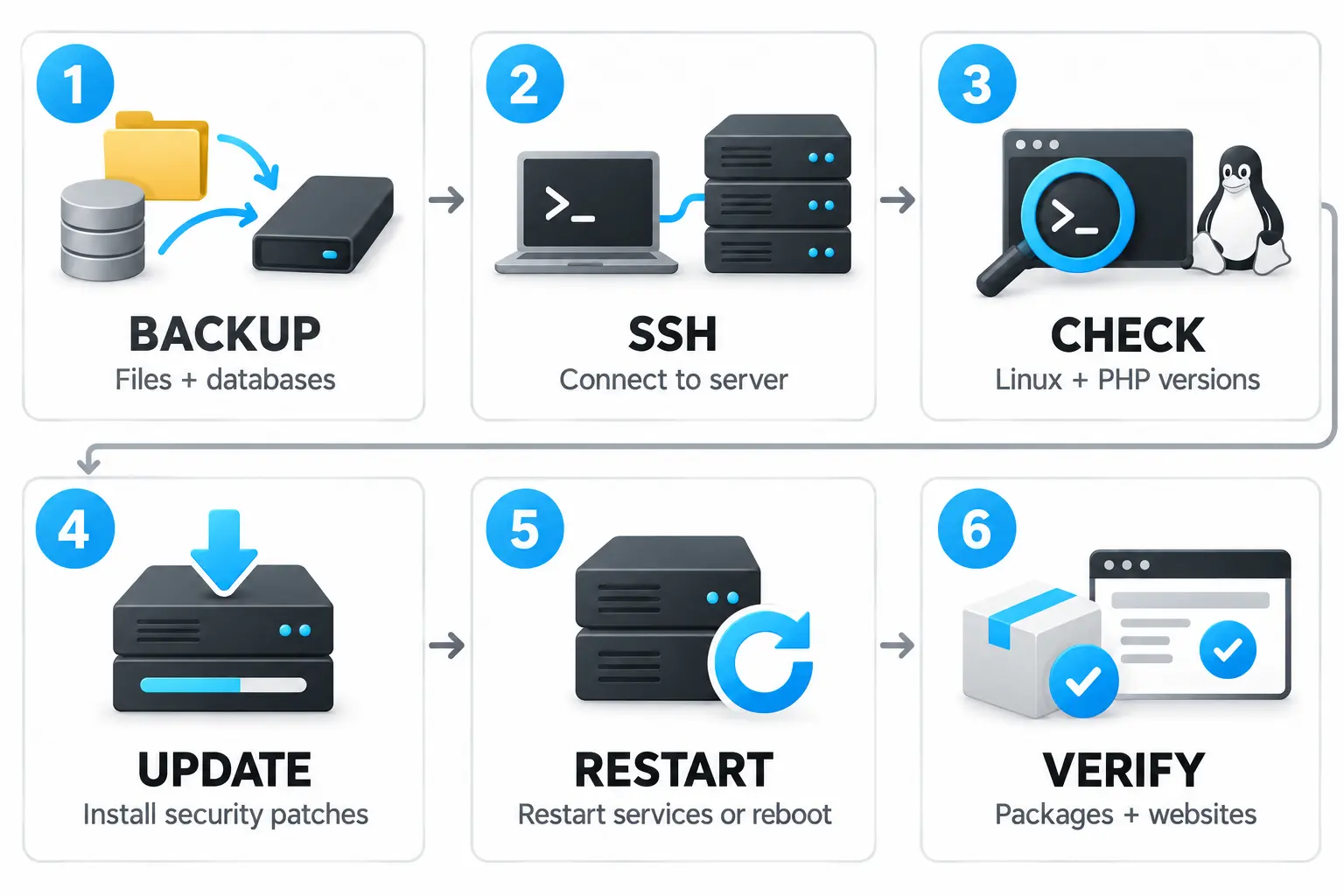
1. Create a backup
Before updating, save backups of site files, databases, and server configurations. Ensure that the copying has completed without errors and that the backups are available for restoration.
2. Connect to the server via SSH
Open the terminal and execute:
ssh USER@SERVER_IP
Replace USER with your username and SERVER_IP with the server's IP address. To connect via a non-standard port:
ssh -p PORT USER@SERVER_IP
Replace PORT with the SSH port number.
Root or sudo rights are required to install updates. If you are working under root, you can omit the sudo prefix in the following commands.
3. Check the operating system and PHP version
To determine the Linux distribution, execute:
cat /etc/os-release
The current console version of PHP can be checked with the command:
php -v
Note: PHP in the console and PHP serving the site may differ. If multiple versions are installed on the server, all versions used by the sites need to be checked.
4. Install available updates
Select commands according to the operating system.
For Ubuntu or Debian, first update the information about available packages:
sudo apt update
Then install the updates:
sudo apt upgrade
For AlmaLinux, Rocky Linux, or RHEL:
sudo dnf upgrade --refresh
These commands update not only PHP but also other system packages. Review the proposed list and confirm the installation. Wait for the operation to complete. If there are errors with repositories, dependencies, or package installations, they need to be resolved first.
5. Reboot the server
After successfully installing updates, it is necessary to restart the processes that use PHP. A simple way to cover all system services is to reboot the server:
sudo reboot
The SSH connection will close, and the sites will be temporarily unavailable. Wait for the server to start and reconnect.
Instead of a full reboot, the administrator can restart the relevant PHP-FPM, Apache, or other services — depending on the server configuration.
6. Check installed packages and website functionality
For Ubuntu/Debian, view the full versions of installed PHP packages:
dpkg -l | grep -E '^ii[[:space:]]+(php|libapache2-mod-php)'
For AlmaLinux/Rocky Linux/RHEL:
rpm -qa | grep -E '^php'
Match the obtained versions with the patch announcement from the package provider. The absence of available updates does not confirm the vulnerabilities have been addressed.
Linux distributions may add security patches to existing PHP versions. Therefore, the main interpreter number may remain unchanged — the complete version of the package and confirmation of the presence of patches are what matters.
After updating, open the sites and check their core functionalities: logging into the admin panel, forms, file uploads, database operations, and order processing.
If patches for your PHP version are not available, contact the server administrator to arrange for a transition to a supported version or obtain a patched package from the provider. Do not delay addressing these vulnerabilities.
Note: the instructions provide a general update procedure. Commands, package names, and services may vary depending on the operating system, the method of PHP installation, and the server configuration.


